Make.com Payment Automation Google Forms GoPay Google Sheets

Automate Pre-Authorized Payments from Google Forms

Create GoPay payments automatically from form responses and maintain a payment log in Google Sheets

Get This Workflow → Make.com · Payment Automation · Free Template
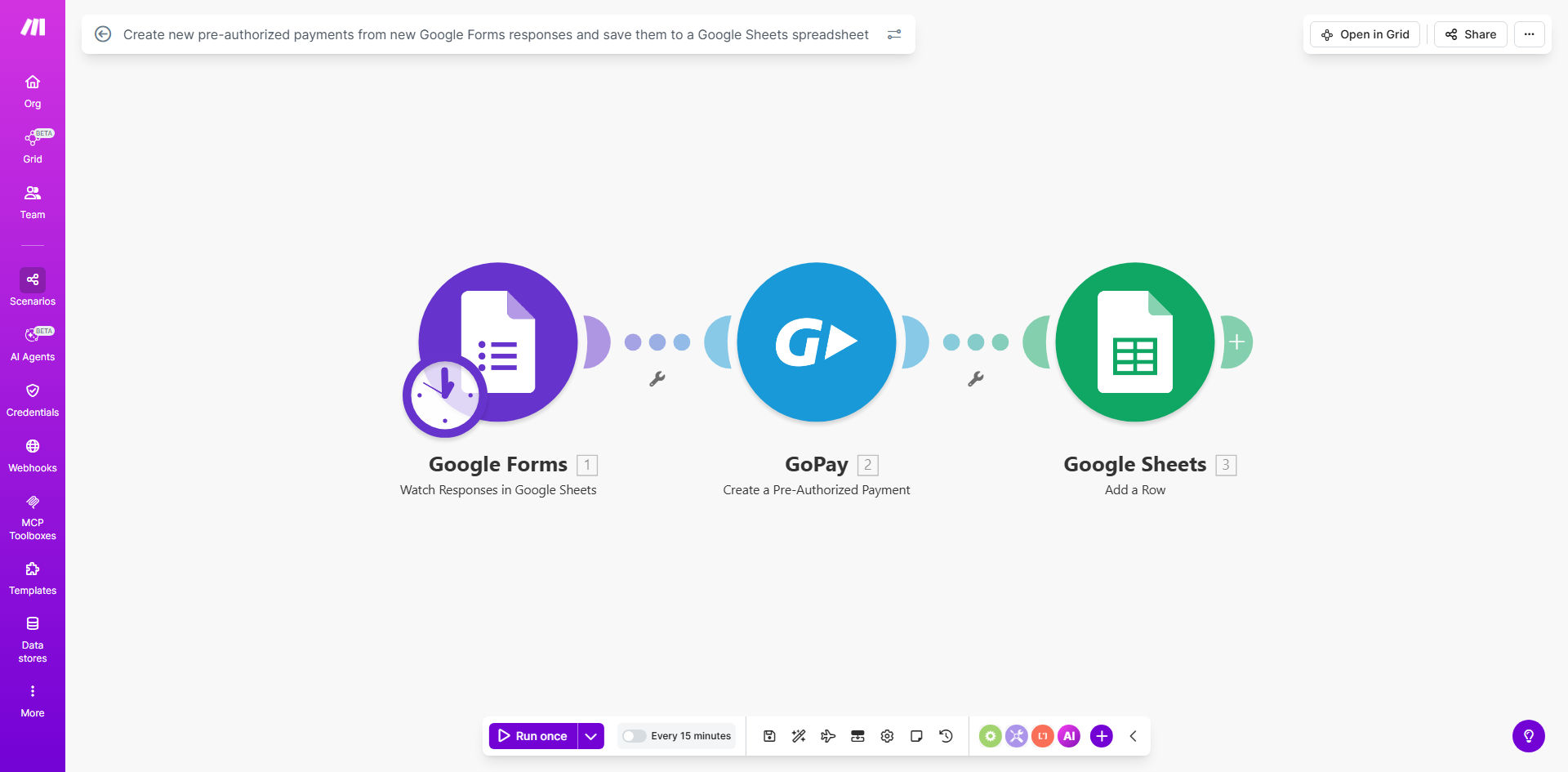
Make.com workflow diagram for automating GoPay payments from Google Forms

What This Workflow Does

This automation solves the tedious manual process of collecting payment information from Google Forms submissions and creating pre-authorized payments in GoPay. Businesses using forms for registrations, orders, or applications often waste hours copying data between systems and risk errors in payment processing.

The workflow automatically checks for new Google Forms responses every 15 minutes (configurable), extracts the payment details, creates a pre-authorized payment in GoPay to reserve funds, and logs the transaction details to a Google Sheets spreadsheet for record-keeping. This creates a seamless payment collection system without manual intervention.

How It Works

1. Scheduled Trigger

The scenario runs on a schedule (default: every 15 minutes) to check your Google Form for new responses since the last run.

2. Response Processing

For each new form submission, the workflow extracts the payment details like amount, customer information, and payment reference from the form fields you specify.

3. GoPay Payment Creation

The system connects to your GoPay account via API and creates a pre-authorized payment with the details from the form. This reserves the funds without immediately capturing them.

4. Google Sheets Logging

Each payment transaction is recorded in your designated Google Sheet with timestamps, payment status, and all relevant details for reconciliation and reporting.

Who This Is For

This automation is ideal for:

  • Event organizers collecting registration fees
  • Educational institutions processing course payments
  • Service businesses taking deposits via forms
  • Nonprofits handling donation forms
  • E-commerce businesses with custom order forms

What You'll Need

  1. A Google Form with payment-related fields (amount, customer details, etc.)
  2. A GoPay business account with API access
  3. A Google Sheet for payment records
  4. A Make.com account (free plan sufficient)

Quick Setup Guide

  1. Clone the template in your Make.com account
  2. Connect your Google account and authorize access to Forms and Sheets
  3. Connect your GoPay account via API credentials
  4. Map your form fields to the payment creation module
  5. Specify your Google Sheet ID and tab name for logging
  6. Adjust the schedule frequency if needed (default: 15 minutes)
  7. Test with sample form submissions

Pro tip: Add a timestamp field to your form to help track when submissions were originally received, separate from when they were processed.

Key Benefits

Reduce payment processing time by 90%: What took hours of manual work now happens automatically in minutes, freeing your team for higher-value tasks.

Eliminate data entry errors: Automated transfer of payment details from form to GoPay ensures accuracy, reducing failed transactions and customer service issues.

Improve cash flow visibility: Real-time payment logging in Google Sheets gives you an up-to-date view of collected and pending payments.

Scale without adding staff: Handle hundreds of payments daily with the same efficiency as a few, perfect for seasonal spikes or business growth.

Enhanced compliance: Automated audit trail in Google Sheets meets record-keeping requirements for financial transactions.

Frequently Asked Questions

Common questions about payment automation and integration

Automating payment processing from Google Forms eliminates manual data entry errors, ensures timely payment collection, and provides an audit trail in Google Sheets. Businesses can process payments 10x faster while reducing administrative overhead.

For example, a summer camp using this automation reduced their registration payment processing time from 3 hours daily to just 15 minutes of verification, while eliminating the 5-7% error rate from manual entry.

Pre-authorized payments are ideal for recurring billing, event registrations, subscription services, and deposits. They reserve funds without immediate capture, giving businesses payment assurance while allowing customers flexibility.

Common use cases include holding a conference ticket payment until event confirmation, securing a rental deposit, or authorizing a subscription payment that will be captured monthly.

The workflow uses OAuth for Google Forms/Sheets and GoPay's secure API. Payment data isn't stored in Make.com - it's transmitted directly between the authorized systems with industry-standard encryption.

Security measures include token-based authentication, encrypted connections, and minimal data retention. The workflow only accesses the specific form fields needed for payment processing, not the entire form response.

Yes, you can modify the Make.com scenario to calculate dynamic amounts based on form responses, apply discounts, or add processing fees before creating the pre-authorized payment.

Advanced customization options include tiered pricing based on quantity selections, early-bird discounts, or adding taxes based on customer location. The workflow can pull these rules from your Google Sheet for easy maintenance.

The workflow can be enhanced to send failure notifications, retry logic, or route problematic submissions to a review queue. Error handling ensures no payments slip through the cracks.

Common failure scenarios include insufficient funds, expired cards, or mismatched payment details. The template includes basic error logging, which can be expanded to trigger specific follow-up actions.

The default 15-minute schedule works for most businesses. High-volume forms may need 5-minute checks, while low-frequency forms could run hourly. Balance responsiveness with API rate limits.

Consider your business needs - event registrations might need near-real-time processing, while monthly membership payments could run daily. Make.com allows different schedules for different scenarios.

GrowwStacks specializes in custom payment automation solutions. We can build workflows tailored to your specific forms, payment gateway, accounting system, and business rules with advanced features like multi-currency support and approval workflows.

Our automation experts will analyze your current payment processes, identify optimization opportunities, and implement a solution that integrates seamlessly with your existing tools. Custom solutions typically include:

  • Advanced error handling and notifications
  • Integration with your CRM or accounting software
  • Custom reporting dashboards
  • Payment reminder automation

Need a Custom Payment Automation?

This free template is a starting point. Our team builds fully tailored automation systems for your specific business needs.