Make.com Task Management Todoist ProofHub Automation

Create ProofHub tasks for new tasks in Todoist

Automatically sync tasks between your personal Todoist workflow and team projects in ProofHub

Get This Workflow → Make.com · Todoist · Free Template
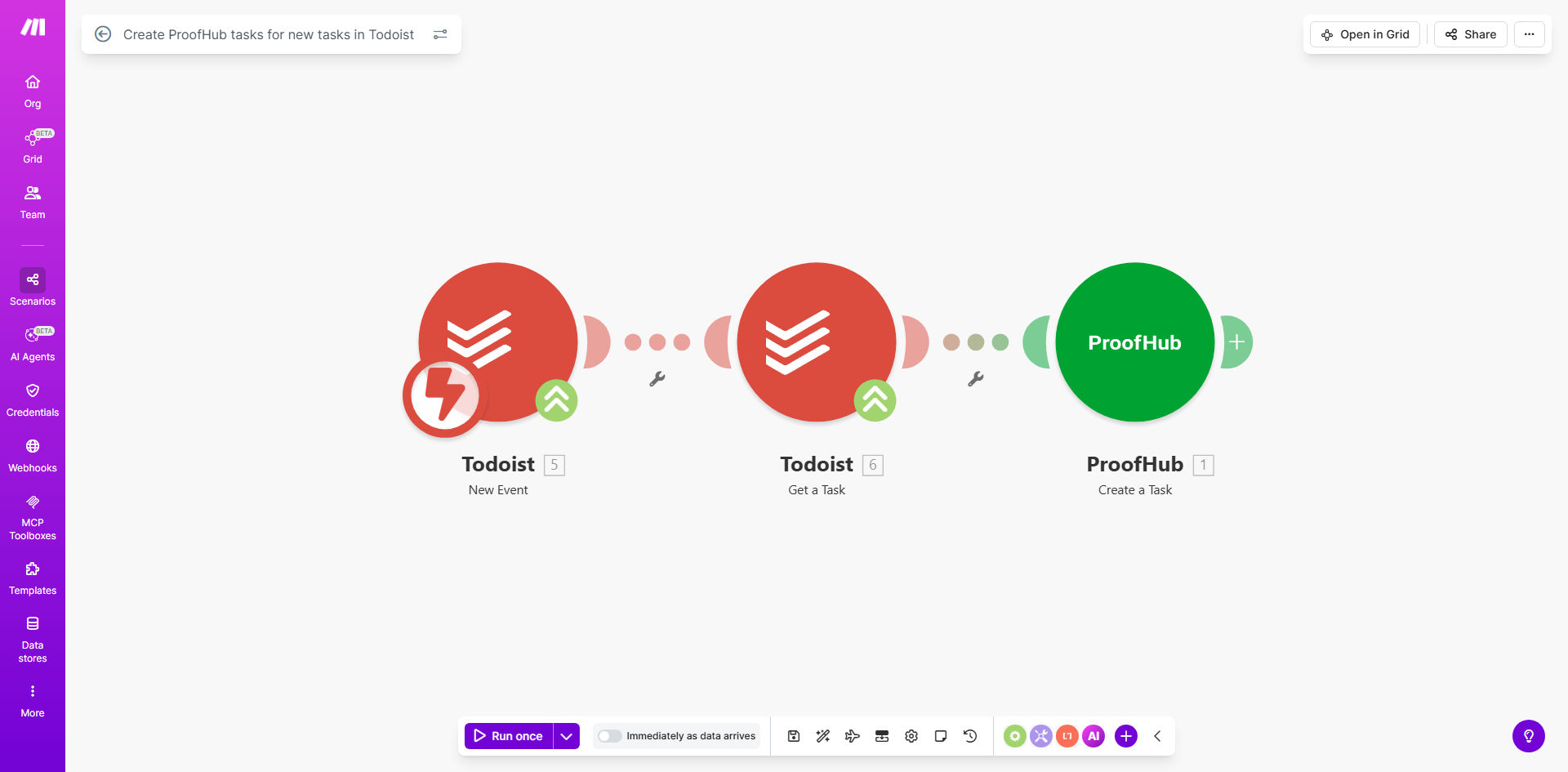
Automation workflow diagram showing Todoist to ProofHub task synchronization

What This Workflow Does

This automation bridges the gap between personal task management in Todoist and team project tracking in ProofHub. Many professionals use Todoist for individual productivity while their teams collaborate in ProofHub, creating duplicate work and visibility gaps when manually transferring tasks between systems.

The workflow solves this by automatically creating ProofHub tasks whenever new items are added to specified Todoist projects. It captures task names, descriptions, due dates, and priority levels, ensuring your personal tasks seamlessly integrate with team workflows without manual data entry.

How It Works

1. Trigger: New Todoist Task

The automation monitors your Todoist account for new tasks in specified projects. When detected, it immediately captures all relevant task details including content, due date, priority, and any labels.

2. Action: Create ProofHub Task

Make then connects to your ProofHub account and creates a matching task in the designated project. The system maps Todoist fields to corresponding ProofHub fields, maintaining data consistency across platforms.

3. Optional: Notification

You can configure the workflow to send confirmation notifications via email or Slack when tasks successfully transfer, providing visibility into the synchronization process.

Pro tip: Set up separate workflows for different Todoist projects to route tasks to appropriate ProofHub projects automatically.

Who This Is For

This integration benefits professionals who:

  • Use Todoist for personal task management but need to share work items with ProofHub-using teams
  • Manage hybrid workflows combining individual and collaborative tasks
  • Want to maintain personal productivity systems while ensuring team visibility
  • Frequently recreate tasks across platforms, wasting valuable time

What You'll Need

  1. Active Todoist account with tasks to sync
  2. ProofHub account with appropriate project access
  3. Make.com account (free tier sufficient for basic setup)
  4. API access enabled for both Todoist and ProofHub

Quick Setup Guide

  1. Click "Get This Workflow" to import the template to your Make.com account
  2. Connect your Todoist account in the first module
  3. Connect your ProofHub account in the second module
  4. Specify which Todoist projects to monitor
  5. Map Todoist fields to corresponding ProofHub fields
  6. Test with a sample Todoist task and verify ProofHub creation
  7. Activate the scenario to begin automatic syncing

Key Benefits

Eliminate duplicate data entry by automatically creating ProofHub tasks from Todoist, saving 5-10 minutes per task that would otherwise require manual recreation.

Maintain workflow continuity between personal and team productivity systems, ensuring nothing falls through the cracks when transitioning between individual and collaborative work modes.

Improve team visibility by instantly surfacing relevant personal tasks in the team's project management system without disruptive manual updates or status meetings.

Reduce context switching by allowing you to work primarily in Todoist while automatically populating team systems, minimizing disruptive app switching.

Customizable mapping lets you control exactly which fields transfer and how they appear in ProofHub, adapting the integration to your specific workflow needs.

Frequently Asked Questions

Common questions about Todoist-ProofHub automation and integration

Connecting Todoist with ProofHub bridges personal task management with team project tracking. While Todoist excels at individual productivity, ProofHub provides robust team collaboration features. This integration ensures tasks created in your personal workflow automatically appear in your team's project management system.

For example, a marketing manager might capture campaign ideas in Todoist during their morning routine, with those tasks automatically appearing in the team's ProofHub workspace for assignment and execution.

The automation transfers task names, descriptions, due dates, and priority levels by default. You can customize the workflow to include additional fields like labels, comments, or attachments depending on your team's requirements.

Advanced configurations can even parse Todoist task content to automatically assign ProofHub tasks to specific team members based on keywords or project mappings.

Tasks sync near-instantly, typically within 10-30 seconds of creation in Todoist. The automation runs continuously in the background, ensuring real-time synchronization without manual intervention.

This immediate transfer prevents the common problem of forgetting to later manually add Todoist tasks to team projects, maintaining workflow continuity.

Yes, you can configure filters based on projects, labels, or priority levels. For example, you might only sync work-related tasks from specific Todoist projects to ProofHub while keeping personal tasks separate.

Common filtering approaches include:

  • Syncing only tasks with specific labels like "Team" or "Client"
  • Excluding personal projects entirely
  • Only transferring high-priority items

This basic workflow creates one-way sync for new tasks only. For two-way synchronization where updates propagate both ways, you would need an expanded automation setup that monitors changes in both systems.

Many teams start with this one-way new task sync, then upgrade to full bi-directional synchronization as they become comfortable with automation between the platforms.

It eliminates duplicate data entry, ensures visibility of personal tasks in team workflows, and maintains consistency across platforms. Teams save 2-3 hours weekly by avoiding manual task recreation while managers gain better oversight.

The automation also reduces miscommunication about task ownership and deadlines that often occurs when manually transferring items between personal and team systems.

Absolutely. GrowwStacks specializes in building tailored automation solutions that match your exact workflow requirements. We can create bi-directional sync, add conditional logic, or integrate additional apps in your stack.

Our custom implementations typically include:

  • Detailed workflow analysis
  • Field mapping consultation
  • Error handling and notifications
  • Ongoing support and optimization

Need a Custom Todoist-ProofHub Automation?

This free template is a starting point. Our team builds fully tailored automation systems for your specific business needs.