Make.com Marketing Automation YOURLS Google Sheets Link Tracking

Shorten URLs with YOURLS + Google Sheets Automation

Automatically shorten and track links with a self-hosted YOURLS system while logging all data in Google Sheets

Get This Workflow → Make.com · YOURLS · Free Template
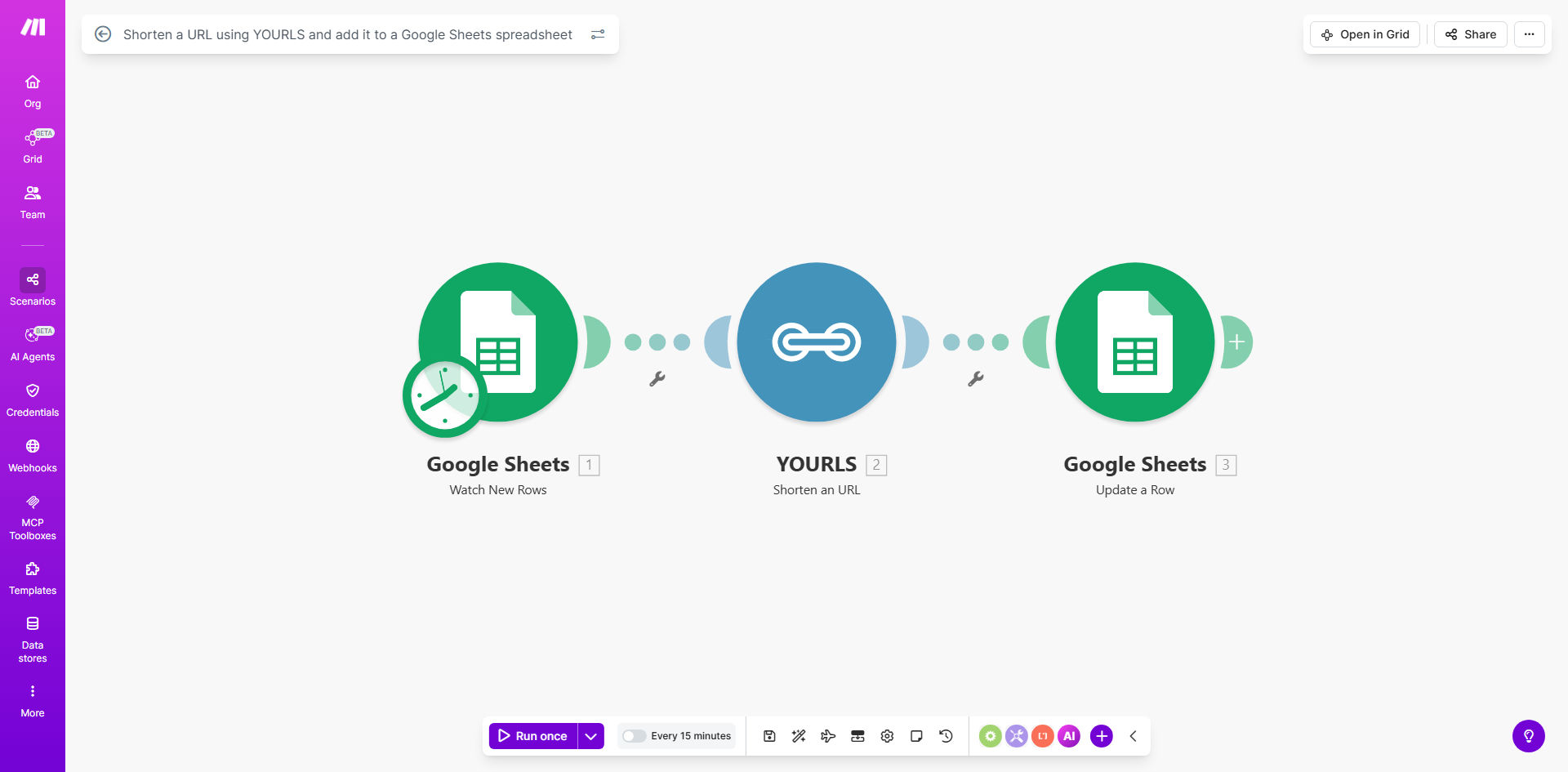
Make.com workflow diagram showing YOURLS and Google Sheets integration

What This Workflow Does

This automation solves the tedious manual process of shortening URLs and maintaining tracking records. Marketing teams, content creators, and social media managers often waste hours copying links between their YOURLS dashboard and spreadsheets. The workflow automatically:

  • Detects new URLs added to a designated Google Sheets column
  • Shortens them through your YOURLS instance
  • Logs both original and shortened URLs with timestamps
  • Maintains a clean, searchable database of all shortened links

How It Works

1. New URL Detection

The workflow monitors a specific Google Sheet for new URL entries. You can designate any column as the input source, making it adaptable to existing spreadsheets.

2. YOURLS API Connection

Each new URL gets passed to your YOURLS installation via its API. The system can use custom shortcodes if specified or generate random ones automatically.

3. Data Logging

The shortened URL, original URL, creation timestamp, and any custom metadata get written back to your Google Sheet in a structured format. This creates an auditable history of all shortened links.

Pro tip: Add a "Campaign" column to your sheet to categorize links by marketing initiative. The workflow can include this metadata in your tracking records.

Who This Is For

This automation delivers the most value for:

  • Marketing teams running multiple campaigns with trackable links
  • Content creators who share links across platforms and need click data
  • Agencies managing client links with custom domains
  • Developers who want to automate their personal link shortening

What You'll Need

  1. A YOURLS installation (self-hosted or managed)
  2. Google Sheets edit access
  3. A Make.com account (free tier works)
  4. API credentials for both systems

Quick Setup Guide

  1. Duplicate the example Google Sheet
  2. Connect your Make.com scenario to Google Sheets
  3. Configure the YOURLS API module with your endpoint and credentials
  4. Map the spreadsheet columns for URL input and output
  5. Test with sample URLs to verify the flow

Key Benefits

Save 2-3 hours weekly by eliminating manual URL shortening and spreadsheet updates. The automation handles everything instantly.

Reduce human error with 100% accurate logging. No more broken links from typos or incorrect spreadsheet entries.

Centralize tracking across all campaigns in one searchable database. Filter by date, campaign, or platform to analyze performance.

Future-proof your links by hosting your own URL shortener. Unlike third-party services, your links won't break if a provider shuts down.

Frequently Asked Questions

Common questions about URL shortening automation and integration

Tracking shortened URLs helps businesses measure click-through rates, campaign performance, and audience engagement. Without tracking, you lose valuable data about which links perform best and where your traffic originates.

For example, an ecommerce brand might discover that Instagram links convert 3x better than Twitter links, allowing them to reallocate their ad spend accordingly. The data also helps identify which content resonates most with your audience.

YOURLS gives you full control over your shortened links with custom domains, detailed analytics, and no third-party branding. Unlike public services, your links won't break if the service shuts down.

Self-hosting means you can create branded short links (like your.co/spring-sale) that build trust with customers. The open-source platform also lets you add custom plugins for advanced features like geo-targeting or expiration dates.

Google Sheets creates a searchable database of all shortened URLs with timestamps, original links, and click data. Teams can sort, filter, and analyze performance across campaigns in one centralized location.

The spreadsheet format enables easy collaboration - multiple team members can access the data without needing YOURLS admin access. You can also connect the sheet to Data Studio for visual dashboards or set up automated reports.

Automation eliminates manual copying/pasting between systems, reduces human error, and ensures every link gets tracked. Marketing teams save 2-3 hours weekly while gaining more accurate data.

Consider a social media manager scheduling 50 posts per week. Automation guarantees all links get shortened consistently with proper tracking, whereas manual processes often lead to missed or incorrectly logged URLs.

Yes, Make.com supports Excel Online, Airtable, and other spreadsheet platforms. The workflow logic remains similar - just replace the Google Sheets steps with your preferred platform's API.

Airtable works particularly well for teams needing relational data capabilities. You could link shortened URLs to specific campaigns, products, or team members within the same database.

The workflow uses OAuth2 for Google Sheets and API keys for YOURLS, both industry-standard security protocols. All credentials are encrypted, and you control access permissions for both systems.

For added security, you can restrict API access to specific IP addresses in your YOURLS configuration. The Google Sheets connection only requests the minimum permissions needed to read/write the designated spreadsheet.

Absolutely. GrowwStacks specializes in custom automation solutions for marketing teams. We can build systems that integrate with your CRM, add UTM parameters automatically, or create branded dashboards for your shortened links.

Our engineers will design a solution tailored to your specific workflows. Common enhancements include:

  • Auto-generating QR codes for print materials
  • Adding expiration dates to time-sensitive links
  • Syncing click data to your analytics platform

Need a Custom URL Shortening Automation?

This free template is a starting point. Our team builds fully tailored automation systems for your specific business needs.