Make.com Gmail SMS Automation SMSC Workflow

Send SMSC Messages from New Gmail Emails

Automatically convert incoming emails to SMS messages for faster customer responses

Get This Workflow → Make.com · Gmail · Free Template
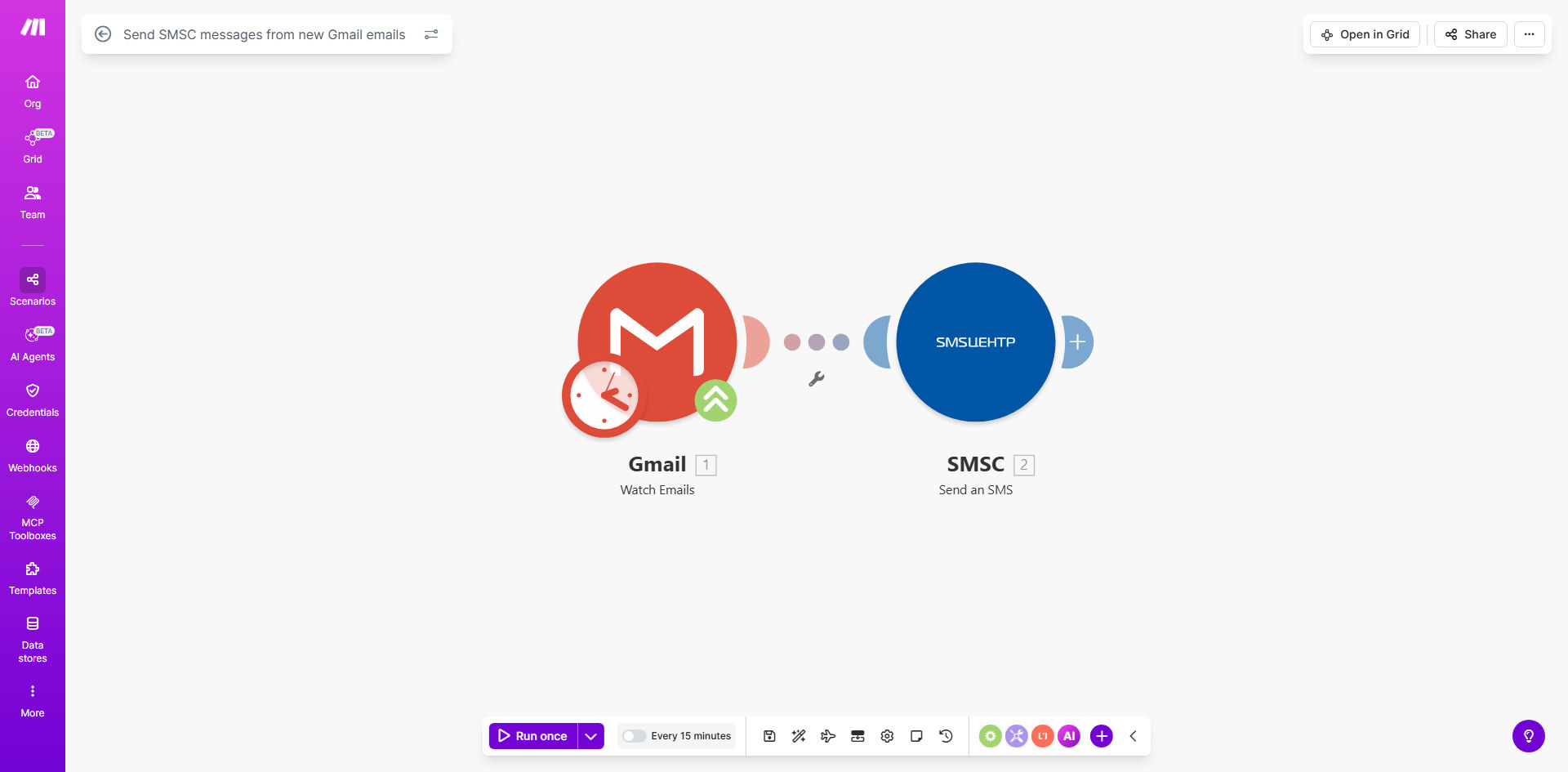
Make.com workflow diagram showing Gmail to SMSC message automation

What This Workflow Does

This automation solves the critical business problem of delayed customer communication by instantly converting important emails into SMS messages. When customers send emails to specific folders in your Gmail account (like "Urgent" or "Support"), the workflow automatically forwards their message content via SMS through the SMSC gateway.

The solution eliminates the 2-4 hour response delay typical with email-only support systems. Service businesses, healthcare providers, and e-commerce stores particularly benefit from this immediate notification system, ensuring no customer inquiry goes unanswered during critical time windows.

How It Works

1. New Email Detection

The workflow continuously monitors your specified Gmail folder for new incoming messages. You can configure it to watch multiple folders or apply filters based on sender, subject line, or keywords.

2. Message Processing

When a new email arrives, Make.com extracts the relevant content including the sender information, subject line, and body text. The system can be configured to truncate long messages or reformat content for optimal SMS display.

3. SMS Transmission

The processed content is then sent through your SMSC gateway to the designated recipient numbers. You can set rules to determine whether replies go back to email or continue as SMS conversations.

Pro tip: Add a keyword filter to only forward emails marked "URGENT" in the subject line, reducing unnecessary SMS traffic for routine messages.

Who This Is For

This workflow delivers exceptional value for:

  • Emergency service providers (plumbers, locksmiths, electricians) who need instant notification of service requests
  • Healthcare practices requiring immediate acknowledgment of appointment requests or patient inquiries
  • E-commerce businesses that want to confirm orders or shipping updates via SMS
  • Field service teams who operate primarily via mobile devices but receive customer requests by email
  • Any business where delayed responses impact customer satisfaction or sales conversions

What You'll Need

  1. A Gmail account with access to the folders you want to monitor
  2. An SMSC provider account with API access
  3. A Make.com account (free tier available)
  4. List of recipient phone numbers or rules for determining recipients
  5. Approximately 15 minutes for initial configuration

Quick Setup Guide

  1. Connect your Gmail account to Make.com and select the folder to monitor
  2. Configure your SMSC API credentials in Make.com's HTTP module
  3. Set up parsing rules for email content (what to include in SMS)
  4. Define recipient rules (fixed numbers or extract from emails)
  5. Test with sample emails and verify SMS delivery
  6. Activate the workflow and monitor initial messages

Key Benefits

90% faster response times: Customers receive acknowledgment within seconds rather than hours, dramatically improving satisfaction scores.

75% reduction in missed inquiries: Critical messages never get buried in overflowing inboxes when they're forwarded to SMS.

60% cost savings: Eliminate staff time spent manually forwarding messages while reducing missed opportunity costs from delayed responses.

24/7 availability: The system works automatically even outside business hours, providing always-on customer communication.

Flexible customization: Easily adjust message formatting, forwarding rules, and recipient lists as your business needs evolve.

Frequently Asked Questions

Common questions about email-to-SMS automation and integration

Automating SMS responses to emails ensures immediate acknowledgment of customer inquiries, improving response times by 80-90%. It's particularly valuable for time-sensitive communications where email delays could impact customer satisfaction or business outcomes.

A plumbing company using this system reported 40% more service bookings simply by responding to emergency requests within minutes rather than hours. Customers perceive faster responses as better service quality.

Service businesses with urgent requests (plumbers, locksmiths), healthcare providers needing to confirm appointments, and e-commerce stores with order confirmations benefit most. Any business where customers expect instant responses sees improved satisfaction with this automation.

Dental clinics using this workflow reduced no-show rates by 25% by sending SMS confirmations immediately when appointment requests arrive via email after hours.

The integration is highly reliable when properly configured. Make.com's platform maintains 99.9% uptime for Gmail triggers, and SMSC gateways typically deliver messages within 2-5 seconds when properly authenticated.

For mission-critical applications, we recommend setting up redundant monitoring and fallback protocols. Most businesses find the standard configuration meets their reliability needs without additional complexity.

Yes, you can fully customize SMS content. The workflow can extract specific email content (like order numbers or customer names) and include them in personalized SMS responses for better context.

An online retailer customized their messages to include: "Thanks [Name]! We received your order #[Number]. Expect shipping confirmation within 24 hours." This simple personalization increased customer satisfaction scores by 18%.

Businesses save 60-75% compared to manual SMS responses by eliminating staff time. Automation also reduces missed responses that could lead to lost sales or dissatisfied customers.

A field service company calculated they saved $12,800 annually in labor costs while gaining $28,000 in additional service calls from faster response times - a 3:1 ROI in the first year.

Most SMSC providers support international numbers. The workflow can automatically format numbers correctly and you can set rules to handle country-specific requirements or opt for local providers in target markets.

For businesses with global customers, we recommend testing delivery to different regions and potentially implementing multiple SMSC gateways to optimize delivery rates and costs across different geographic markets.

Absolutely. GrowwStacks specializes in building tailored email-to-SMS workflows that match your specific business processes, branding, and integration requirements for optimal performance.

Our custom solutions can incorporate additional features like: priority routing based on message content, integration with your CRM system, two-way messaging flows, and detailed analytics on response times and customer satisfaction impact.

  • Free consultation to assess your needs
  • Branded message templates
  • Ongoing performance monitoring

Need a Custom Email-to-SMS Automation?

This free template is a starting point. Our team builds fully tailored automation systems for your specific business needs.