Make.com Loyverse SMS Alert Retail Automation Customer Receipts

Send short Loyverse receipt by SMS using SMS Alert

Automatically send digital receipts to customers via SMS, saving time and improving their shopping experience

Get This Workflow → Make.com · Loyverse · Free Template
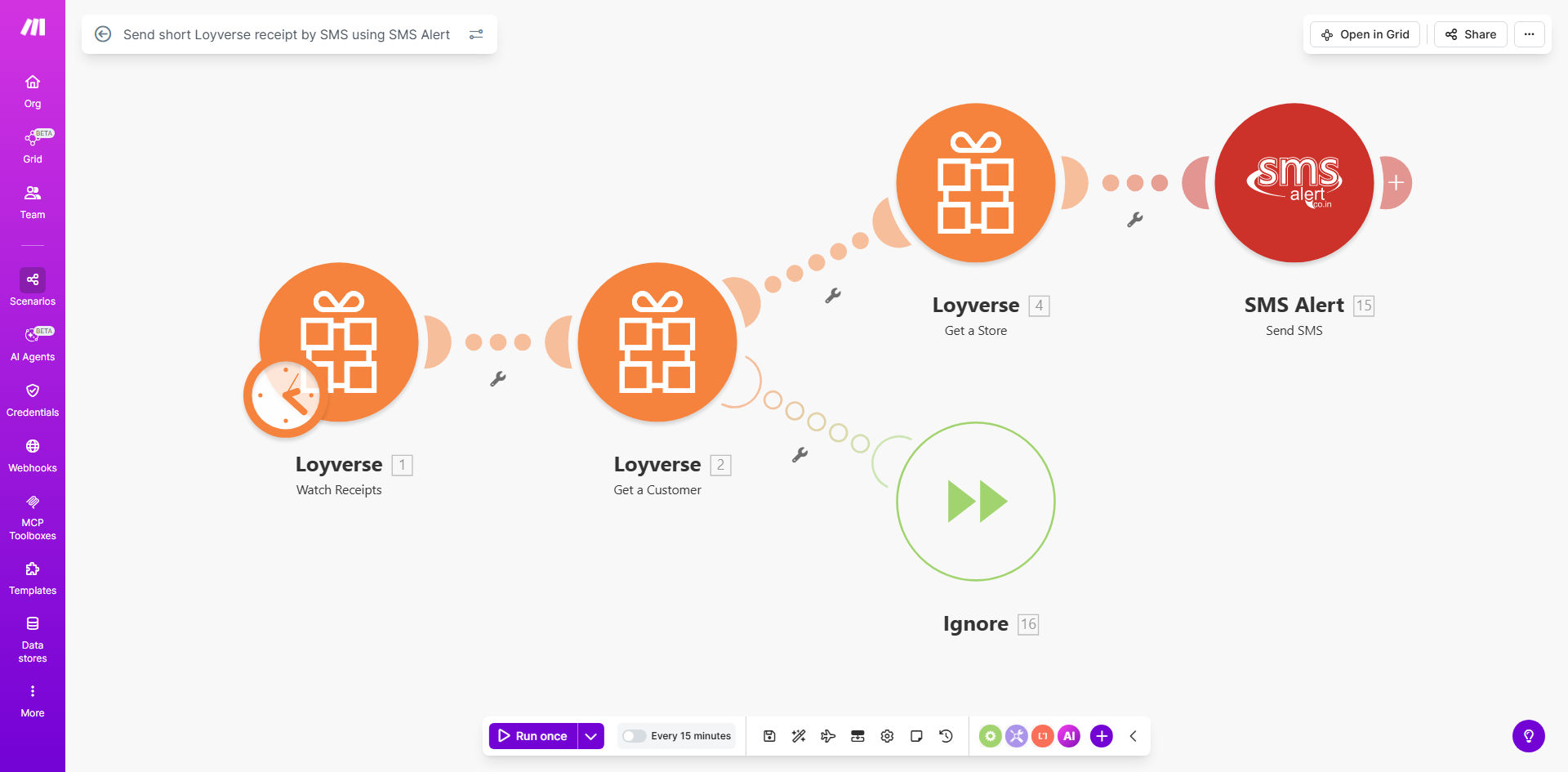
Make.com workflow diagram for Loyverse SMS receipts automation

What This Workflow Does

This automation solves the common retail challenge of providing customers with immediate purchase confirmations while reducing paper waste. The workflow connects your Loyverse point-of-sale system with SMS Alert to automatically send digital receipts via text message whenever a new transaction occurs.

Instead of printing paper receipts or manually sending messages, this system runs in the background every 15 minutes (configurable), checking for new Loyverse receipts and forwarding the key details to customers via SMS. It handles the entire process from data extraction to message delivery without any staff intervention.

How It Works

1. Scheduled Check for New Receipts

The workflow begins by querying your Loyverse account at regular intervals to detect any new receipts that haven't been processed yet.

2. Extract Key Transaction Details

For each new receipt, the system pulls essential information like customer phone number, purchase total, items purchased, and transaction timestamp.

3. Format SMS Message

The workflow compiles the extracted data into a concise, readable SMS format that fits within standard message limits (160 characters).

4. Send via SMS Alert

The formatted message is delivered to the customer's phone number through your SMS Alert account, with delivery confirmation.

Pro tip: Customize the SMS template with your store name and a thank you message to enhance brand recognition and customer experience.

Who This Is For

This automation is ideal for retail businesses using Loyverse as their POS system that want to:

  • Reduce paper receipt costs and environmental impact
  • Provide customers with instant digital purchase confirmations
  • Minimize manual work for staff at checkout
  • Improve customer experience with convenient receipt access
  • Lay foundation for future SMS marketing campaigns

What You'll Need

  1. An active Loyverse account with receipt data
  2. SMS Alert API credentials (sign up at smsalert.com)
  3. Make.com account (free tier available)
  4. Customer phone numbers collected at checkout
  5. Basic understanding of Make.com scenario editing

Quick Setup Guide

  1. Copy this template to your Make.com account
  2. Connect your Loyverse account in the first module
  3. Add your SMS Alert API credentials in the SMS module
  4. Customize the SMS message template if desired
  5. Adjust the schedule frequency (default: every 15 minutes)
  6. Test with a real transaction and monitor the logs

Key Benefits

Save 5-10 hours monthly by eliminating manual receipt management. Staff no longer need to handle paper receipts or send individual confirmations.

Reduce receipt costs by 80% compared to thermal paper rolls. SMS receipts cost pennies per transaction versus ongoing paper supply expenses.

Improve customer satisfaction with instant digital records they can't lose. 72% of customers prefer SMS receipts over paper according to retail studies.

Enable future marketing opportunities by establishing SMS communication with customers. With consent, you can later send promotions or loyalty updates.

Go green effortlessly by significantly reducing paper waste. A medium-sized store can save 5,000+ paper receipts annually with this automation.

Frequently Asked Questions

Common questions about SMS receipt automation and integration

SMS receipts provide instant confirmation, reduce paper waste, and improve customer experience. Customers appreciate having digital records they can easily reference, while businesses benefit from reduced printing costs and better engagement opportunities.

A 2023 retail survey found that stores offering SMS receipts saw 28% fewer receipt-related customer service inquiries and 15% higher satisfaction scores compared to paper-only options.

SMS Alert offers competitive pricing, high deliverability rates, and simple integration. It's particularly popular for transactional messages like receipts due to its reliable infrastructure and straightforward API that works well with automation platforms.

Key advantages include pay-as-you-go pricing without monthly commitments, 99%+ delivery rates in most countries, and dedicated short codes available for high-volume senders.

An effective SMS receipt should include store name, transaction date/time, total amount, last 4 digits of payment method, and a short thank you message. Keep it under 160 characters for single-message delivery.

For returns and warranties, consider adding a brief note like "Keep this message for returns within 30 days" if space allows. The template includes placeholders for all essential fields.

Yes, SMS Alert supports two-way messaging. Businesses can configure replies to go to a designated number or email, allowing for customer feedback or support requests directly from the receipt message.

This feature enables valuable interactions like satisfaction surveys or product questions. However, avoid marketing in receipt messages as they're considered transactional communications.

For most retail businesses, checking every 15-30 minutes provides timely notifications without overloading systems. High-volume stores may need more frequent checks, while low-traffic businesses can extend the interval.

The default 15-minute schedule ensures customers receive receipts before leaving your store. Adjust based on your transaction volume and Make.com plan limits.

The workflow can include error handling to retry failed sends or notify staff. Common issues include incorrect phone numbers or carrier filtering - having a backup email receipt option is recommended.

For troubleshooting, check SMS Alert's delivery reports and ensure your account has sufficient credits. International numbers may require country code formatting adjustments.

Yes, GrowwStacks specializes in tailored retail automation solutions. We can customize this workflow with your branding, add loyalty program integration, or combine with other systems like inventory management.

Our team will assess your specific needs and build a solution that fits your operations perfectly. Common customizations include:

  • Multi-language SMS templates
  • Integration with loyalty programs
  • Advanced error handling and notifications

Need a Custom SMS Receipt Automation?

This free template is a starting point. Our team builds fully tailored automation systems for your specific business needs.