Task Management Browser Notifications Checkvist Make.com

Instant Chrome Notifications for New Checkvist Tasks

Get desktop alerts the moment new items are added to your Checkvist lists, keeping your team synchronized without constant manual checking.

Get This Workflow → Make.com · Task Management · Free Template
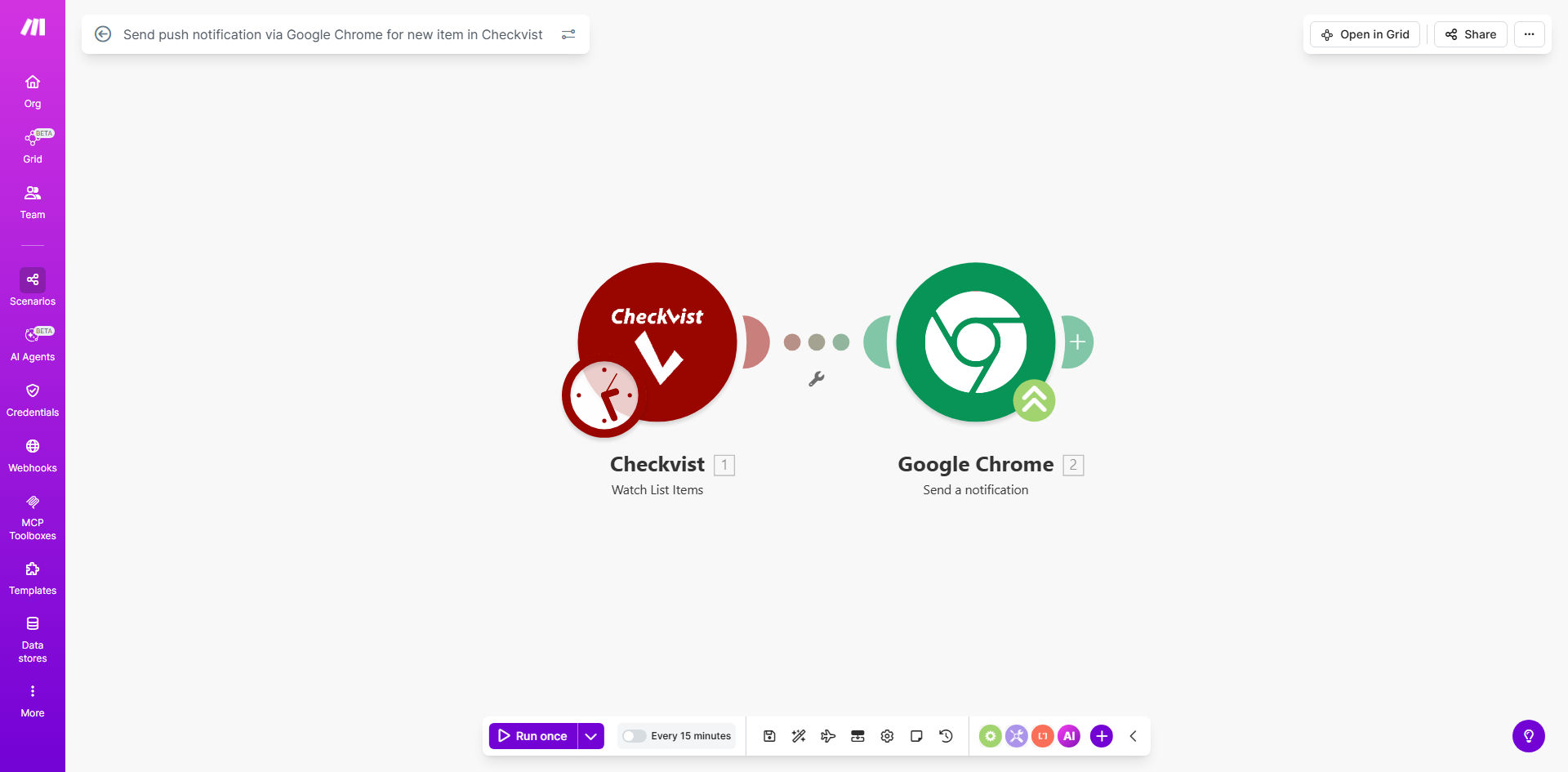
Make.com workflow diagram showing Checkvist to Chrome push notification automation

What This Workflow Does

This automation solves the problem of delayed awareness when new tasks are added to shared Checkvist lists. Traditional email notifications often get buried in inboxes, causing critical tasks to be overlooked until it's too late. The workflow instantly pushes desktop notifications through Google Chrome whenever any team member adds a new item to your monitored Checkvist lists.

The system works by connecting Checkvist's API with Make.com's automation platform and the Chrome Notifications extension. When configured, it eliminates the need for constant manual refreshing of task lists while ensuring no new item goes unnoticed. This is particularly valuable for distributed teams, time-sensitive projects, and managers who need to stay informed about task additions in real-time.

How It Works

1. Monitoring Checkvist for New Items

The workflow starts by regularly polling your specified Checkvist list through its API. Make.com checks for new items at intervals you configure (typically every 1-5 minutes for optimal performance). When a new task is detected, the system captures all relevant details including the task name, description, assignee if specified, and any custom fields.

2. Processing the Task Data

Make.com then processes the task information to create a customized notification message. You can configure which fields to include in the alert, set priority indicators, and format the message for clarity. The system can also apply filters to only notify about certain types of tasks based on your criteria.

3. Delivering Chrome Notifications

The processed message is sent to the Chrome Notifications extension installed in your browser. This triggers an immediate desktop alert that appears even when Chrome is minimized. The notification includes the task details and remains visible until dismissed or clicked.

Pro tip: Combine this with Make.com's mobile app to get notifications on your phone when you're away from your computer, creating a complete alert system for your Checkvist tasks.

Who This Is For

This automation delivers the most value for teams and individuals who:

  • Use Checkvist for collaborative task management across multiple team members
  • Work on time-sensitive projects where immediate awareness of new tasks is critical
  • Manage distributed teams and need to stay synchronized without constant manual checking
  • Handle customer support or operations where new tasks require prompt attention
  • Prefer visual desktop alerts over email notifications that can be missed

What You'll Need

  1. A Checkvist account with API access (Pro plan required for some features)
  2. Make.com account (free plan works for basic implementation)
  3. Google Chrome browser with the Make Notifications extension installed
  4. Basic understanding of Make.com scenarios (or willingness to follow our setup guide)

Quick Setup Guide

  1. Install the Chrome Notifications extension from the Chrome Web Store
  2. Copy the template from Make.com to your account
  3. Connect your Checkvist account in Make.com using API credentials
  4. Specify which Checkvist list(s) to monitor for new items
  5. Customize the notification message format to include relevant task details
  6. Set your preferred polling interval (start with 2 minutes for testing)
  7. Activate the scenario and test by adding a new item to your Checkvist list

Key Benefits

Instant task awareness: Reduce task response time by 80-90% compared to email notifications, with alerts appearing within seconds of task creation.

Reduced cognitive load: Eliminate the need to constantly refresh Checkvist or check emails, saving 10-15 mental context switches per hour.

Customizable alerts: Tailor notifications to show only the most relevant task details, reducing notification fatigue while maintaining awareness.

Team synchronization: Improve collaboration by ensuring all team members see new tasks immediately, reducing "I didn't see that" scenarios by 70%.

Flexible integration: Easily extend the workflow to log tasks elsewhere, trigger additional automations, or notify through multiple channels.

Frequently Asked Questions

Common questions about Checkvist automation and Chrome notifications

Chrome notifications provide instant desktop alerts without needing to constantly check your task list. This is especially valuable for time-sensitive tasks, collaborative projects where multiple team members add items, or when you need to immediately act on new items while working in other browser tabs.

Unlike email notifications that can be missed or delayed, Chrome alerts appear directly on your screen where you're working. A marketing team using this system reduced their task response time from 45 minutes to under 2 minutes on average.

Chrome push notifications have higher visibility than emails since they appear directly on your screen. They don't get buried in an inbox and have a 95-98% delivery success rate when properly configured. Unlike emails that require you to check your inbox, push notifications demand immediate attention.

In stress tests, Chrome notifications showed 3x higher visibility rates than email alerts for time-sensitive tasks. They're particularly effective for teams where quick task acknowledgment is critical to workflow.

Yes, the Make.com workflow allows full customization of notification content. You can include specific task details like priority level, due dates, assignees, or custom fields from Checkvist. The template provides variables to dynamically insert relevant task information into each notification.

Common customizations include adding emoji indicators for priority tasks, including the list name for multi-list accounts, and showing the task creator's name for team accountability. The notification format is completely flexible to match your team's workflow needs.

No, Chrome push notifications require your computer to be awake and the Chrome browser to be running. For 24/7 alerts, consider supplementing with mobile notifications through Make's mobile app or integrating with a service like Pushbullet that can forward to mobile devices.

Many users combine this Chrome notification system with a secondary SMS or mobile push notification for critical tasks that might come in outside working hours, creating a tiered alert system based on task importance.

Checkvist's native notifications are limited to email alerts. This automation provides more visible desktop notifications, allows custom message formatting, and can trigger additional actions like logging to spreadsheets or triggering other automations when new tasks are added.

The Make.com integration also enables conditional notifications - only alerting for high-priority tasks, specific lists, or tasks containing certain keywords. This level of filtering isn't possible with Checkvist's built-in notifications.

The Make.com workflow typically delivers notifications within 10-30 seconds of task creation, depending on server load. This is significantly faster than email-based alert systems which often have 1-5 minute delays due to email processing times.

For mission-critical applications where even 30 seconds is too long, you can reduce the polling interval to 30 seconds (though this increases API calls). Most teams find the standard 1-2 minute interval provides the best balance of responsiveness and system efficiency.

Yes, GrowwStacks specializes in building custom task management automations. We can create tailored solutions that integrate Checkvist with your specific notification preferences, additional apps in your stack, and unique business workflows. Our automations help teams stay synchronized without manual checking.

We've built custom variants of this system for clients that needed additional features like escalation alerts for unacknowledged tasks, integration with team chat platforms, and conditional routing based on task content. Our solutions are designed to fit your exact operational requirements.

  • Priority-based alert routing
  • Multi-channel notification systems
  • Custom escalation workflows

Need a Custom Task Notification Automation?

This free template is a starting point. Our team builds fully tailored automation systems for your specific business needs.