Make.com Drupal Content Alerts Email Automation

Get Emails for New Drupal Content

Automatically receive email notifications whenever new content is published in your Drupal CMS

Get This Workflow → Make.com · Drupal · Free Template
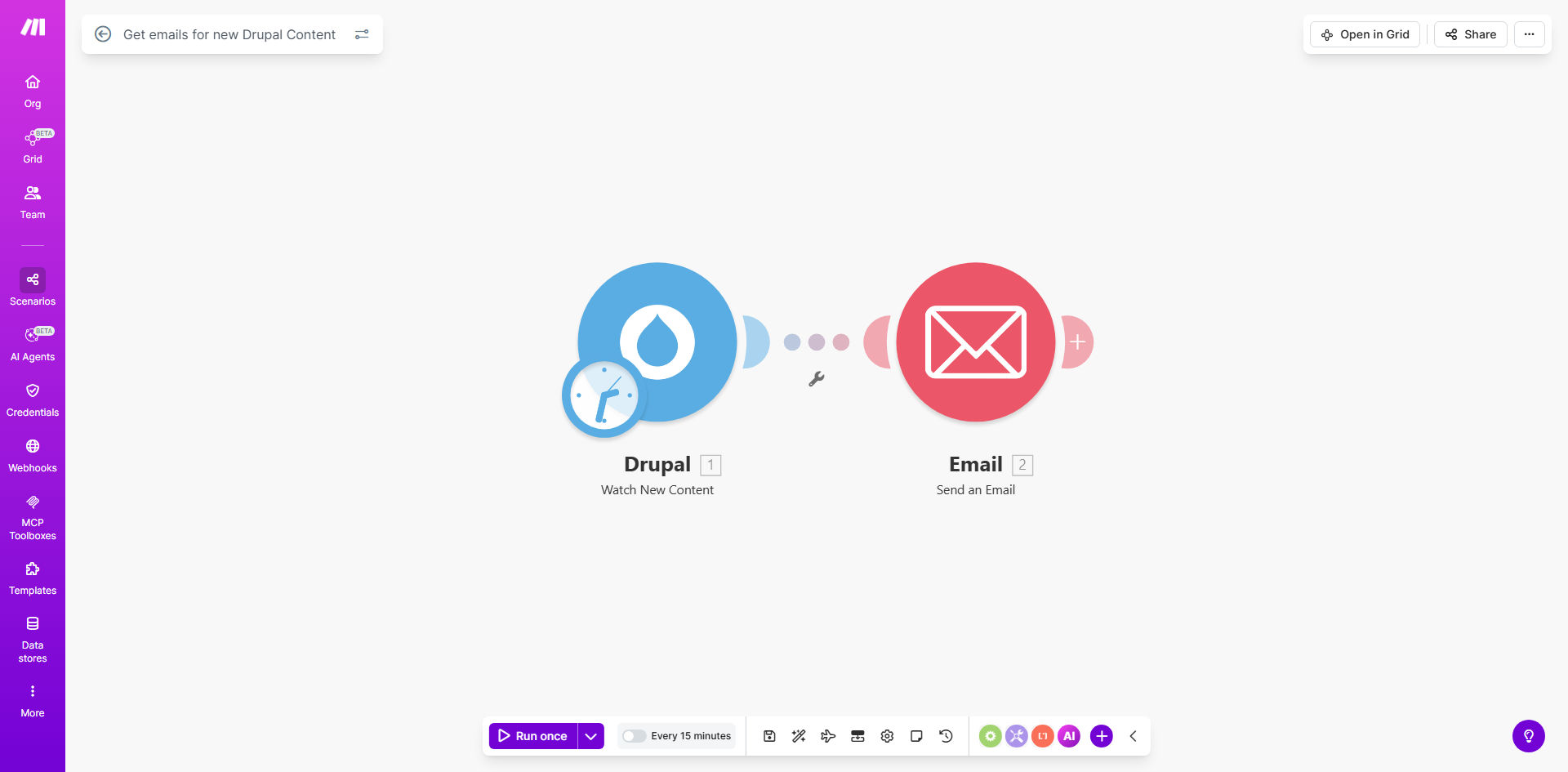
Drupal content notification workflow diagram showing email automation

What This Workflow Does

This automation solves the common challenge of content teams needing to manually check Drupal for new published content or relying on inconsistent notification systems. When multiple editors, reviewers, or stakeholders need to be informed about content updates, manual processes create delays and potential oversights.

The workflow automatically detects new content in your Drupal CMS and sends immediate email notifications to designated recipients. It eliminates the need for team members to constantly monitor the CMS dashboard while ensuring timely awareness of all content updates across your organization.

How It Works

1. Drupal Triggers the Workflow

Whenever new content is published in Drupal, the system sends a webhook notification to Make.com. This can be configured to trigger on specific content types or publication statuses.

2. Content Details Are Extracted

The workflow pulls relevant information from the Drupal content node including title, author, publication date, URL, and any custom fields you specify. This data is formatted for the email notification.

3. Email Notification Is Sent

A customized email template is populated with the content details and sent to your specified recipients. The email can include direct links to the content for quick review.

Pro tip: Configure different recipient lists for different content types - for example, send marketing content to your communications team while sending product updates to your sales team.

Who This Is For

This workflow is ideal for:

  • Content teams managing Drupal websites with multiple editors
  • Marketing departments coordinating content publication schedules
  • Organizations with content approval workflows requiring stakeholder notifications
  • Teams that need audit trails of content publication activities
  • Businesses with distributed teams who need instant content updates

What You'll Need

  1. A Drupal website (versions 8, 9, or 10)
  2. Admin access to configure webhooks or API connections
  3. A Make.com account (free tier available)
  4. The email addresses of notification recipients

Quick Setup Guide

  1. Install and configure the Drupal webhook or REST API module
  2. Create a new Make.com scenario using this template
  3. Connect your Drupal instance to Make.com
  4. Configure your email template with desired content fields
  5. Set your recipient list(s) and test the workflow

Key Benefits

Never miss new content: Receive instant notifications the moment content goes live, eliminating manual checks and reducing content review delays by 80-90%.

Improved team coordination: Keep all stakeholders automatically informed about content updates, reducing email threads and status meeting time by 50%.

Customizable alerts: Create different notification rules for different content types, departments, or priority levels to match your editorial workflow.

Audit trail: Maintain a record of content publications with timestamps and recipient lists for compliance and reporting.

Frequently Asked Questions

Common questions about Drupal content automation and integration

Automating Drupal content notifications saves time by eliminating manual checks for new content. Editors and stakeholders receive instant alerts when content goes live, improving team coordination and content review processes without requiring constant CMS monitoring.

For example, a university web team reduced their content review cycle from 3 days to just 4 hours by implementing automated notifications to department heads whenever new course pages were published.

The emails typically include the content title, author, publication date, URL, and any custom fields you configure. You can customize the email template to show exactly what information your team needs to review.

Common additions include content status, revision notes, related taxonomy terms, and direct edit links. The flexibility allows different teams to see only the information relevant to their role in the content lifecycle.

Yes, you can configure the workflow to send notifications to entire teams, specific departments, or individual stakeholders. The template supports multiple recipient lists based on content type or other criteria.

Many organizations set up distribution groups in their email system and send notifications to those groups. Others create dynamic recipient lists in Make.com based on content taxonomy or custom fields.

  • Create separate lists for editors, approvers, and observers
  • Use content taxonomy to route notifications
  • Set up escalation paths for urgent updates

Notifications are sent instantly, typically within seconds of content being published in Drupal. The automation runs continuously, ensuring no delay in alerting your team about new content.

This real-time notification capability is particularly valuable for time-sensitive content like news articles, event announcements, or product updates where early visibility impacts business outcomes.

Yes, the workflow is compatible with modern Drupal versions including 9 and 10. It uses standard Drupal webhook or API functionality that remains consistent across recent versions.

The JSON API module in Drupal core provides reliable integration points, while contributed modules like Webhooks offer additional flexibility for custom implementations.

Absolutely. The workflow allows full customization of email templates including branding, layout, and included content fields. You can match your corporate identity or create different templates for different content types.

Common customizations include adding logos, color schemes, action buttons, and conditional content sections. The template editor in Make.com provides WYSIWYG editing plus HTML access for advanced styling.

Yes, GrowwStacks specializes in custom Drupal automation solutions. We can build tailored workflows that integrate with your specific content approval processes, team structure, and notification requirements.

Our team has created advanced Drupal automation systems for publishers, universities, and enterprise clients, including multi-stage approval workflows, conditional notifications based on content fields, and integration with Slack/MS Teams alongside email.

  • Custom approval workflows
  • Multi-channel notifications
  • Content analytics integration

Need a Custom Drupal Automation?

This free template is a starting point. Our team builds fully tailored automation systems for your specific business needs.