CRM Integration Contact Management Automated Sync

Automated Teamleader to ActiveCampaign Contact Sync

Keep both CRMs in perfect harmony with real-time contact updates

Get This Workflow → Make.com · Free Template
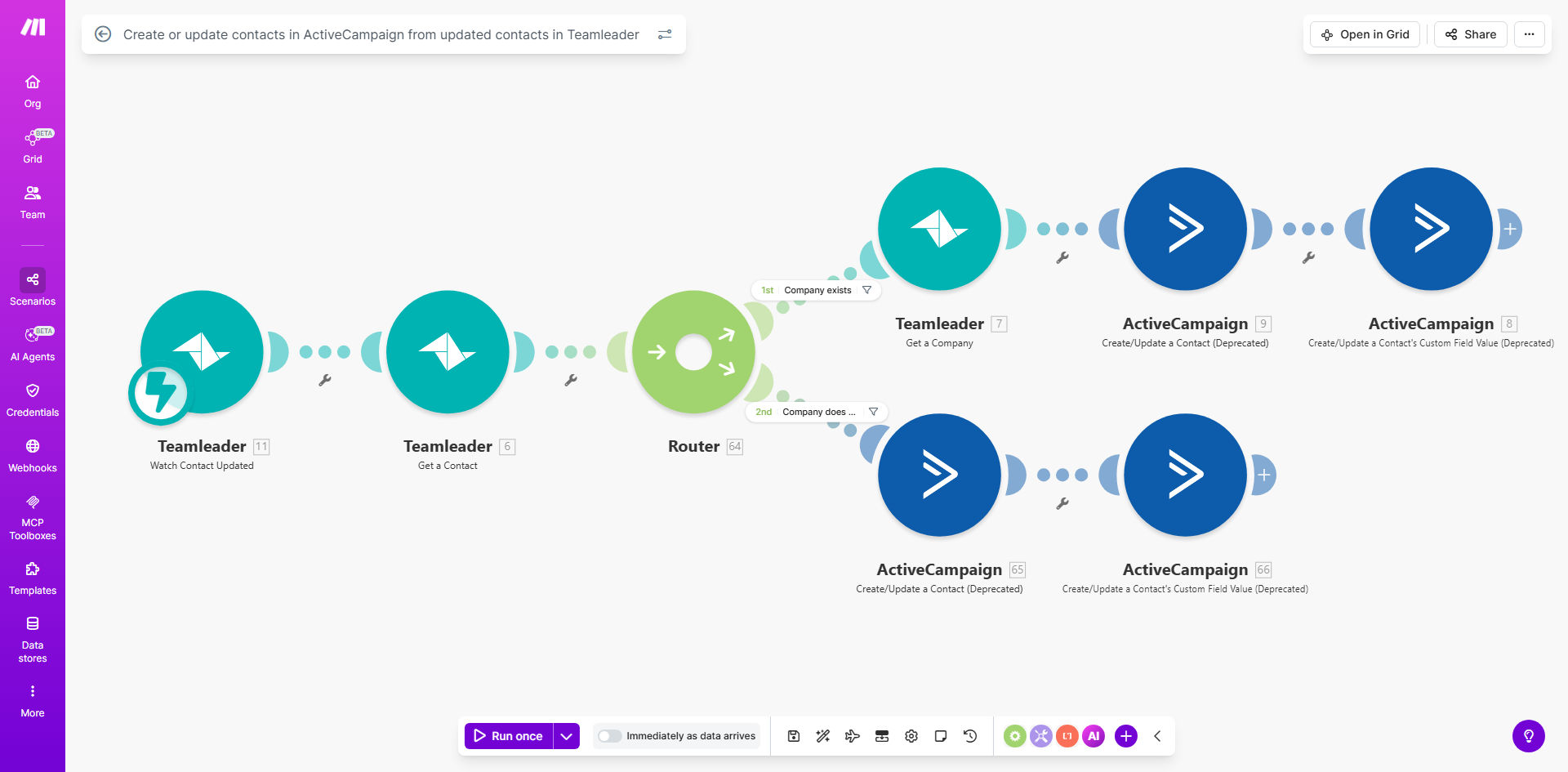
Visual diagram showing contact data flowing from Teamleader to ActiveCampaign

What This Workflow Does

This automation solves the common challenge of maintaining consistent contact information across Teamleader (a popular CRM for service businesses) and ActiveCampaign (a powerful marketing automation platform). When sales teams update client details in Teamleader, those changes often need to be manually copied to ActiveCampaign - until now.

The workflow automatically detects contact updates in Teamleader and instantly syncs them to ActiveCampaign. New contacts are created, while existing ones are updated, preventing duplicate entries. This ensures your marketing team always works with current customer data without manual intervention.

Pro tip: Combine this with our ActiveCampaign to Teamleader sync template for complete bidirectional contact management.

How It Works

1. Contact Update Detection

The workflow continuously monitors Teamleader for any contact changes, whether new additions or updates to existing records.

2. Data Extraction

When a change is detected, the system pulls all relevant contact information including name, email, phone, company, and custom fields.

3. ActiveCampaign Matching

The workflow checks ActiveCampaign for existing contacts using email as the unique identifier to prevent duplicates.

4. Smart Sync Logic

New contacts are created in ActiveCampaign, while existing ones are updated with the latest information from Teamleader.

Who This Is For

This workflow is ideal for businesses that:

  • Use Teamleader for CRM and ActiveCampaign for marketing
  • Have sales teams updating contact details frequently
  • Want to eliminate manual data transfer between systems
  • Need accurate customer data for email campaigns
  • Want to trigger marketing automations based on CRM updates

What You'll Need

  1. ActiveCampaign account with API access
  2. Teamleader account with API permissions
  3. Make.com account (free tier available)
  4. List of key contact fields to sync between systems

Quick Setup Guide

  1. Click "Get This Workflow" to import the template to your Make.com account
  2. Connect your Teamleader and ActiveCampaign accounts
  3. Map the contact fields between systems (default mapping provided)
  4. Test with sample contact updates
  5. Activate the workflow for automatic syncing

Key Benefits

Eliminate manual data entry that consumes 2-5 hours per week typically spent copying contact information between systems.

Improve data accuracy by removing human error from the transfer process, ensuring both systems have identical information.

Enable real-time marketing with up-to-date contact information flowing instantly into your ActiveCampaign sequences.

Maintain single customer view across sales and marketing teams, reducing confusion and improving collaboration.

Frequently Asked Questions

Common questions about CRM synchronization

Syncing these systems eliminates manual data entry, reduces errors, and ensures all teams work with the same updated contact information. Sales teams get real-time updates in ActiveCampaign while customer service maintains accurate records in Teamleader.

For example, when a sales rep updates a client's phone number in Teamleader, marketing campaigns in ActiveCampaign will immediately use the correct contact details without any manual intervention.

Real-time synchronization is ideal for sales and marketing teams. This workflow triggers instantly when contacts are updated in Teamleader, ensuring ActiveCampaign always has the latest information without delay.

Batch syncing overnight can work for some businesses, but real-time updates prevent situations where marketing campaigns use outdated contact details that were updated in the CRM earlier in the day.

Essential fields include name, email, phone, company, and custom fields like lead status. The template maps these automatically, but you can customize which fields transfer based on your sales process.

Consider syncing: Contact owner assignments, lead scores, tags/categories, and custom fields used for segmentation in your marketing automations.

Yes, the workflow supports custom field mapping between Teamleader and ActiveCampaign. You can configure which custom fields sync and transform data formats if needed during the transfer.

For instance, you might map Teamleader's "Project Stage" field to ActiveCampaign's "Lead Status" field with value transformations to match each platform's terminology.

The workflow intelligently updates existing ActiveCampaign contacts rather than creating duplicates. It matches contacts by email address to maintain data integrity across both platforms.

This prevents situations where marketing sends duplicate communications to the same contact under slightly different records in ActiveCampaign.

Make.com workflows include error handling and retry logic. If a sync fails temporarily, the system will attempt to complete the transfer, and you'll receive notifications for any persistent issues.

The platform provides detailed logs of each synchronization attempt, allowing you to monitor success rates and troubleshoot any patterns of failures.

Absolutely. While this free template handles basic contact syncing, our team can build custom integrations with field mapping rules, data transformations, and additional business logic tailored to your specific workflows.

We specialize in creating bespoke automation solutions that connect your entire tech stack. Book a consultation to discuss adding conditional sync rules, data enrichment steps, or integration with additional systems.

Need a Custom CRM Integration?

This free template is a starting point. Our team builds fully tailored automation systems for your specific business needs.