Make.com Qwilr Google Sheets Document Tracking Automation

Automatically Log Accepted Qwilr Pages to Google Sheets

Never miss tracking an accepted document again with this seamless Qwilr to Google Sheets integration

Get This Workflow → Make.com · Qwilr · Free Template
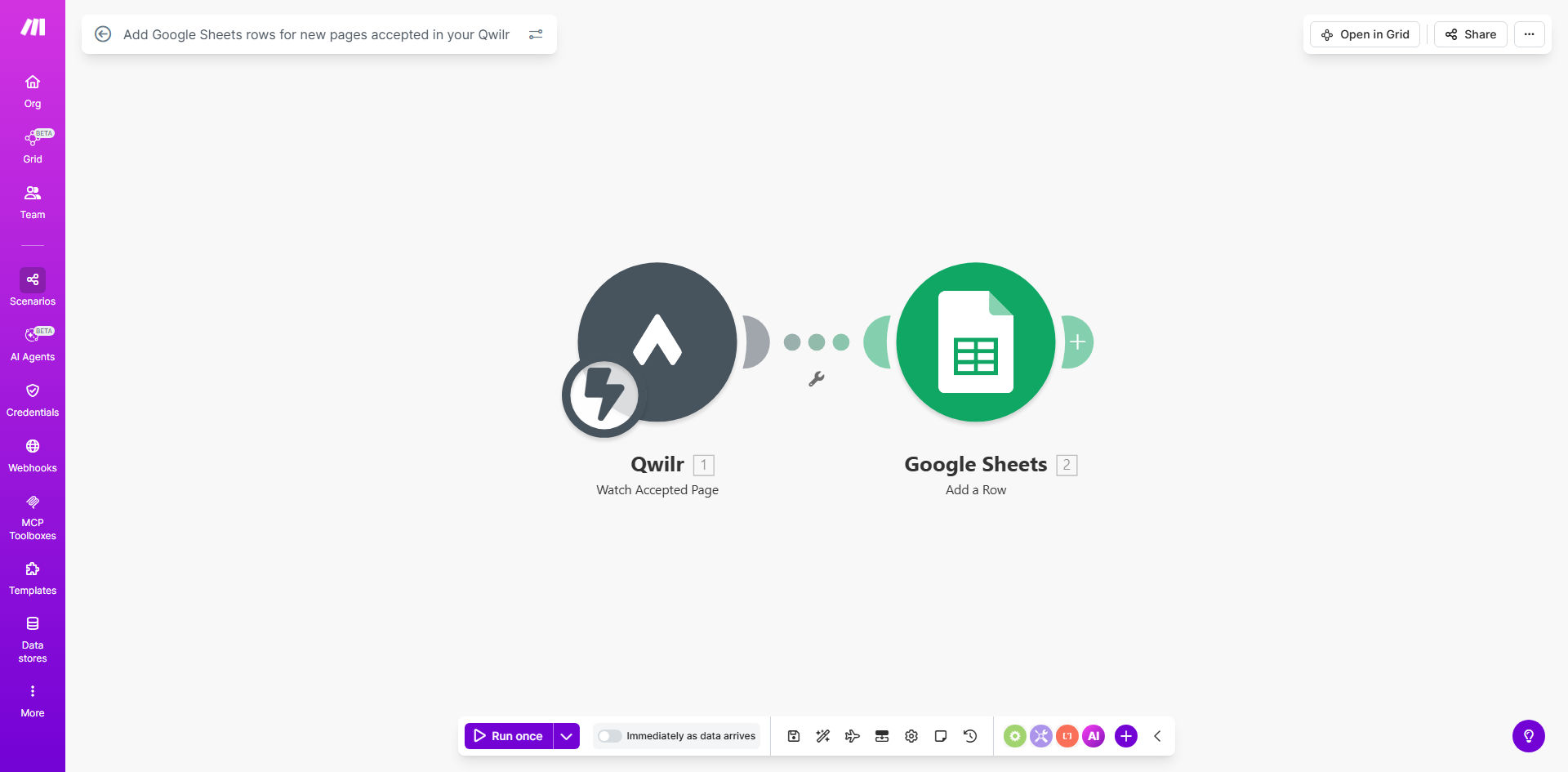
Qwilr to Google Sheets automation workflow diagram

What This Workflow Does

This automation solves the common problem of manually tracking which documents clients have accepted in Qwilr. Every time a client accepts a new page in your Qwilr account, the workflow automatically creates a corresponding row in your Google Sheets spreadsheet with all relevant document details.

Professional services firms, legal teams, and sales organizations often struggle with maintaining accurate records of accepted proposals, contracts, and other client documents. This workflow eliminates manual data entry errors and ensures your document acceptance records are always up-to-date.

How It Works

1. Qwilr Triggers the Workflow

The workflow monitors your Qwilr account for new page acceptance events. When a client accepts a document, Qwilr sends this event data to Make.com.

2. Data Extraction and Formatting

Make.com processes the Qwilr webhook data, extracting key information like document title, acceptance timestamp, client details, and document URL. You can customize which fields to capture based on your tracking needs.

3. Google Sheets Update

The formatted data is then automatically appended as a new row in your designated Google Sheet. The template maps Qwilr fields to your preferred column structure in Sheets.

Pro tip: Add a timestamp column in your Google Sheet to track when the record was added, separate from the Qwilr acceptance time. This helps with auditing your automation.

Who This Is For

This workflow is ideal for:

  • Legal firms tracking signed contracts and agreements
  • Consulting businesses managing client proposal approvals
  • Sales teams monitoring accepted quotes and order forms
  • Any professional service provider using Qwilr for client documents
  • Operations teams needing centralized document acceptance records

What You'll Need

  1. An active Qwilr account with documents to track
  2. A Google Sheets spreadsheet set up with your desired column headers
  3. A Make.com account (free plan sufficient for basic usage)
  4. Admin access to connect both Qwilr and Google Sheets to Make.com

Quick Setup Guide

  1. Clone the template from Make.com to your account
  2. Connect your Qwilr account via OAuth in Make.com
  3. Connect your Google Sheets account and select your target spreadsheet
  4. Map the Qwilr fields to your Google Sheets columns
  5. Test with a sample Qwilr document acceptance
  6. Activate the workflow for continuous monitoring

Key Benefits

Eliminate manual data entry: Save 2-5 hours per week typically spent copying acceptance data between systems.

Improve accuracy: Reduce human error in document tracking with 100% automated data transfer.

Enhance compliance: Maintain complete audit trails of all accepted documents for legal and regulatory purposes.

Better visibility: All stakeholders can access the Google Sheet for real-time status updates on document approvals.

Scalable solution: The workflow handles any volume of document acceptances without additional work from your team.

Frequently Asked Questions

Common questions about Qwilr and Google Sheets automation

Automating Qwilr page acceptance tracking saves significant administrative time while ensuring no accepted documents fall through the cracks. Manual tracking often leads to missed entries or outdated records, especially when handling multiple client documents simultaneously.

A law firm using this automation reduced their document tracking time by 75% while eliminating three instances per month where signed contracts weren't properly recorded in their system.

You can track document titles, acceptance dates, client names, document URLs, and any custom metadata from Qwilr. The workflow maps these fields to corresponding columns in your Google Sheet for comprehensive tracking.

Common tracking fields include:

  • Document title and version
  • Client name and email
  • Acceptance timestamp
  • Document sharing link
  • Custom Qwilr form responses

This integration creates a centralized audit trail of all accepted documents, making it easy to verify client agreements, track document versions, and generate reports for compliance purposes.

One consulting firm uses the automated Google Sheet to power their client dashboard, showing real-time status of all outstanding and accepted proposals. This reduced client status inquiries by 60%.

Yes, the Make.com template allows full customization of which Qwilr fields map to which Google Sheets columns. You can add or remove fields based on your specific tracking needs.

For advanced customization:

  • Add calculated fields (like days since acceptance)
  • Include conditional formatting rules
  • Create derived columns from Qwilr data

The basic workflow logs initial acceptance. For version tracking, you can enhance the template to flag updated documents or create new rows for significant revisions.

Many users add a "version tracking" column that gets updated when the source document changes, creating a complete revision history in their Google Sheet over time.

Make.com uses OAuth 2.0 for secure connections to both Qwilr and Google Sheets. Data is encrypted in transit, and you control access permissions for both services.

The integration follows industry security standards:

  • Encrypted API connections
  • Granular permission scopes
  • No data storage in Make.com

Absolutely. GrowwStacks specializes in building tailored automation solutions that match your specific document workflow requirements, including advanced tracking, notifications, and reporting features.

Our custom implementations often include additional capabilities like:

  • Slack notifications for urgent acceptances
  • CRM updates triggered by document acceptance
  • Automated follow-up sequences
  • Custom reporting dashboards

Need a Custom Qwilr Automation?

This free template is a starting point. Our team builds fully tailored automation systems for your specific business needs.