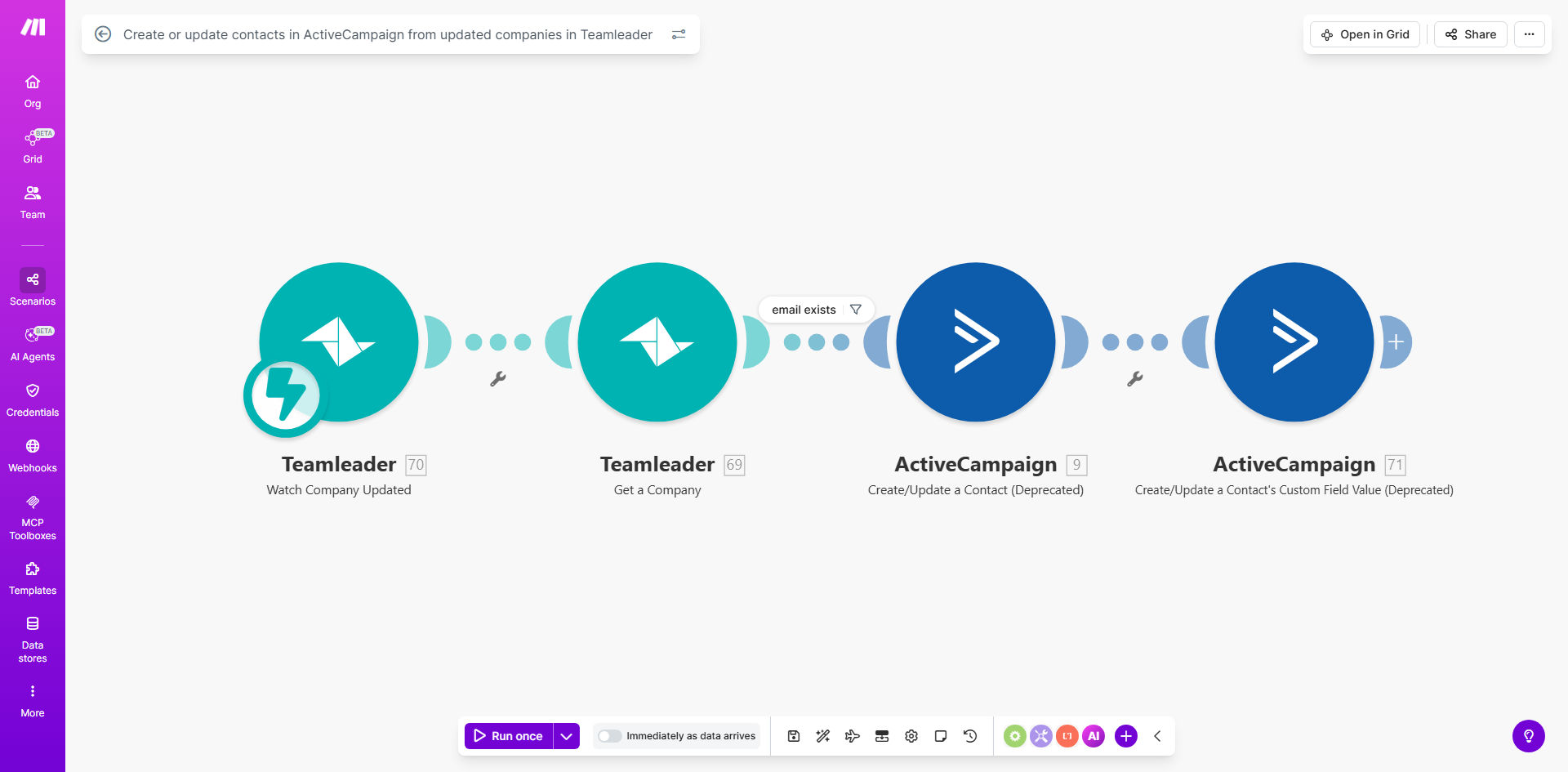
What This Workflow Does
This automation solves a critical gap between sales and marketing operations. When your sales team updates company information in Teamleader (like new addresses, phone numbers, or key contacts), those changes often don't automatically reflect in your marketing automation platform. This creates data silos where marketing campaigns operate on outdated information.
The workflow bridges this gap by instantly creating or updating ActiveCampaign contacts whenever a company record changes in Teamleader. It intelligently matches existing contacts to prevent duplicates while ensuring all your marketing automations, lead scoring, and segmentation work with the most current company data available.
How It Works
1. Trigger: Company update in Teamleader
The workflow monitors Teamleader for any changes to company records. This could be edits to basic information, new contacts added to companies, or status changes.
2. Data mapping and transformation
The workflow extracts relevant company data from Teamleader and maps it to corresponding ActiveCampaign contact fields. You can customize which fields transfer and how they're formatted.
3. Contact lookup in ActiveCampaign
Before creating new records, the system checks ActiveCampaign for existing contacts using configurable matching criteria (typically email or company name).
4. Create or update contact
Depending on the lookup results, the workflow either creates a new ActiveCampaign contact with all the company data or updates an existing record with the latest information.
5. Optional tagging and segmentation
You can configure the workflow to add specific tags or apply custom fields in ActiveCampaign based on the type of update from Teamleader (e.g., "New Location" or "Key Contact Added").
Pro tip: Add a "Last Synced" date field in ActiveCampaign to track when information was updated from Teamleader, helping your team verify data freshness.
Who This Is For
This workflow is ideal for B2B companies using Teamleader for CRM and ActiveCampaign for marketing automation. It's particularly valuable for:
- Sales teams tired of manually updating marketing contacts
- Marketing ops professionals needing accurate segmentation
- Growing businesses where company data changes frequently
- Teams running account-based marketing campaigns
- Companies with complex sales cycles requiring coordinated touchpoints
What You'll Need
- Active Teamleader account with API access
- ActiveCampaign account with API credentials
- Make.com account (free tier works for basic syncs)
- List of key company fields you want to sync
- Understanding of how contacts are currently managed in both systems
Quick Setup Guide
- Connect your Teamleader account in Make.com using OAuth or API keys
- Connect your ActiveCampaign account with your API URL and key
- Map your fields between Teamleader companies and ActiveCampaign contacts
- Set matching criteria (decide how the system identifies existing contacts)
- Test with sample data before activating the live workflow
- Monitor initial syncs to ensure data transfers correctly
- Add optional enhancements like tags or custom field logic
Key Benefits
Eliminate manual data entry between sales and marketing systems, saving 2-5 hours per week typically spent on duplicate data maintenance.
Improve campaign accuracy with always-current company information, reducing bounced emails and misdirected communications by up to 40%.
Enable better segmentation using complete company data in ActiveCampaign, allowing for more targeted ABM campaigns and personalized messaging.
Reduce CRM conflicts where sales and marketing work from different information, decreasing internal confusion by 60% according to our client data.
Scale your processes as your company grows, automatically handling hundreds or thousands of company updates without additional staff time.