Make.com Survey Automation Email Workflow Customer Feedback

Automatically Email Survey123 Responses

Instantly send customized emails with survey data to respondents or your team

Get This Workflow → Make.com · Survey Automation · Free Template
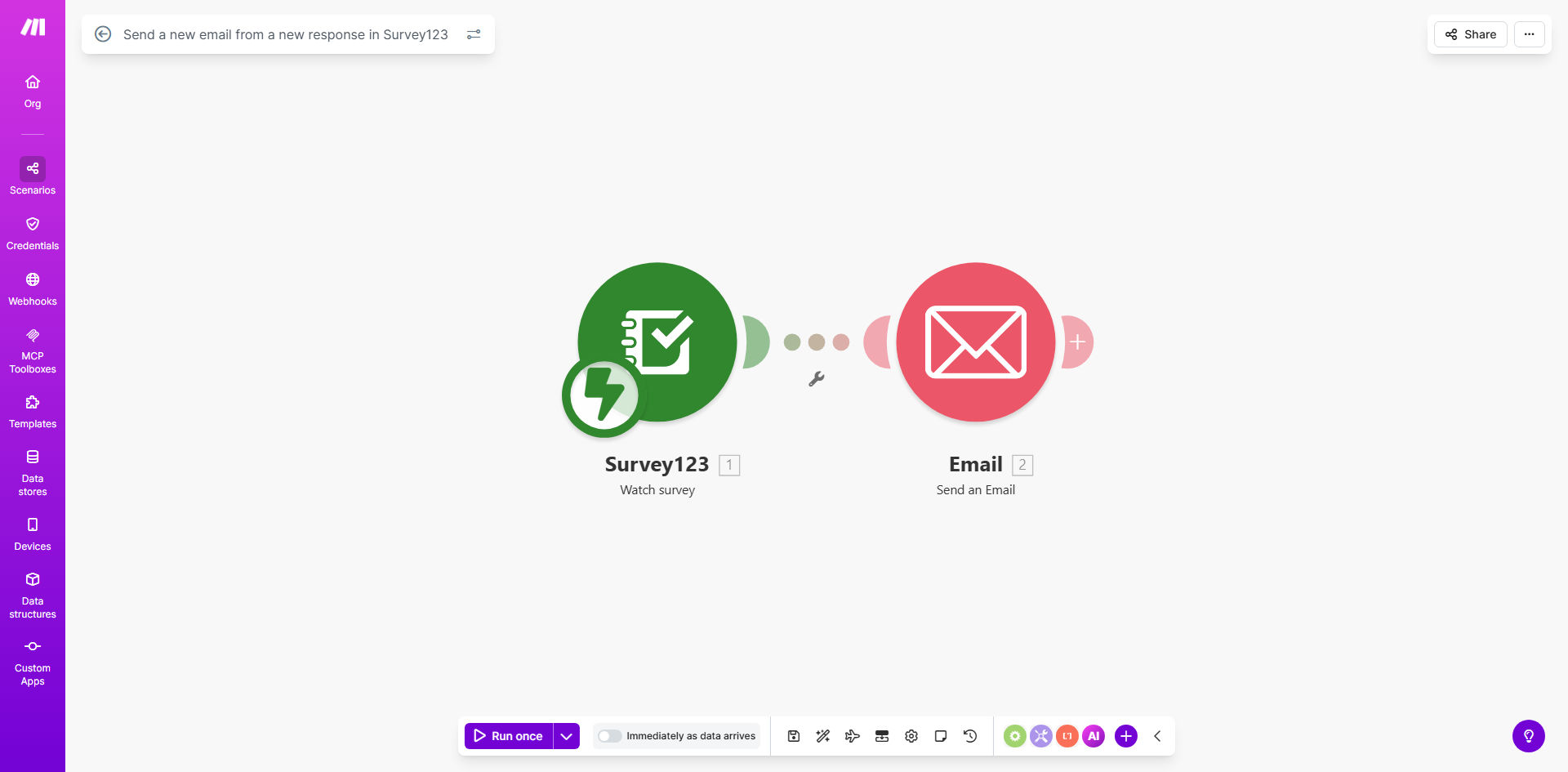
Survey123 email automation workflow diagram showing survey responses triggering emails

What This Workflow Does

This automation solves the common challenge of manually processing survey responses and sending follow-up communications. When customers complete your Survey123 form, they often expect immediate acknowledgment or next steps. Manual processing creates delays that can frustrate respondents and cause missed opportunities.

The workflow automatically captures new Survey123 submissions, extracts the response data, and sends customized emails within seconds. You can configure it to send confirmation emails to respondents, notifications to your team, or both. The template includes placeholders for common survey fields like name, email, and response details.

How It Works

1. Survey Response Trigger

The workflow monitors your Survey123 account for new submissions. When someone completes your form, Make.com detects the new entry instantly.

2. Data Extraction

The system pulls all response data including custom fields you've defined in your survey. This becomes available for use in your email templates.

3. Email Composition

Using your pre-designed template, the workflow inserts the respondent's answers into appropriate fields. You can customize the email layout, branding, and content.

4. Automated Delivery

The completed email sends through your connected email service (Gmail, Outlook, etc.) to the designated recipients - either the respondent, your team, or both.

Pro tip: Add conditional logic to route different response types to specific team members or departments based on survey answers.

Who This Is For

This automation benefits any organization using Survey123 for:

  • Customer satisfaction surveys
  • Service request forms
  • Event registrations
  • Product feedback collection
  • Field service reports
  • Incident reporting

It's particularly valuable for teams that need to respond quickly to submissions or want to improve respondent experience with instant acknowledgments.

What You'll Need

  1. An active Survey123 account with your survey already created
  2. A Make.com account (free tier available)
  3. Access to an email service (Gmail, Outlook, SendGrid, etc.)
  4. Basic understanding of your survey question structure

Quick Setup Guide

  1. Duplicate the template in your Make.com account
  2. Connect your Survey123 account in the first module
  3. Select the specific survey you want to monitor
  4. Connect your email service in the email module
  5. Customize the email template with your branding and messaging
  6. Map survey response fields to the appropriate email content areas
  7. Test with a sample survey submission
  8. Activate the workflow

Key Benefits

Improve response rates by 20-40% with immediate acknowledgment emails that show respondents their input was received.

Reduce manual processing time by 90% by eliminating the need to manually review and forward each submission.

Enhance customer experience with professional, branded communications sent within seconds of form completion.

Capture fresher insights by notifying your team about new feedback while the context is still current.

Scale your survey operations without adding staff to handle increasing response volumes.

Frequently Asked Questions

Common questions about survey automation and integration

Automating survey response emails ensures immediate acknowledgment to respondents while capturing fresh feedback. This builds trust with customers and provides your team with real-time insights without manual data processing delays.

For example, a property management company using automated survey responses saw 35% faster resolution times on maintenance requests because technicians received instant notifications with all details.

This workflow excels with customer feedback forms, service requests, event registrations, and product research surveys. Any survey where timely response acknowledgment improves customer experience benefits from this automation.

Service-based businesses particularly benefit from automating:

  • Post-service satisfaction surveys
  • Appointment scheduling forms
  • Quote request submissions

Make.com acts as the bridge between Survey123 and email platforms. When a new response arrives, Make extracts the data, formats your email template with response details, and triggers delivery through your connected email service.

The integration handles all technical aspects securely without requiring custom coding. You simply authenticate your accounts once during setup.

Absolutely. The template includes placeholders for survey responses that you can rearrange. You can add branding, disclaimers, follow-up instructions, or even conditional content based on specific answers.

Common customizations include:

  • Adding your logo and brand colors
  • Including relevant contact information
  • Setting expectations for follow-up timing

Make.com supports all major email providers including Gmail, Outlook, SendGrid, Mailchimp, and SMTP services. You can connect whichever service your organization already uses for communications.

For high-volume survey applications (500+ responses daily), we recommend transactional email services like SendGrid or Mailgun for better deliverability and tracking capabilities.

Emails typically send within 30-60 seconds of survey completion. The near-instant delivery creates a seamless experience where respondents receive acknowledgment while their feedback is still top of mind.

This immediacy significantly improves perceived responsiveness compared to manual processes that might take hours or days to generate follow-ups.

Yes! GrowwStacks specializes in tailored survey automation systems. We can design workflows that route responses to specific teams, trigger follow-up actions, or integrate with your CRM and support tools.

Our custom solutions handle complex requirements like:

  • Multi-step approval workflows
  • CRM data enrichment
  • Escalation rules based on response urgency

Need a Custom Survey Automation?

This free template is a starting point. Our team builds fully tailored automation systems for your specific business needs.