Make.com Facebook Lead Ads noCRM Lead Capture Automation

Automatically Sync Facebook Lead Ads to noCRM

Capture every lead instantly without manual data entry by connecting your Facebook forms directly to your CRM

Get This Workflow → Make.com · Facebook Lead Ads · Free Template
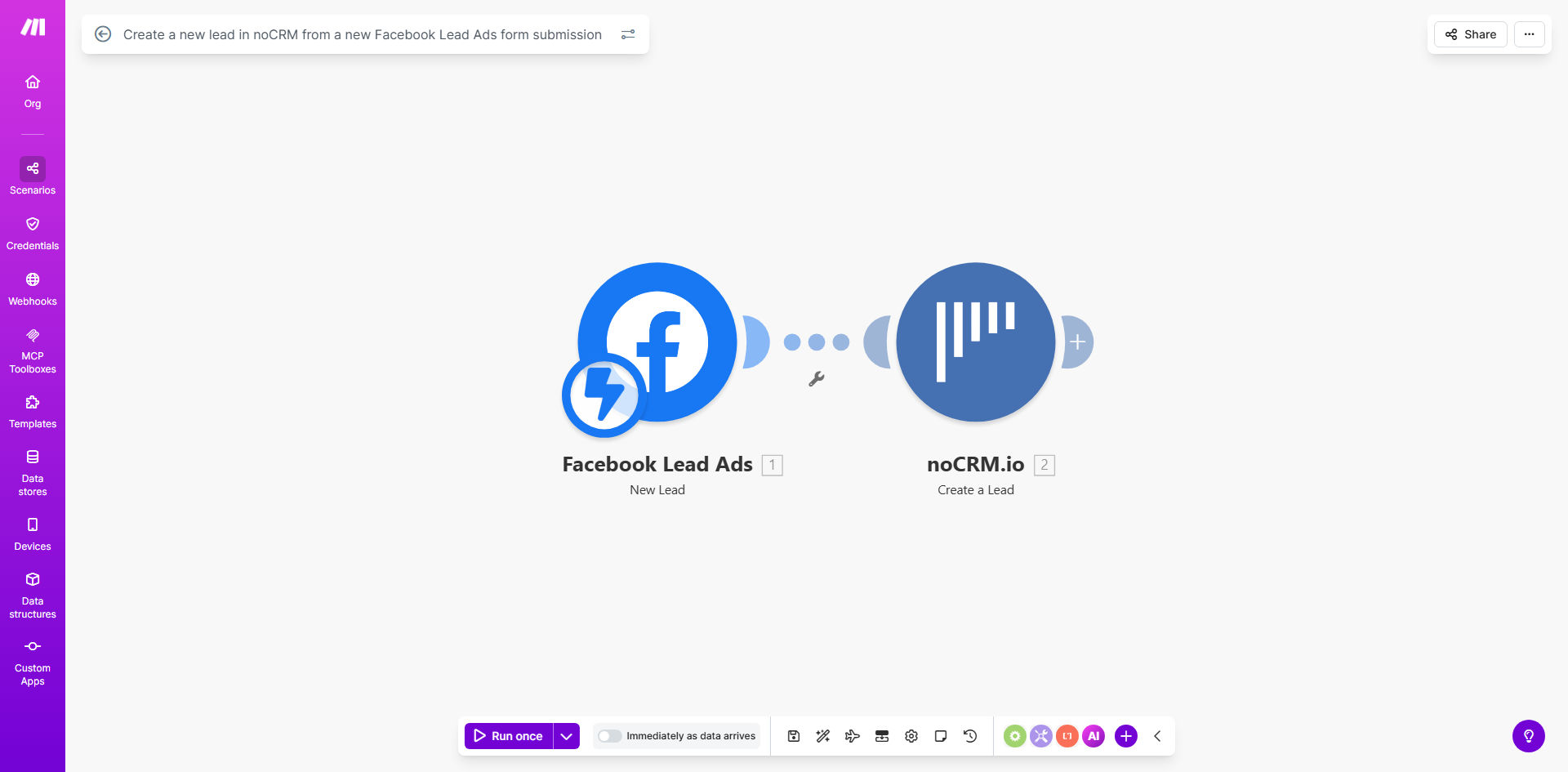
Facebook Lead Ads to noCRM automation workflow diagram

What This Workflow Does

This automation solves the critical problem of lost or delayed leads from Facebook advertising campaigns. When potential customers submit your Facebook Lead Ads form, their information often sits unprocessed until someone manually transfers it to your CRM. This template eliminates that friction point by automatically creating a new lead in noCRM the moment someone submits your Facebook form.

The workflow ensures your sales team receives complete lead information immediately, while the prospect is still engaged. Studies show that responding to leads within 5 minutes increases conversion rates by 9x compared to waiting just 30 minutes. By automating this handoff, you'll capture more qualified leads and give your team the best chance to convert them.

How It Works

1. Facebook Lead Ads Trigger

The workflow monitors your Facebook Lead Ads account for new form submissions. When someone completes your lead form, Facebook sends the data to Make.com within seconds.

2. Data Processing

The automation extracts all form fields including contact details, custom questions, and metadata about the ad campaign that generated the lead. It validates required fields (especially email) and formats the data for noCRM.

3. noCRM Lead Creation

Make.com creates a new lead record in your noCRM account with all available information. The workflow maps Facebook form fields to corresponding noCRM fields automatically.

4. Success Confirmation

The system logs each successful sync and can optionally notify your team via email or Slack when high-value leads come through.

Pro tip: Add a lead scoring step to prioritize hot prospects. Score based on form answers, ad campaign, or response time to help your sales team focus on the most promising leads first.

Who This Is For

This automation delivers the most value for:

  • Marketing agencies running Facebook lead gen campaigns for clients
  • B2C businesses collecting leads through Facebook ads
  • Sales teams that need instant access to new leads
  • Small businesses without dedicated data entry staff
  • Companies spending $500+/month on Facebook lead ads

What You'll Need

  1. A Facebook Business Manager account with Lead Ads access
  2. An active Facebook Lead Ads form collecting email addresses
  3. A noCRM.io account with API access enabled
  4. A Make.com account (free plan works for basic setups)

Quick Setup Guide

  1. Copy this template to your Make.com account
  2. Connect your Facebook Lead Ads account in the first module
  3. Select the specific lead form you want to monitor
  4. Connect your noCRM account in the second module
  5. Map form fields to corresponding noCRM fields
  6. Test with a real form submission
  7. Turn on the scenario to go live

Key Benefits

Never miss a lead: Automatic sync means zero submissions get forgotten in spreadsheets or email inboxes. Every lead reaches your CRM instantly.

Faster response times: Sales teams can contact leads within minutes of form submission, when conversion rates are highest.

Eliminate manual work: Save 5-15 minutes per lead that would otherwise be spent copying data between systems.

Better data quality: Automated transfers reduce human errors in data entry that can derail follow-up efforts.

Campaign tracking: The workflow preserves which Facebook ad generated each lead for accurate ROI measurement.

Frequently Asked Questions

Common questions about Facebook Lead Ads and CRM automation

Connecting Facebook Lead Ads to noCRM eliminates manual data entry, ensures no leads fall through the cracks, and lets your sales team respond faster. Studies show responding to leads within 5 minutes increases conversion rates by 9x compared to waiting 30 minutes.

Manual transfers often lead to lost leads, delayed follow-up, and data entry errors. Automation creates a seamless handoff from marketing to sales while capturing complete lead context.

Beyond basic contact info, you can map all form fields including custom questions, lead source details, ad campaign data, and timestamps. This creates richer lead profiles for better qualification and personalization in your sales process.

Common mapped fields include: full name, email, phone, company, job title, form answers, ad ID, campaign name, lead generation time, and any custom questions from your form.

This automation processes leads in real-time, typically within 10-30 seconds of form submission. The exact speed depends on Facebook's API response times and your Make.com plan's execution frequency.

For time-sensitive offers, you can enhance the template to trigger immediate SMS or Slack notifications when high-value leads come through.

Yes, you can enhance the template with filters to route high-intent leads differently, trigger immediate notifications for hot prospects, or validate email addresses before creating CRM records.

Popular enhancements include: lead scoring based on form answers, automatic task creation for sales reps, duplicate lead checking, and integration with email marketing tools.

The workflow can handle custom fields by mapping them to noCRM's custom field options. You'll need to configure field matching in the Make.com scenario based on your specific form structure.

During setup, simply add additional field mappings for each custom question. The automation will pass through all available data from Facebook to your CRM.

Make.com provides 99.9% uptime for their automation platform. The workflow includes error handling to retry failed syncs and can notify you of any issues through email or Slack alerts.

For mission-critical leads, we recommend adding a backup notification system and periodic audits to ensure all submissions processed correctly.

Absolutely! GrowwStacks specializes in building tailored lead capture automations that connect Facebook Lead Ads with any CRM system, including custom field mapping, lead scoring, and sales team notifications.

Our automation experts can create a solution that fits your exact sales process, with features like: automatic lead assignment, integration with your phone system, AI-powered lead qualification, and real-time dashboard reporting.

  • Custom workflows for any CRM
  • Lead scoring models
  • Sales team notifications

Need a Custom Facebook Lead Automation?

This free template is a starting point. Our team builds fully tailored automation systems for your specific business needs.