Make.com ClickUp Zistemo Task Automation Time Tracking

Create new Zistemo tasks for new ClickUp tasks

Automatically sync your project management and time tracking systems to eliminate manual data entry

Get This Workflow → Make.com · ClickUp · Free Template
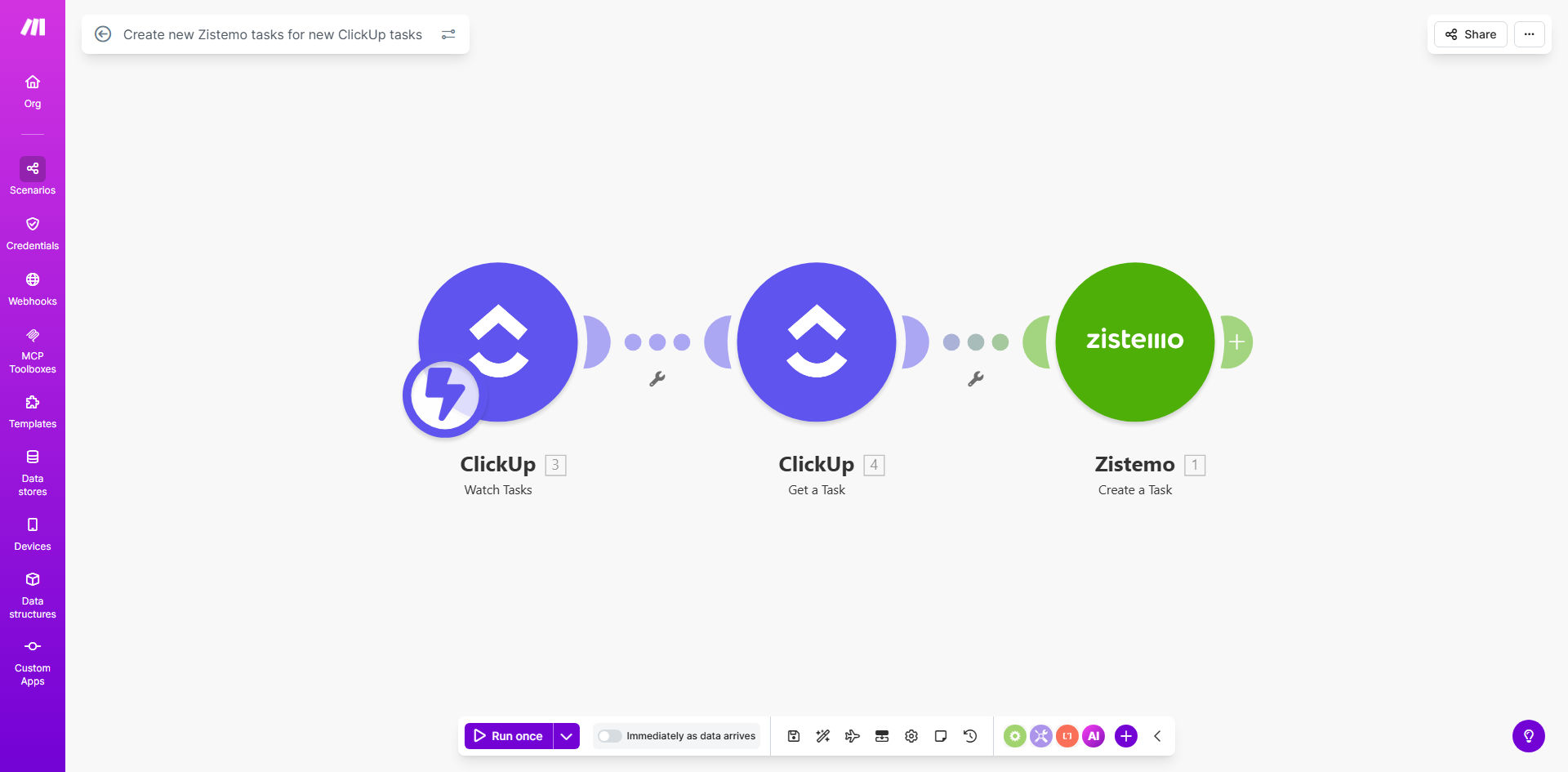
Automation workflow diagram showing ClickUp to Zistemo task creation

What This Workflow Does

This automation bridges the gap between project management in ClickUp and time tracking in Zistemo. Whenever your team creates a new task in ClickUp, the workflow automatically generates a corresponding task in Zistemo with all relevant details.

Manual task duplication between systems is a common source of errors and wasted time. This integration ensures your time tracking always reflects current project tasks, improves billing accuracy, and saves each team member 1-2 hours per week previously spent on administrative work.

How It Works

1. New task detection in ClickUp

The workflow monitors your specified ClickUp space/list for new task creations using Make.com's instant trigger. No polling delays mean tasks sync to Zistemo within seconds.

2. Data mapping and transformation

Key task details like name, description, due date, and assignees are extracted from ClickUp. The workflow can transform this data to match Zistemo's expected format, handling differences in field types between platforms.

3. Task creation in Zistemo

Using Zistemo's API, the workflow creates a new time tracking task with all mapped fields. The system can optionally notify assignees or add default time estimates based on your configuration.

Pro tip: Add a filter step to only sync tasks with specific tags or from certain lists. This prevents cluttering Zistemo with internal tasks that don't require time tracking.

Who This Is For

This integration delivers the most value for:

  • Agencies and professional service firms tracking billable hours
  • Remote teams needing accurate time tracking across projects
  • Project managers overseeing distributed teams
  • Freelancers managing multiple client projects
  • Companies transitioning from manual timesheets to automated tracking

What You'll Need

  1. A Make.com account (free or paid)
  2. Admin access to your ClickUp workspace
  3. Zistemo account with API access enabled
  4. The specific ClickUp list/space you want to monitor
  5. 5-10 minutes for initial configuration

Quick Setup Guide

  1. Install the template from Make.com's template library
  2. Connect your ClickUp account and select the space/list to monitor
  3. Connect your Zistemo account and verify API permissions
  4. Map ClickUp fields to corresponding Zistemo fields
  5. Test with a new ClickUp task to verify sync works
  6. Activate the scenario for continuous automation

Key Benefits

Eliminate duplicate data entry between project management and time tracking systems, reducing errors and saving 5-10 minutes per task.

Improve billing accuracy by ensuring all billable work in ClickUp automatically appears in Zistemo for time tracking.

Reduce administrative overhead - teams spend less time on system maintenance and more on productive work.

Maintain data consistency across platforms with standardized task naming and field mapping.

Scale operations efficiently as new projects and team members are automatically incorporated into time tracking.

Frequently Asked Questions

Common questions about ClickUp-Zistemo automation and integration

Connecting ClickUp with Zistemo eliminates manual task duplication between project management and time tracking systems. This ensures time tracking always reflects current project tasks, improves billing accuracy, and saves 1-2 hours per week per employee on administrative work.

For agencies, this integration can reduce billing disputes by 30-40% since all billable work automatically appears in time tracking. Team members also report higher satisfaction when freed from repetitive data entry tasks.

The workflow transfers task names, descriptions, due dates, and assignees from ClickUp to Zistemo. You can customize which fields to sync based on your time tracking requirements and project management workflow.

Common additional mappings include project/client codes, priority levels, and custom fields like budget hours. The template provides a flexible structure to adapt to your specific data needs between platforms.

By automatically creating time tracking tasks when projects begin, teams can start tracking billable hours immediately without setup delays. This reduces context switching and ensures no billable work goes unrecorded due to manual entry errors.

Productivity gains come from eliminating the cognitive load of maintaining two separate systems. Teams report 15-20% more focus time when they don't need to mentally translate tasks between platforms.

Yes, you can configure the automation to only sync tasks from specific ClickUp lists, with certain tags, or meeting other criteria. This prevents cluttering your time tracking system with non-billable internal tasks.

Common filters include excluding tasks marked "Internal", only including tasks with "Billable" tag, or syncing just from client project lists. These rules maintain Zistemo as a clean system for actual time tracking needs.

This template creates new tasks but doesn't update existing ones. For two-way sync with updates, you would need an extended automation that also watches for task modifications in ClickUp.

Many businesses start with this one-way sync for new tasks, then later add update functionality. This phased approach lets you validate the basic integration before implementing more complex logic.

Make.com provides enterprise-grade reliability with 99.9% uptime for integrations. The platform handles API rate limits, retries failed operations, and provides error notifications if any sync issues occur.

In practice, most implementations experience fewer than 1-2 missed syncs per month. The system includes built-in recovery mechanisms to catch and process any tasks that might get missed during temporary outages.

Absolutely! GrowwStacks specializes in building tailored ClickUp-Zistemo integrations that match your exact workflow. We can add task updates, custom field mapping, approval workflows, and reporting dashboards.

Our typical custom implementations include: two-way sync between platforms, automatic time entry reconciliation, client-specific billing rules, and manager approval workflows. We'll design a solution that fits your existing processes perfectly.

  • Free consultation to assess your needs
  • 2-week implementation timeline for most projects
  • Ongoing support and optimization

Need a Custom ClickUp-Zistemo Automation?

This free template is a starting point. Our team builds fully tailored automation systems for your specific business needs.