Stripe Clover POS Customer Sync Make.com

Automatically Add Stripe Customers to Clover POS

Eliminate manual data entry and keep customer records synchronized between your payment processor and point-of-sale system

Get This Workflow → Make.com · Free Template
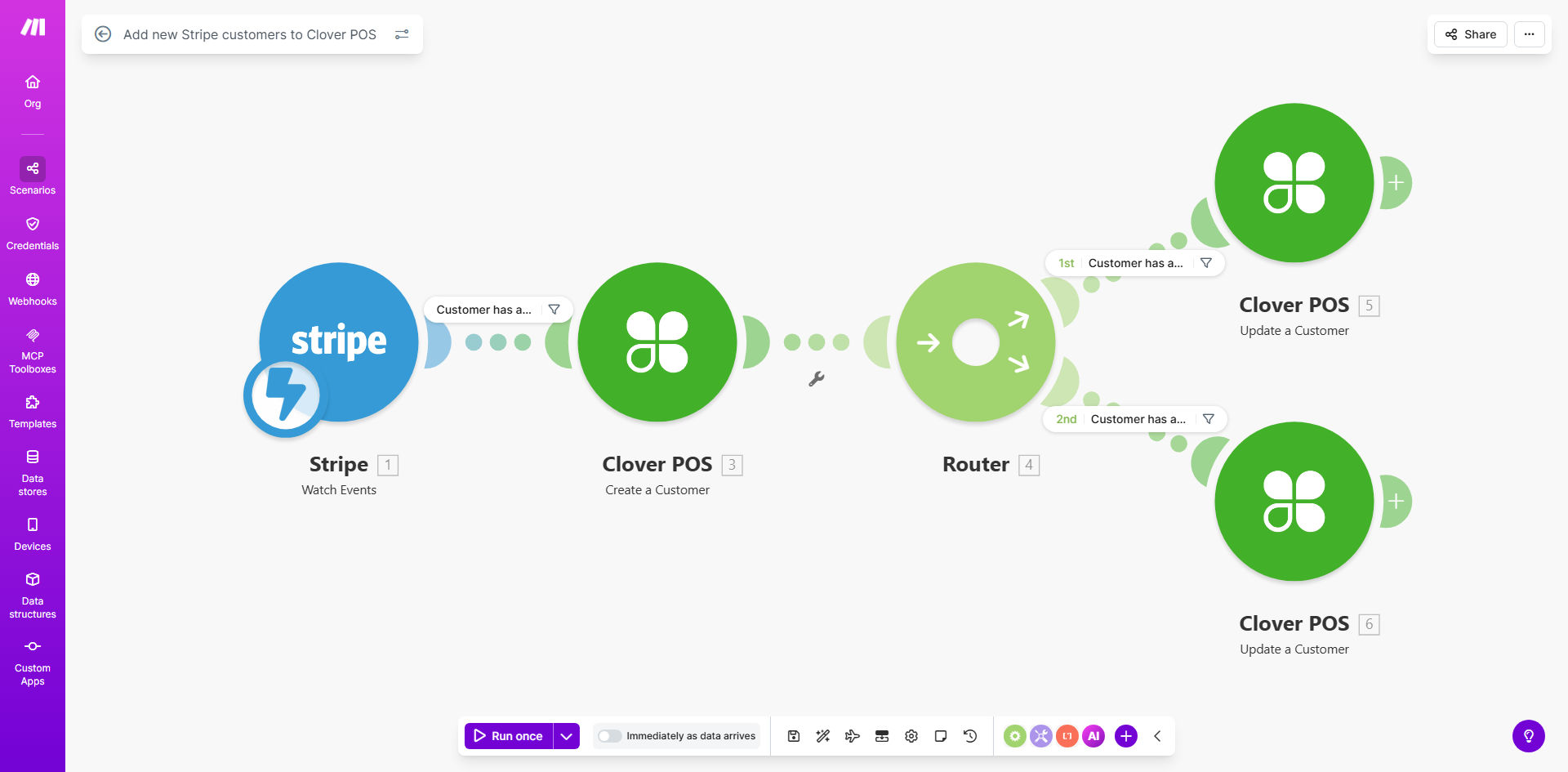
Make.com workflow diagram showing Stripe to Clover POS customer sync automation

What This Workflow Does

This automation solves a critical pain point for businesses using Stripe for online payments and Clover POS for in-person sales. Without integration, staff must manually re-enter customer information between systems—a time-consuming process prone to errors that creates disjointed customer experiences.

The workflow automatically creates a matching customer record in Clover POS whenever a new customer completes a Stripe transaction. This synchronization happens in real-time, ensuring your sales team has immediate access to complete customer information whether the purchase happened online or in-store.

How It Works

1. New Customer Trigger

The workflow monitors Stripe for new customer creation events, whether from checkout pages, subscriptions, or manual additions.

2. Data Transformation

Customer details are formatted to match Clover POS's expected structure, with address standardization and phone number formatting.

3. Duplicate Check

The system queries Clover POS to verify the customer doesn't already exist, using email and phone as matching criteria.

4. Record Creation

If no duplicate is found, the workflow creates a new customer in Clover POS with all available Stripe data.

Who This Is For

This template benefits:

  • Retailers with both ecommerce and physical stores
  • Restaurants offering online ordering and dine-in service
  • Service businesses taking online bookings and in-person payments
  • Any business tired of manually transferring customer data between systems

Pro tip: Combine this with our Clover POS to Mailchimp template to build a complete customer marketing automation system.

What You'll Need

  1. Active Stripe account with processing history
  2. Clover POS with admin access
  3. Make.com account (free tier sufficient for testing)
  4. API credentials for both platforms

Quick Setup Guide

  1. Copy the template to your Make.com account
  2. Connect your Stripe and Clover POS accounts
  3. Map the customer fields between systems
  4. Test with a new Stripe customer
  5. Monitor the logs for successful syncs

Key Benefits

Saves 5-15 hours monthly by eliminating manual customer data entry between systems.

Reduces errors by 90%+ compared to manual transcription between platforms.

Improves customer experience with consistent information across all touchpoints.

Enables unified reporting by having complete customer records in both systems.

Frequently Asked Questions

Common questions about Stripe and Clover POS integration

Syncing customers eliminates manual data entry between systems, reduces errors, and creates a unified customer database. This improves order accuracy, enables better customer service, and provides complete purchase history visibility across online and in-store transactions.

For example, when a customer who first purchased online visits your store, your staff will immediately see their full purchase history and preferences without asking the customer to repeat information.

The workflow triggers instantly whenever a new customer is created in Stripe. In real-world use, this means customer data appears in Clover POS within seconds, ready for in-store transactions or loyalty programs.

Unlike batch processing that might run hourly or daily, this real-time approach ensures your staff always has the most current customer information available.

Typically includes name, email, phone number, and billing address. The template can be customized to include additional fields like purchase preferences or custom metadata that exists in both systems.

Basic implementation transfers these core fields automatically: First/Last name, Email, Phone, Address (street, city, state, zip), Customer ID reference.

This template focuses on new customers, but can be modified to backfill existing customers. Many businesses run a one-time import of historical data before activating the automated sync for future customers.

We recommend exporting your Stripe customer list to CSV, then using Clover's bulk import tool for initial setup before implementing this real-time solution.

The template includes duplicate checking logic. You can configure it to either skip existing customers or update their records with the latest Stripe data, depending on your business needs.

For businesses with established customer bases, we recommend the update approach to ensure phone numbers and addresses stay current across both platforms.

Make.com workflows have 99.9% uptime. Failed syncs automatically retry and you receive alerts for any persistent issues. Most businesses report this method is more reliable than manual entry which has human error rates of 1-5%.

The template includes error handling for common scenarios like API rate limits, temporary outages, and data format mismatches between the systems.

Absolutely. GrowwStacks specializes in tailored ecommerce-POS integrations. We can customize field mappings, add validation rules, connect additional systems, and handle complex edge cases specific to your operations.

Our typical customizations include: Adding loyalty program integration, syncing custom metadata fields, implementing business-specific matching logic, and connecting third-party systems like your CRM or email marketing platform.

  • Free consultation to assess your specific needs
  • 2-week average implementation timeline
  • Ongoing support and optimization included

Need a Custom Stripe-Clover Automation?

This free template is a starting point. Our team builds fully tailored automation systems for your specific business needs.