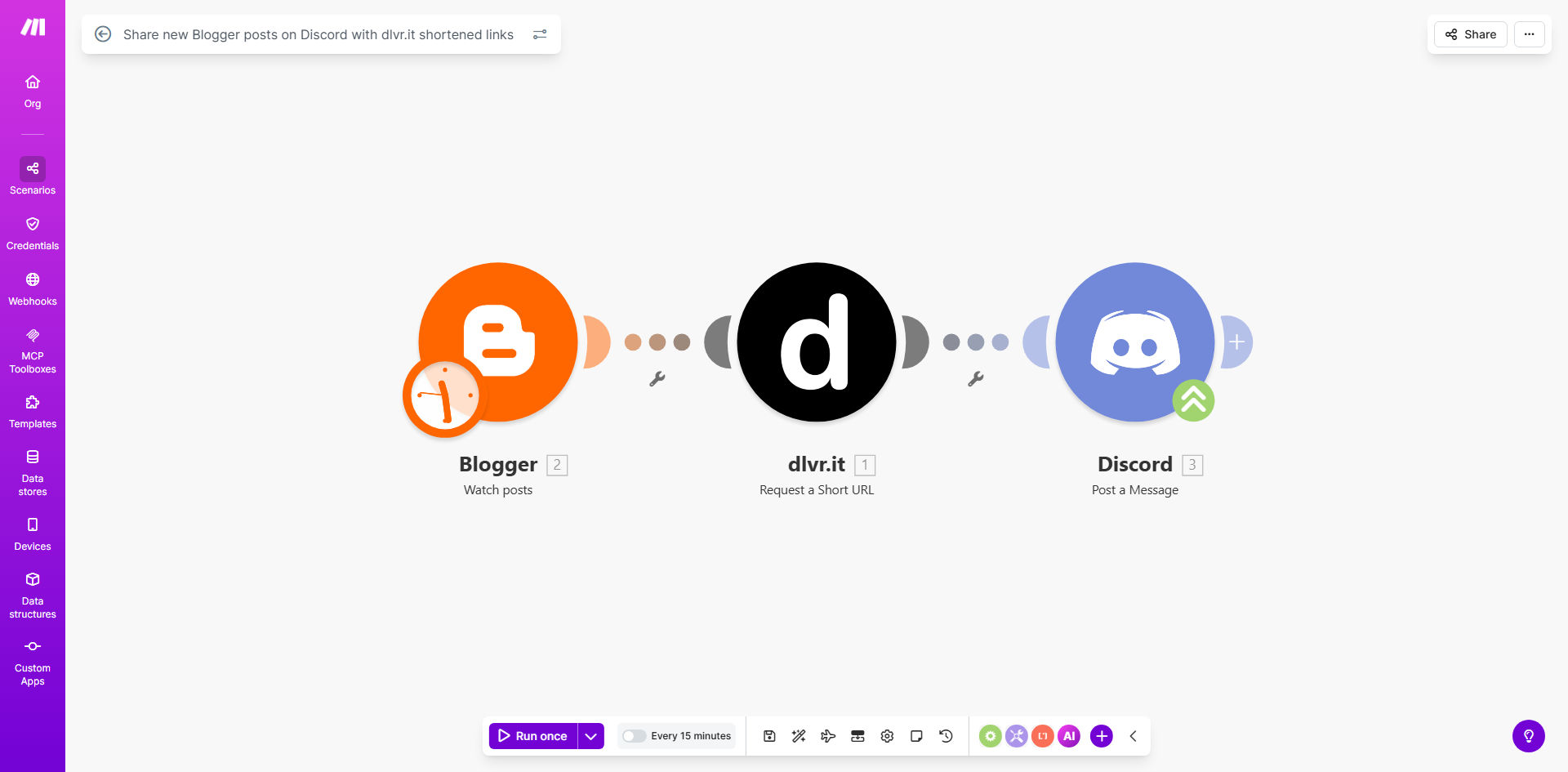
What This Workflow Does
This automation solves the time-consuming process of manually sharing new blog posts across platforms. Whenever you publish new content on Blogger, the workflow automatically detects the post, creates a shortened link through dlvr.it, and shares it in your designated Discord channel with a customizable message.
For content creators and community managers, this eliminates the risk of forgetting to promote new posts while ensuring your Discord community receives updates immediately after publication. The professional shortened links make your shares cleaner and more clickable, while the automated process saves 5-10 minutes per post that would otherwise be spent copying links, formatting messages, and posting manually.
How It Works
1. New post detection
The workflow continuously monitors your Blogger account for new publications using Make.com's polling system. When a new post is detected, it extracts the post title, URL, and other relevant metadata.
2. Link shortening
The full Blogger URL is sent to dlvr.it's link shortening service, which generates a clean, trackable short link. This makes your shares more visually appealing in Discord and provides basic click analytics.
3. Discord message creation
The workflow formats a Discord message using your preferred template, combining the post title, shortened link, and any additional text or emojis you want to include. You can customize this message format to match your community's style.
4. Automated posting
Finally, the formatted message is sent to your specified Discord channel via webhook, appearing as if posted by your designated bot. The entire process happens within seconds of publication without any manual intervention.
Pro tip: Add UTM parameters to your links before shortening to track Discord-sourced traffic in Google Analytics. This helps measure how effectively your Discord community engages with your content.
Who This Is For
This automation is ideal for bloggers, content creators, and community managers who:
- Maintain an active Blogger-based website with regular new posts
- Have an engaged Discord community interested in their content
- Want to save time on repetitive promotional tasks
- Value consistent, timely content distribution
- Want basic analytics on link clicks from their Discord audience
It's particularly valuable for educational content creators, gaming bloggers, tech tutorial writers, and anyone building a knowledge-sharing community around their blog.
What You'll Need
- A Blogger account with published content
- A Discord server where you have permission to create webhooks
- A free dlvr.it account for link shortening
- A Make.com account (free tier sufficient for basic usage)
Quick Setup Guide
- Copy the template from Make.com to your account
- Connect your Blogger account in the workflow settings
- Set up your dlvr.it API credentials for link shortening
- Create a Discord webhook for your target channel and add it to the workflow
- Customize the message format to match your preferred posting style
- Test with a new Blogger post to verify the automation works
- Schedule the workflow to run at your desired frequency (recommended: every 15-30 minutes)
Key Benefits
Time savings: Eliminates 5-10 minutes of manual work per post, freeing you to focus on content creation rather than distribution.
Increased consistency: Ensures every post gets promoted to your Discord community, preventing missed opportunities from forgotten shares.
Professional presentation: Shortened links and formatted messages make your shares look cleaner and more intentional.
Basic analytics: dlvr.it provides click tracking so you can measure engagement from your Discord audience.
Community engagement: Immediate notifications keep your Discord members informed and engaged with your latest content.