Make.com Google Forms dlvr.it Google Sheets URL Shortener

Automatically Shorten URLs from Google Forms Responses

Save hours of manual work by automatically processing form links through dlvr.it and logging them to Google Sheets

Get This Workflow Make.com · Google Forms · Free Template
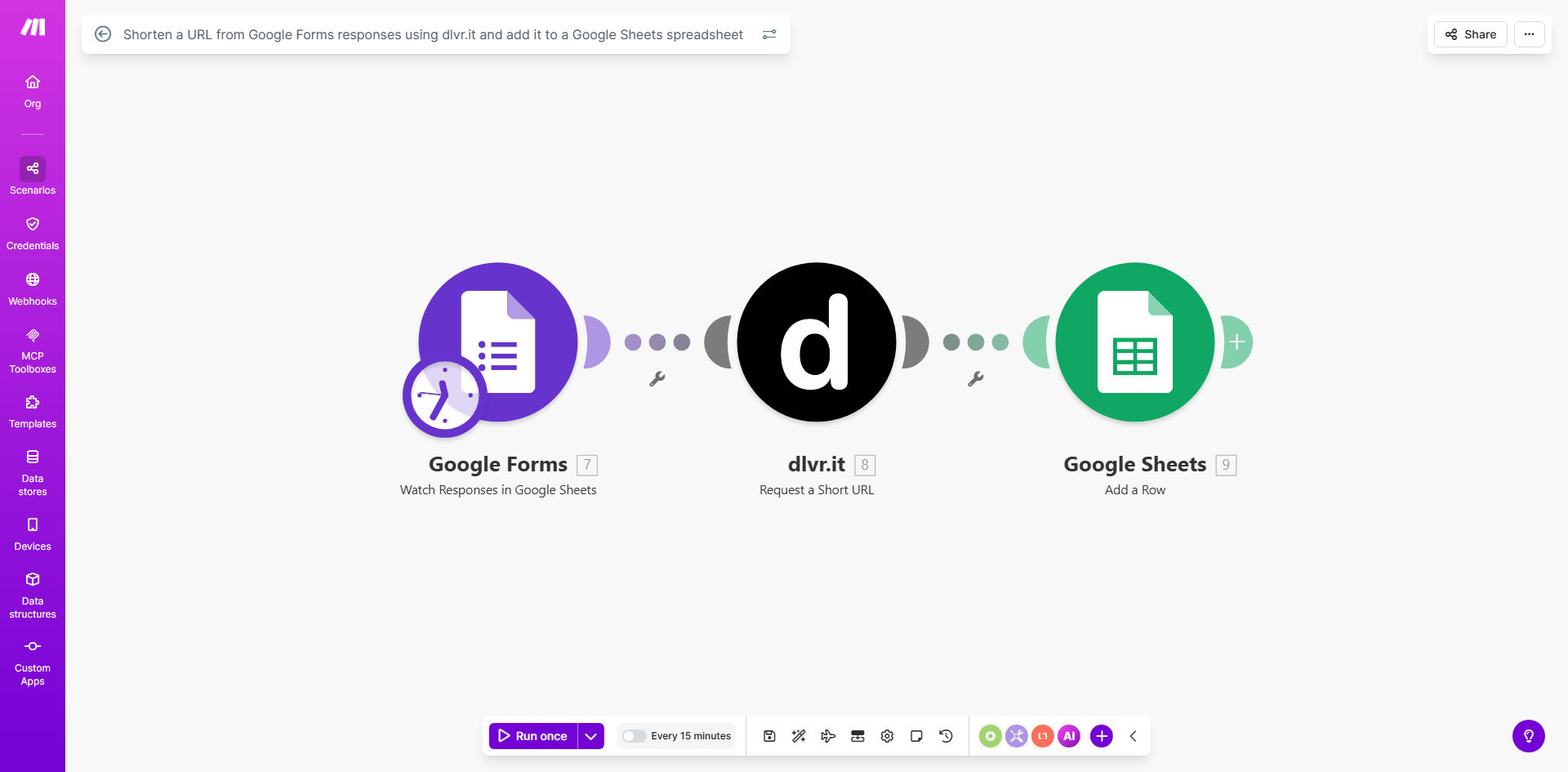
Automated URL shortening workflow diagram showing Google Forms to dlvr.it to Google Sheets integration

What This Workflow Does

This automation solves the tedious manual process of shortening URLs collected through Google Forms. When respondents submit links (like website references, document URLs, or social media profiles), the workflow automatically processes them through dlvr.it's URL shortener and logs both the original and shortened versions in your Google Sheets spreadsheet.

Marketing teams, researchers, and event organizers frequently need to collect and share URLs through forms. Long, unwieldy links look unprofessional in communications and make analytics tracking difficult. This workflow ensures every submitted URL gets consistently shortened while maintaining a complete audit trail in your spreadsheet.

How It Works

1. New form submission triggers the workflow

The scenario monitors your Google Form for new responses containing URL fields. Each new submission instantly initiates the shortening process.

2. URL validation and processing

The system checks that the submitted text is a valid URL and prepares it for shortening. Invalid entries get flagged in your spreadsheet with error details.

3. dlvr.it API shortening

The workflow sends the URL to dlvr.it's shortening service through their API, which returns a compact, trackable link (like dlvr.it/ABC123).

4. Google Sheets logging

Both the original URL and shortened version get recorded in your designated spreadsheet along with timestamps and any other form response data you want to preserve.

Pro tip: Enhance this workflow by adding columns for click analytics from dlvr.it. Schedule daily updates to show each shortened link's performance metrics right in your spreadsheet.

Who This Is For

This automation benefits any business or team that collects URLs through Google Forms:

  • Marketing teams running campaigns that require link submissions
  • Event organizers collecting speaker website/social media links
  • Research projects gathering reference materials from participants
  • HR departments processing job applicant portfolio links
  • Educators managing student project submissions

What You'll Need

  1. A Google Forms with URL collection fields
  2. dlvr.it account (free tier available)
  3. Google Sheets spreadsheet for logging
  4. Make.com account (free plan sufficient)
  5. 5 minutes to set up the template

Quick Setup Guide

  1. Click "Get This Workflow" to copy the template to your Make.com account
  2. Connect your Google Forms and Sheets accounts when prompted
  3. Add your dlvr.it API credentials in the designated module
  4. Map the form fields to the workflow's input variables
  5. Specify your destination spreadsheet and tab name
  6. Test with a sample form submission and verify the output
  7. Activate the scenario and start collecting shortened URLs automatically

Key Benefits

Saves 2-3 hours per week by eliminating manual URL processing. What typically required copying, pasting, and tracking across multiple tools now happens instantly with each form submission.

Improves link consistency across your organization. All shared links use the same short domain with your branding, rather than a mix of different services.

Enables better analytics by using a dedicated shortener. dlvr.it provides click tracking, geographic data, and referral source information you can't get with raw URLs.

Reduces errors in link handling. Automated processing means no more broken links from manual copying mistakes or forgotten shortening steps.

Creates searchable archives of all submitted links. Your Google Sheets log becomes a permanent reference that's filterable, sortable, and shareable with team members.

Frequently Asked Questions

Common questions about URL shortening automation and integration

Shortening URLs makes them more manageable for sharing, tracking, and analytics. Long URLs from form submissions can break email layouts, look unprofessional, and make analytics tracking difficult. Automated shortening ensures consistency and provides better click-through rates.

For example, marketing teams running webinar registrations often need to share presentation links. Shortened URLs fit neatly in confirmation emails and allow tracking how many attendees actually access the materials.

dlvr.it specializes in social media link shortening with built-in analytics, while services like Bitly offer broader features. dlvr.it excels for marketing teams needing to track social engagement from shared links, providing detailed click data per platform.

The service focuses on marketers with features like auto-posting to social channels and multi-platform click tracking. For simple shortening needs, other services might offer more basic free tiers.

Centralized logging creates an audit trail of all shortened links, helps prevent link duplication, and enables easy sharing with teams. You can sort, filter, and analyze link performance over time while maintaining a master reference list.

HR teams conducting recruitment often use this to track all applicant portfolio links in one searchable sheet, making it easy to revisit submissions during the hiring process without hunting through emails.

Yes, the automation can process multiple URLs simultaneously from form responses. The Make.com scenario includes error handling to manage rate limits and ensure all URLs get processed even with high submission volumes.

Event managers collecting speaker links for conferences often receive dozens of submissions at once. This workflow processes them in batches automatically, preventing the need for manual intervention during submission spikes.

While convenient, shortened URLs shouldn't contain sensitive parameters. Consider adding password protection or using enterprise-grade shorteners with expiration dates for confidential links. Always review what data appears in URLs before shortening.

For internal systems, some companies configure their own branded short domains with additional security layers. The workflow can be modified to use different shortener services based on your security requirements.

Beyond just storing the shortened URL, you can enhance the workflow to track click counts, geographic data, referral sources, and device types by integrating with your shortener's analytics API and appending these metrics to your Sheets log.

Marketing analysts often add columns for UTM parameters and campaign tags, creating a complete picture of which submitted links perform best across different channels and audience segments.

Absolutely. GrowwStacks specializes in building tailored URL management systems that integrate with your existing marketing stack, including custom analytics dashboards, branded domains, and enterprise-grade security features for sensitive links.

Our automation engineers can create solutions that combine multiple shorteners, add approval workflows for sensitive links, and integrate with your CRM or marketing automation tools. We'll design a system that matches your specific link handling requirements and compliance needs.

  • Branded short domains with your company name
  • Role-based access controls for link management
  • Automated expiration of temporary links

Need a Custom URL Management Automation?

This free template is a starting point. Our team builds fully tailored automation systems for your specific business needs.