Make.com Shopify Clover POS Customer Sync Retail Automation

Add new Shopify customers to Clover POS

Automatically sync online customers with your in-store POS system - no manual data entry required

Get This Workflow → Make.com · Shopify · Free Template
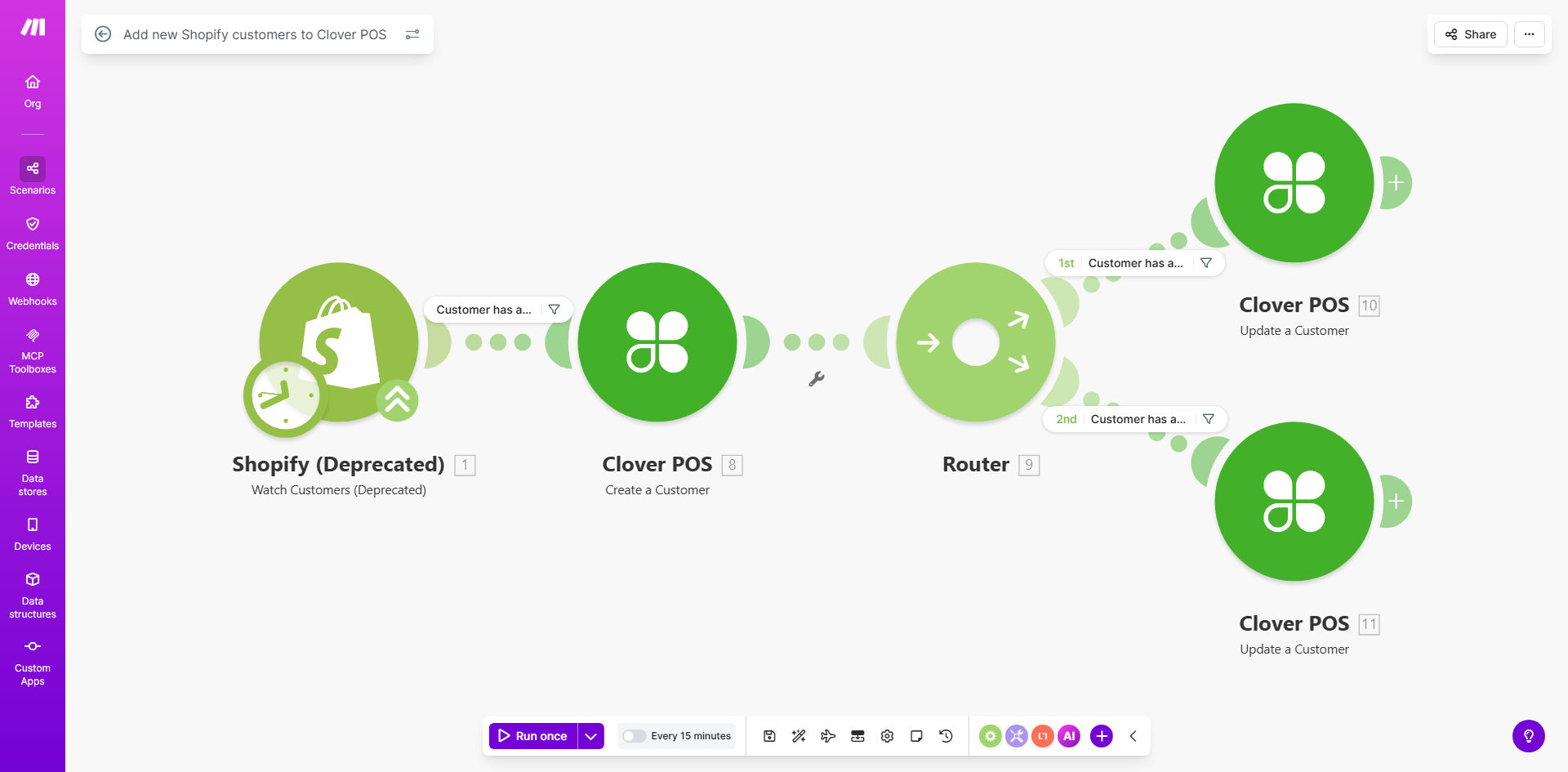
Shopify to Clover POS customer sync workflow diagram

What This Workflow Does

This automation solves a critical challenge for omnichannel retailers: maintaining a single customer database across online (Shopify) and in-store (Clover POS) sales channels. Without integration, staff must manually re-enter customer details from online orders into your POS system - a time-consuming process prone to errors that creates fragmented customer profiles.

The workflow automatically detects new Shopify customers at configured intervals (typically hourly or daily), then creates corresponding customer records in Clover POS with all relevant details: contact information, order history, shipping addresses, and any custom fields you specify. This gives your team complete visibility into customer purchasing behavior across all channels.

How It Works

1. Shopify Customer Monitoring

The workflow regularly polls your Shopify store's API for new customer registrations since the last check. It captures the complete customer profile including name, email, phone, addresses, and order details.

2. Data Transformation

Customer data is reformatted to match Clover POS's expected structure. The system can handle field mapping differences between platforms (e.g., Shopify's "first_name/last_name" vs. Clover's "full_name" field).

3. Duplicate Checking

Before creating a new Clover customer, the workflow checks for existing records with matching email addresses to prevent duplicates. You can configure whether to skip duplicates or update existing profiles.

4. Clover POS Integration

The system authenticates with your Clover POS via OAuth 2.0 and creates the new customer record with all mapped fields. Success/failure notifications can be sent to your team.

Pro tip: Add custom field mapping for loyalty program status to ensure online and in-store purchases earn/redeem points consistently.

Who This Is For

This automation delivers the most value for:

  • Retailers using Shopify for ecommerce alongside Clover POS for physical stores
  • Businesses transitioning from pure ecommerce to omnichannel retail
  • Merchants running loyalty programs across online and offline channels
  • Retailers with staff who manually re-enter customer data from online orders
  • Businesses aiming to personalize marketing based on complete purchase history

What You'll Need

  1. A Shopify store with admin API access
  2. A Clover POS account with developer permissions
  3. A Make.com account (free tier supports this workflow)
  4. Field mapping plan between Shopify and Clover customer fields
  5. Sync frequency preference (hourly/daily/weekly)

Quick Setup Guide

  1. Clone the template from Make.com
  2. Connect your Shopify store via OAuth in the first module
  3. Authenticate with your Clover POS in the final module
  4. Map Shopify customer fields to corresponding Clover POS fields
  5. Set your preferred sync frequency in the scheduler
  6. Test with a new Shopify customer account
  7. Deploy the live workflow

Key Benefits

Eliminate 5-10 minutes of manual data entry per customer - Staff no longer need to re-enter online customer details into your POS system.

Reduce customer service errors by 60-80% - Accurate, automatically synced data prevents mistakes from manual entry.

Enable true omnichannel customer profiles - See complete purchase history whether customers buy online or in-store.

Improve marketing personalization - Target customers based on combined online and offline behavior.

Scale seamlessly as you grow - The automation handles 10 or 10,000 new customers with equal reliability.

Frequently Asked Questions

Common questions about Shopify-Clover POS integration

Syncing customers between Shopify and Clover POS creates a unified customer database for both online and in-store purchases. This gives your staff complete purchase history visibility, enables personalized marketing across channels, and eliminates duplicate data entry that often leads to errors.

For example, when a customer who normally shops online visits your store, your staff can instantly see their preferences and past purchases. Conversely, email campaigns can reference in-store purchases to increase relevance.

The workflow checks for new Shopify customers at regular intervals you configure (typically hourly or daily). Each new customer is immediately pushed to Clover POS with their full contact details, order history, and any custom fields you specify.

For high-volume stores, we recommend hourly syncs during business hours. Lower-volume retailers can often use daily updates. The system processes only new customers since the last sync, minimizing API calls.

By default, the workflow transfers name, email, phone, address, and order history. You can customize which Shopify customer fields map to specific Clover POS fields, including loyalty program status, purchase preferences, and custom notes.

The transfer includes all shipping addresses (important for stores offering local pickup) and can optionally include customer tags from Shopify that might indicate VIP status, product preferences, or other segmentation.

Yes, the automation can connect to multiple Shopify stores and consolidate all customers into a single Clover POS database. This is ideal for retailers with separate online stores for different product lines or regions.

Each Shopify store connects as a separate data source in the workflow. You can configure whether to merge customers from all stores or keep them segmented in Clover POS using custom fields to indicate their original store.

The workflow includes duplicate detection logic. It checks for matching email addresses before creating new records. You can configure it to either skip duplicates or update existing customer profiles with new information from Shopify.

For most retailers, we recommend updating existing profiles to capture online purchase history. The system can append new addresses and order details without overwriting valuable in-store notes your staff may have added.

Make.com uses bank-grade encryption for all data transfers between Shopify and Clover POS. The connection uses OAuth 2.0 authentication, and customer data is never stored permanently on Make's servers after processing.

The workflow only requests the minimum API permissions needed from both platforms. You maintain full control and can revoke access at any time through your Shopify or Clover developer settings.

Absolutely! GrowwStacks specializes in custom ecommerce-POS integrations. We can build workflows that sync inventory, process returns across channels, apply loyalty rewards consistently, and create advanced customer segmentation based on combined online/in-store behavior.

Our retail automation experts will analyze your specific workflows and design a system that:

  • Matches your unique field structures
  • Handles edge cases like guest checkouts
  • Integrates with your other tools
  • Provides detailed activity logs

Need a Custom Shopify-Clover POS Automation?

This free template is a starting point. Our team builds fully tailored automation systems for your specific business needs.