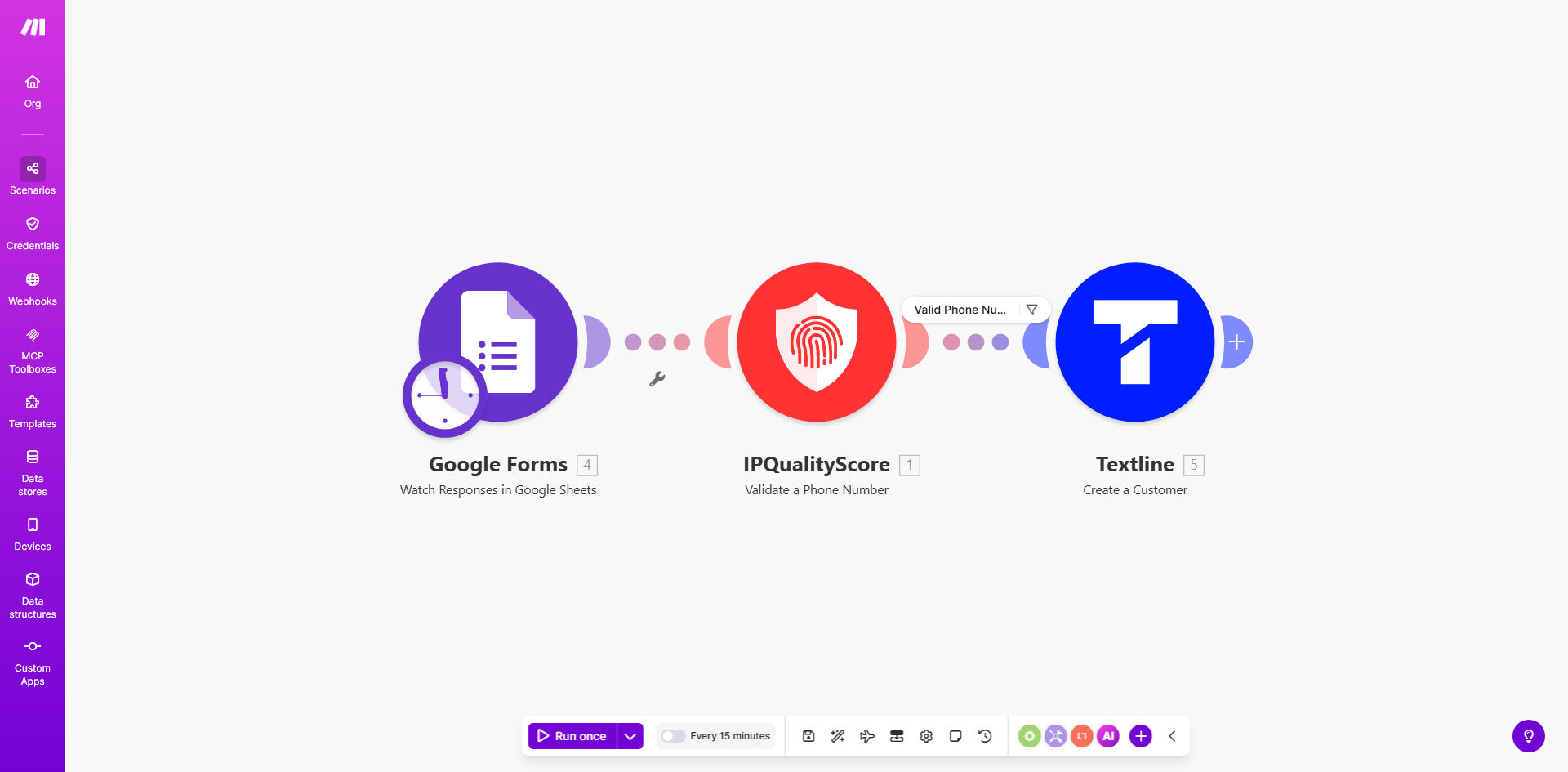
What This Workflow Does
This automation solves the critical business problem of invalid or fraudulent phone numbers entering your customer database. When prospects submit information through Google Forms, their phone numbers are automatically validated using IPQualityScore's advanced fraud detection before being created as customers in Textline.
The workflow filters out disposable numbers, VOIP services, and known scam patterns that basic validation misses. This ensures your sales and support teams only contact legitimate customers, improving communication success rates while reducing wasted effort on invalid contacts.
How It Works
1. Form Submission Trigger
The workflow activates when a new submission is received in your Google Form. It extracts the submitted phone number along with other customer information for processing.
2. IPQualityScore Validation
The phone number is sent to IPQualityScore's API for comprehensive validation. This checks number validity, carrier information, risk score, and over 20 fraud indicators.
3. Validation Decision
The workflow evaluates IPQualityScore's response to determine if the number meets your validation criteria. You can customize thresholds for acceptable risk levels.
4. Customer Creation in Textline
For valid numbers, the workflow automatically creates a new customer record in Textline with all submitted information. Invalid submissions are logged separately without creating contacts.
Who This Is For
This automation delivers the most value for businesses that:
- Collect customer phone numbers through online forms
- Experience high rates of invalid or fraudulent submissions
- Use Textline for customer communication
- Need to improve SMS deliverability and response rates
- Want to reduce wasted sales effort on fake leads
What You'll Need
- A Make.com account (free plan sufficient)
- Google Forms with phone number collection
- IPQualityScore API key (free trial available)
- Textline account with API access
Quick Setup Guide
- Copy the template to your Make.com account
- Connect your Google Forms, IPQualityScore, and Textline accounts
- Map the form fields to the workflow variables
- Set your validation thresholds in the IPQualityScore module
- Test with sample valid and invalid numbers
- Activate the workflow for live form submissions
Pro tip: Start with stricter validation rules and gradually relax them if you get too many false positives. Monitor your rejection rate and adjust thresholds accordingly.
Key Benefits
Reduce fake leads by 60-80%: IPQualityScore's advanced detection filters out disposable numbers and known fraud patterns that basic validation misses.
Improve SMS deliverability by 40%: Clean customer data means fewer bounced messages and better inbox placement for legitimate communications.
Save 5+ hours/week on manual validation: Automating the screening process eliminates time wasted verifying numbers or chasing invalid contacts.
Enhance customer experience: Valid numbers ensure timely delivery of order confirmations, appointment reminders, and support responses.
Reduce compliance risks: Proper validation helps maintain TCPA compliance by ensuring you only message valid, consenting numbers.