Make.com Signi Dropbox Document Automation Contract Management

Save Contracts from Signi to New Dropbox Folder

Automatically archive signed documents into organized, dated folders. Eliminate manual filing and ensure a secure, searchable contract repository.

Get This Workflow → Make.com · Signi & Dropbox · Free Template
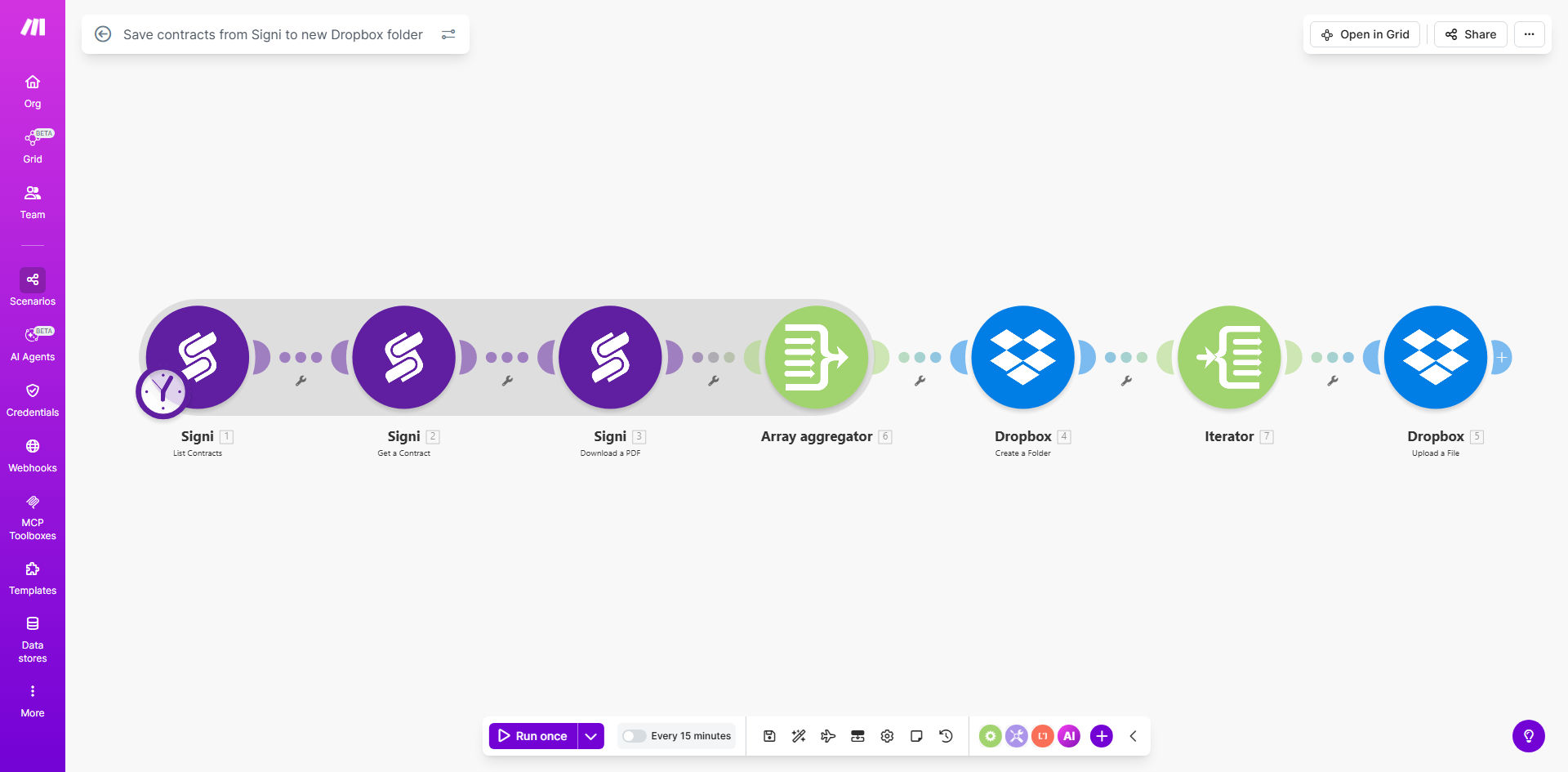
Diagram showing automation flow from Signi to Dropbox for contract storage

What This Workflow Does

For businesses that rely on contracts, the process after signing is often chaotic. Executed documents get emailed, downloaded to random folders, or worse—lost in inboxes. This creates compliance risks, slows down operations, and wastes time searching for the final version.

This automation solves that by creating a seamless bridge between your e-signature platform, Signi, and your cloud storage, Dropbox. Every time a document is signed and meets your defined criteria, the workflow instantly triggers. It captures the final, executed contract and saves it to a new, neatly labeled Dropbox folder—often using the current date for perfect chronological organization. This turns a manual, error-prone task into a zero-touch, reliable process.

The result is a single source of truth for all signed agreements. Your team gains immediate access to any contract, auditors can easily trace documents, and you eliminate the risk of misplacing critical legal paperwork. The automation works silently in the background, ensuring your document management is as professional and efficient as the rest of your business.

How It Works

The workflow is a straightforward, three-step process built on Make.com's visual automation platform.

Step 1: Monitor for Signed Documents in Signi

The scenario starts by watching your Signi account for specific events. You can configure it to trigger when a document's status changes to "signed," "completed," or when it meets other custom conditions you set, like a specific tag or template name.

Step 2: Retrieve the Final Contract File

Once the trigger fires, Make.com communicates with Signi's API to fetch the final, signed PDF of the document. It securely pulls all relevant data, including the document name, signing parties, and the date of completion.

Pro tip: Use Signi's custom fields or tags to add metadata (like Client ID or Project Code) to your documents. The automation can read this data and use it to create even smarter folder names and file organization in Dropbox.

Step 3: Create Folder and Save to Dropbox

This is where the magic of organization happens. The workflow uses the date the scenario runs (or the signing date) to create a new folder in your designated Dropbox directory—for example, "Signed Contracts/2024-11-26". It then uploads the PDF into that new folder. This creates a clean, date-based archive automatically.

Who This Is For

This template is ideal for any professional or team that manages a steady stream of signed agreements. This includes small business owners handling client contracts, sales teams finalizing deals, HR departments onboarding new employees, and legal or freelance professionals managing client paperwork. If you find yourself repeatedly downloading and manually filing PDFs from your e-signature tool, this automation is for you.

What You'll Need

  1. A Make.com account (free tier available).
  2. A Signi account with admin or API access to generate connection credentials.
  3. A Dropbox account (Business or Personal) where you want to store the contracts.
  4. Basic understanding of the folder structure you want to create in Dropbox (e.g., a main "Signed Contracts" folder).

Quick Setup Guide

You can have this automation running in under 15 minutes.

  1. Clone the Template: Click the "Get This Workflow" button to open the template in your Make.com account and create a copy.
  2. Connect Your Apps: In the Make.com scenario editor, click on the Signi module and authenticate your account. Repeat the process for the Dropbox module.
  3. Configure the Trigger: Set the Signi module to watch for the specific document status that indicates a completed signing (e.g., "completed").
  4. Set the Dropbox Path: In the Dropbox module, specify the main parent folder (e.g., "/Company/Signed Contracts/") and confirm the folder naming convention (using the date is default).
  5. Activate & Test: Turn the scenario on and sign a test document in Signi. Check your Dropbox in a minute to see the new dated folder and your contract safely inside.

Key Benefits

Eliminate Manual Filing Forever: Save 2-3 hours per week per team member previously spent downloading, renaming, and moving contract files. This time is now reclaimed for revenue-generating work.

100% Contract Capture Rate: Never lose a signed document again. The automated system guarantees every executed agreement is captured and stored the moment it's finalized, removing human error from the equation.

Instant Audit Trail: Create a perfect, chronological record of all signed documents organized by date. This simplifies compliance reviews, internal audits, and finding specific contracts from any point in time.

Enhanced Security & Control: Contracts are immediately moved from the e-signature platform to your secured, company-controlled Dropbox. You manage access permissions and backup policies, reducing data sprawl and risk.

Scalable Foundation: This workflow is a starting point. Once contracts are auto-filed, you can easily extend the automation to notify teams in Slack, update CRM records, or trigger invoice creation—building a powerful, end-to-end contract lifecycle system.

Frequently Asked Questions

Common questions about contract storage automation and integration

Automating contract storage ensures no signed document is ever misplaced or forgotten. It creates an instant, organized digital paper trail that is critical for compliance, audits, and resolving potential disputes. Manual filing is error-prone and wastes valuable administrative time that could be spent on higher-value tasks.

For example, a sales team closing ten deals a week might spend collective hours just managing PDFs. Automation eliminates this chore completely, allowing them to focus on selling and customer success instead of document admin.

Dropbox provides secure, cloud-based storage with robust access controls, version history, and easy sharing capabilities. Storing contracts there centralizes your documents, making them accessible from anywhere while maintaining strong security. It integrates seamlessly with many other business tools, creating a reliable hub for your critical files.

Unlike local drives or scattered email attachments, Dropbox offers features like link expiration and viewer history, which are essential for controlling sensitive contract access. Its widespread adoption also means most teams already know how to use it, minimizing training needs.

Signi integration triggers actions the moment a document is signed, turning a signature from an endpoint into a starting point for automation. This eliminates the lag between signing and filing, ensuring the final executed contract is immediately captured and processed without any human intervention, speeding up entire business cycles.

This real-time trigger is more reliable than email notifications or manual checks. It means the contract is archived before anyone even thinks to look for it, creating a truly hands-off process that enhances both speed and reliability.

Yes, automation tools like Make.com can create dynamic folder structures based on data from the signed document. You can automatically generate folders named by client name, project, signing date, or contract type. This transforms a chaotic download folder into a logically organized filing system without manual sorting.

For instance, you could set up a structure like Dropbox/Contracts/[Client Name]/[Year-Month]/. The automation reads the client name from the Signi document and places the PDF in the correct path, making retrieval instantaneous.

  • Use data points like custom fields for smart sorting.
  • Combine date and client for optimal organization.
  • Avoid special characters in automated folder names.

When set up correctly, automated storage can enhance security and compliance. It reduces human error—like saving to the wrong location—and creates consistent audit trails. Using platforms like Dropbox with encryption and access logs, combined with the immutable trigger from Signi, often provides better compliance than manual, inconsistent processes.

The key is to ensure your automation uses secure, token-based connections (OAuth) and that your Dropbox folder has appropriate permission settings. This controlled, automated flow is generally more secure than relying on individuals to correctly handle sensitive documents.

A contract signature can trigger a wide range of follow-up actions. Common automations include notifying the account manager, updating CRM deal status, creating invoices in your accounting software, scheduling onboarding calls, and adding key dates to a shared team calendar. This turns a signature into a powerful business process catalyst.

Imagine a new client agreement that, once signed, automatically creates a project in Asana, alerts the delivery team via Slack, and sends a welcome email. This level of integration eliminates onboarding delays and ensures a stellar client experience from minute one.

Yes, GrowwStacks specializes in building tailored contract management automations. We can design a system that fits your specific signing platform, storage preferences, and internal workflows, connecting to your CRM, project tools, and compliance software. Our experts handle the technical setup so you get a seamless, secure process that saves your team hours each week.

We start by understanding your current contract lifecycle, identify the biggest pain points, and build a solution that not only files documents but also triggers the right internal actions. The result is a custom automation that feels like a natural extension of your business operations.

  • Integration with your existing tech stack (CRM, ERP, etc.).
  • Custom logic for document routing and approvals.
  • Ongoing support and optimization as your needs change.

Need a Custom Contract Management Automation?

This free template is a starting point. Our team builds fully tailored automation systems for your specific business needs.