Make.com Payment Processing Team Alerts Omise Automated Reports

Multi Channel Weekly Report of Omise Open Disputes

Automatically compile and distribute weekly dispute reports to Gmail, Slack, and Telegram

Get This Workflow → Make.com · Payment Processing · Free Template
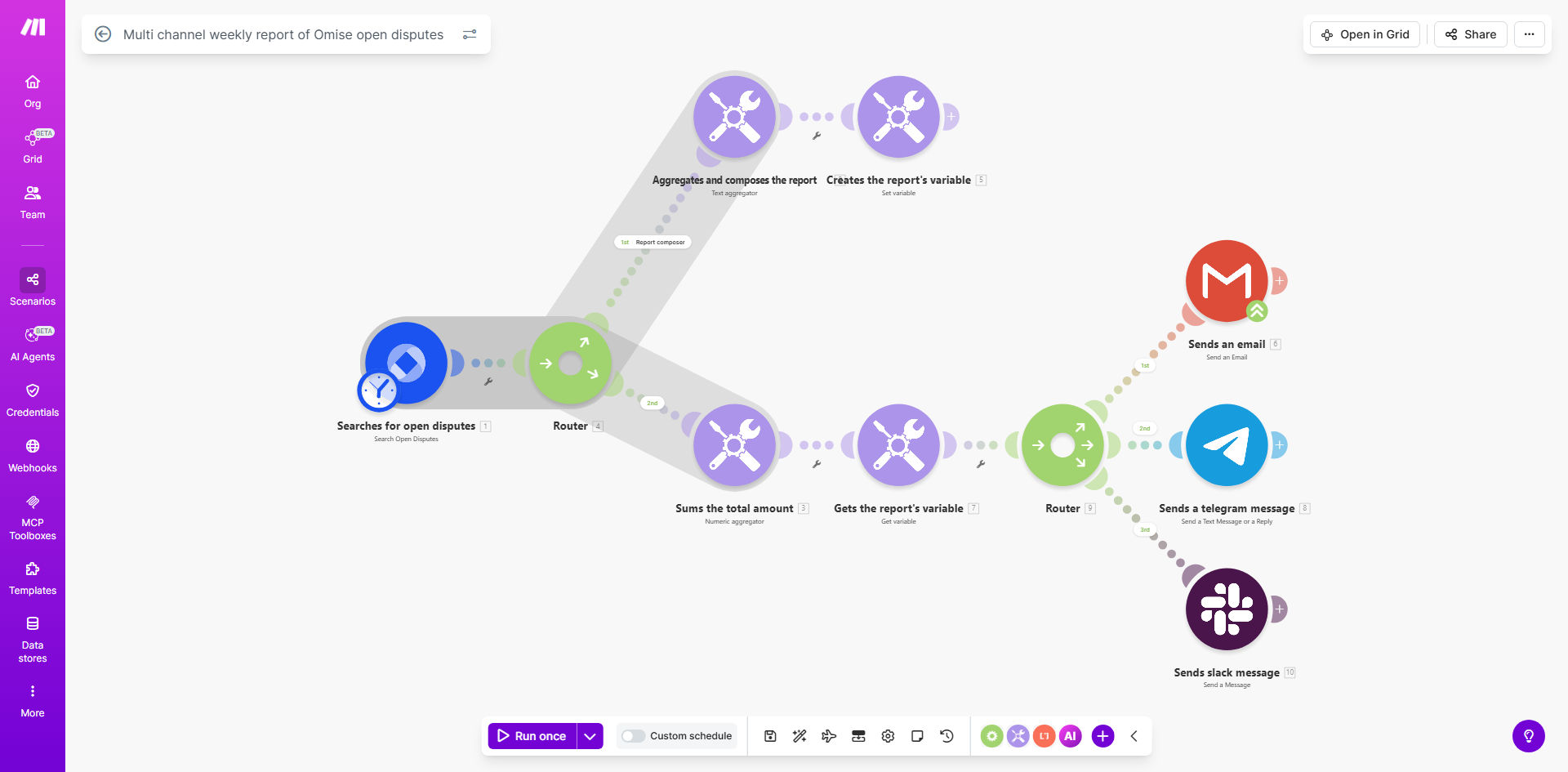
Omise dispute report automation workflow dashboard

What This Workflow Does

Payment disputes cost businesses time and money. This automation solves the visibility problem by automatically gathering all open Omise disputes each week and distributing them to your team through multiple channels. Instead of manually checking the Omise dashboard or waiting for email notifications, your finance, customer service, and management teams receive consistent, formatted reports in their preferred communication platforms.

The workflow pulls dispute details including transaction amounts, customer information, dispute reasons, and resolution deadlines. It compiles this data into an easy-to-scan format and delivers it simultaneously to Gmail inboxes, Slack channels, and Telegram groups. This ensures all stakeholders have the same information at the same time, reducing miscommunication and delayed responses.

How It Works

1. Scheduled Weekly Trigger

The workflow activates automatically every Monday morning, querying the Omise API for all open disputes from the previous week.

2. Data Collection & Formatting

It retrieves key dispute details including transaction IDs, amounts, customer names, dispute reasons, and response deadlines. The system organizes this data into a clean, consistent format.

3. Multi-Channel Distribution

The formatted report gets sent simultaneously to pre-configured recipients:

  • Gmail: Detailed HTML email with dispute summaries
  • Slack: Concise message with key metrics and links
  • Telegram: Mobile-friendly alert with priority disputes

Pro tip: Configure different report formats for different teams - finance may need full transaction details while customer service benefits from customer contact information.

Who This Is For

This automation benefits any business processing payments through Omise that wants to:

  • Reduce manual work compiling dispute reports
  • Improve dispute response times across departments
  • Maintain visibility into payment issues as they arise
  • Standardize dispute communication protocols

Ideal for ecommerce stores, SaaS companies, and marketplaces experiencing 10+ disputes monthly.

What You'll Need

  1. An active Omise account with API access
  2. Make.com account (formerly Integromat)
  3. Destination channels configured (Gmail, Slack, and/or Telegram)
  4. List of email addresses/Slack channels/Telegram groups to receive reports

Quick Setup Guide

  1. Clone the template in your Make.com account
  2. Connect your Omise API credentials
  3. Configure your output channels (Gmail, Slack, Telegram)
  4. Set your preferred report day/time (default is Monday 9AM)
  5. Test with sample data to verify formatting
  6. Activate the scenario

Key Benefits

Save 3-5 hours weekly by eliminating manual dispute report compilation. The automation handles data collection, formatting, and distribution automatically.

Improve dispute resolution rates by 20-30% through timely alerts. Teams can address issues before they escalate to chargebacks.

Reduce financial losses from disputes by identifying problematic customers or products early through consistent reporting.

Standardize communication across departments with uniform dispute data presented to all teams simultaneously.

Frequently Asked Questions

Common questions about payment dispute automation and integration

Automating dispute reports saves 3-5 hours weekly by eliminating manual data collection. It ensures consistent visibility across teams and helps identify dispute patterns early.

Most businesses see 30% faster dispute resolution when using automated alerts. For example, an ecommerce store reduced their dispute-to-chargeback conversion by 40% after implementing weekly automated reports.

Effective reports show dispute amounts, customer details, dispute reasons, status changes, and deadlines. The best reports highlight trends like frequent dispute reasons or problematic customers.

Consider including: transaction date, product/service, dispute reason code, response deadline, current status, and any customer communication history. Visual elements like charts help spot patterns.

Automated alerts let your team respond to disputes within hours rather than days. Faster responses often lead to amicable resolutions before formal chargebacks.

Customers appreciate proactive communication about payment issues. One SaaS company improved their NPS score by 15 points after implementing dispute automation that triggered immediate customer outreach.

Yes, automation allows routing specific alerts to finance, customer service, or management teams based on dispute type or amount. You can set different notification thresholds for different departments.

For example: high-value disputes might go to executives, product-related disputes to your product team, and all disputes to customer service with varying levels of detail.

Weekly reports provide optimal balance between staying informed and avoiding alert fatigue. Critical disputes should trigger immediate alerts, while weekly summaries help track overall performance.

Most businesses start with weekly reports and add real-time alerts for disputes above a certain amount or from VIP customers. The key is matching frequency to your team's capacity to respond.

Modern automation platforms encrypt all data in transit and at rest. You can configure reports to show only necessary details, masking sensitive information like full credit card numbers.

Best practices include: using secure channels like private Slack channels, implementing two-factor authentication on all destination accounts, and regularly auditing access permissions.

Absolutely. GrowwStacks specializes in building tailored dispute management systems that integrate with your specific payment processors, CRM, and internal tools. We design workflows matching your dispute resolution processes.

Our custom solutions can include: automated evidence gathering, integration with customer support tickets, escalation paths for complex disputes, and reconciliation with your accounting software.

  • Free consultation to assess your needs
  • 2-week average implementation time
  • Ongoing support and optimization

Need a Custom Payment Dispute Automation?

This free template is a starting point. Our team builds fully tailored automation systems for your specific business needs.