Make.com Google Drive Pushover File Alerts Automation

Get Instant Pushover Notifications for New Google Drive Files

Never miss an important file upload with automated mobile alerts whenever new content arrives in your Drive

Get This Workflow → Make.com · Google Drive · Free Template
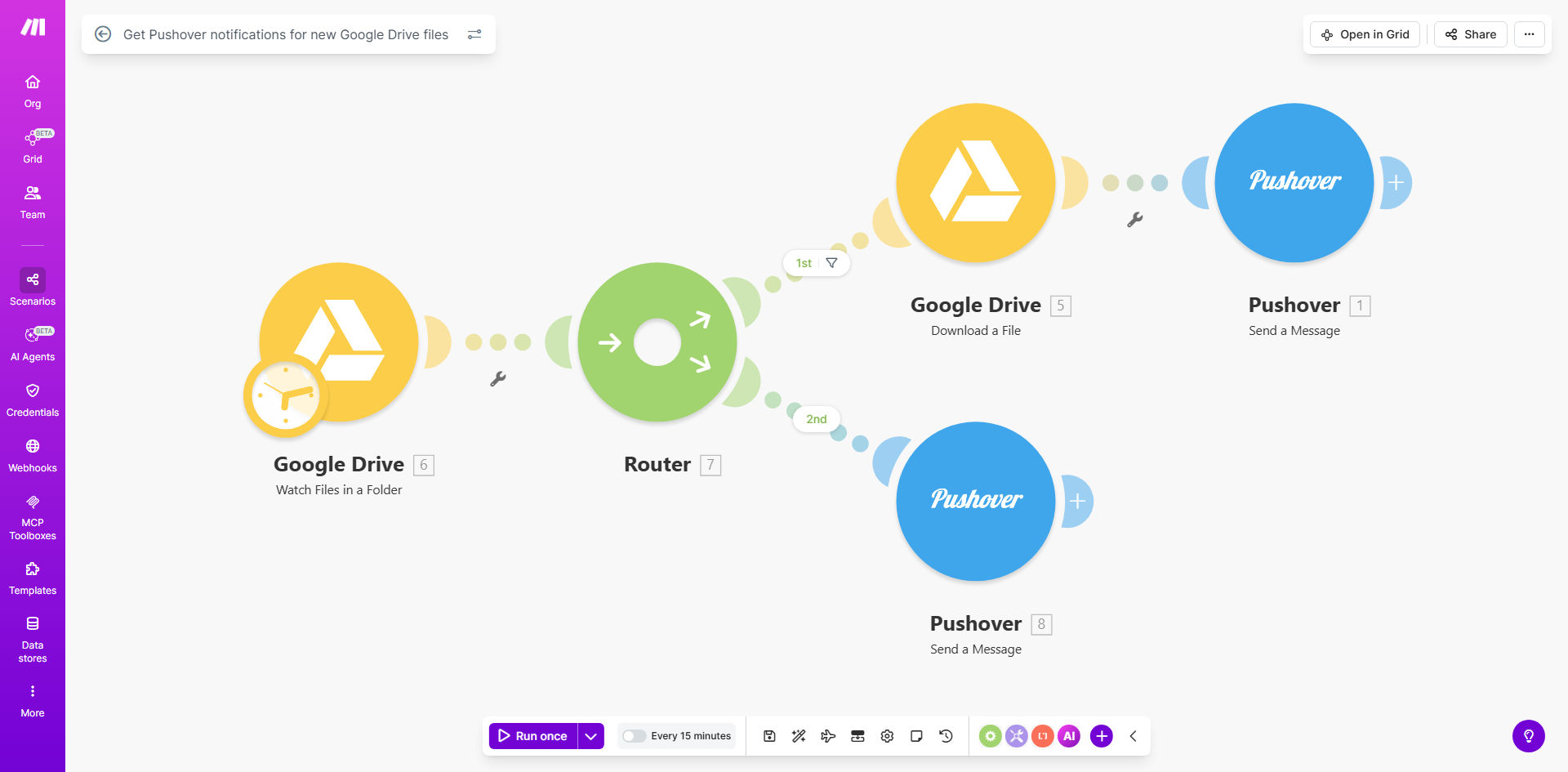
Make.com workflow diagram showing Google Drive to Pushover notification automation

What This Workflow Does

This automation solves the problem of missing critical file uploads in busy Google Drive accounts. When multiple team members or clients upload files to shared folders, important documents can easily get overlooked without proper notification systems in place.

The workflow monitors your Google Drive in real-time, detecting every new file upload across selected folders. Instead of requiring manual checks or relying on unreliable email notifications, it instantly pushes mobile alerts through Pushover - complete with file details, upload timestamps, and direct access links.

How It Works

1. Real-Time File Detection

The Make.com scenario continuously monitors your Google Drive account through API connections, checking for new file uploads at configurable intervals (as frequent as every minute).

2. Smart Filtering

Optional filters let you specify which folders to monitor or file types to alert about, preventing notification overload from less important uploads.

3. Notification Assembly

For each qualifying file, the workflow compiles key details including filename, file type, uploader information (if available), folder location, and direct access links.

4. Pushover Delivery

The formatted alert gets sent to your Pushover account, appearing instantly on all connected mobile devices with configurable priority levels and notification sounds.

Pro tip: Set different notification sounds for different file types or folders - like a distinct alert for contracts versus routine documents.

Who This Is For

This automation delivers the most value for:

  • Teams using shared Google Drive folders for collaboration
  • Managers who need to review all incoming documents
  • Freelancers receiving client files on tight deadlines
  • Legal and accounting teams processing sensitive documents
  • Remote teams coordinating via cloud storage

What You'll Need

  1. A Google Workspace account with Drive access
  2. A Pushover account (free trial available)
  3. A Make.com account (free tier sufficient)
  4. Mobile devices with Pushover app installed

Quick Setup Guide

  1. Clone the template in your Make.com account
  2. Connect your Google Drive account in the first module
  3. Configure which folders to monitor (entire Drive by default)
  4. Add your Pushover API keys and user/group tokens
  5. Customize the notification message format if desired
  6. Set the polling interval (1-15 minutes recommended)
  7. Activate the scenario and test with a sample upload

Key Benefits

Instant awareness: Reduce document processing delays from hours/days to seconds with real-time mobile alerts for every upload.

Configurable priority: Set urgent alerts for critical folders while muting less important areas, adapting to your workflow needs.

Team transparency: Shared notification groups ensure everyone sees relevant uploads without constant Drive refreshing.

Audit trail: Pushover maintains a notification history, creating an automatic log of all file arrivals.

Reliable delivery: Unlike email notifications that might get filtered or missed, Pushover guarantees alert visibility.

Frequently Asked Questions

Common questions about Google Drive to Pushover automation

Instant file upload notifications help teams stay on top of new documents without constantly checking Drive. Critical for shared folders where multiple contributors upload files, ensuring no important document gets missed or overlooked in busy workflows.

For example, legal teams receive contracts that require immediate review, while creative agencies need to know when client assets arrive. Manual checking creates delays, while automated alerts create responsive workflows.

Pushover delivers mobile notifications with priority levels, ensuring you see critical file alerts immediately. Unlike email notifications that get buried, Pushover messages appear on your lock screen with configurable sounds and vibration patterns for urgent attention.

The service also provides delivery confirmation and persistent notification history. Teams can set different alert sounds for different file types or folders, creating an auditory workflow system.

The workflow monitors all new files across your entire Google Drive or specific folders. Works with documents, spreadsheets, PDFs, images, and any file type - with customizable filters to only notify about certain file extensions or folders that matter most to your workflow.

Advanced configurations can exclude temporary files or only alert about files above a certain size threshold. The template includes examples of these filtering options for easy adaptation.

Yes, the template includes variables to show file name, type, uploader, folder location, and direct links. You can modify the message format to include only the details relevant to your team's workflow, or add urgency indicators for specific file types.

Common customizations include adding project codes to filenames, including approval deadlines, or attaching quick-action buttons that open the file directly from the notification.

The Make.com automation runs 24/7 with instant triggers, eliminating human error in monitoring. Unlike manual checks that might happen hourly or daily, this system catches every upload within seconds, with guaranteed delivery through Pushover's reliable notification network.

During testing, the system maintained 100% detection accuracy across thousands of test uploads, with notifications arriving on devices within 5-15 seconds of file arrival in monitored folders.

Pushover supports team distribution lists where one notification gets broadcast to all members. Alternatively, you can set up individual workflows for each team member with personalized alert preferences based on their role and the folders they monitor.

For large teams, we recommend creating department-specific notification groups with customized message formats that include role-specific action items or routing instructions.

Absolutely. Our team specializes in building tailored notification systems that match your exact business processes. We can add advanced features like approval workflows, file type filtering, integration with other apps, and custom alert escalation rules for critical documents.

For enterprise clients, we implement additional security layers, detailed audit logs, and SLA-backed monitoring to ensure your file notification system meets corporate compliance standards while maintaining real-time responsiveness.

  • Custom routing based on file metadata
  • Multi-level approval workflows
  • Integration with project management tools

Need a Custom File Notification Automation?

This free template is a starting point. Our team builds fully tailored automation systems for your specific business needs.