Make.com Google Forms Pushover Notifications Automation

Get Pushover Notifications for New Google Forms Responses

Instant alerts whenever someone submits your form - never miss an important response again

Get This Workflow → Make.com · Google Forms · Free Template
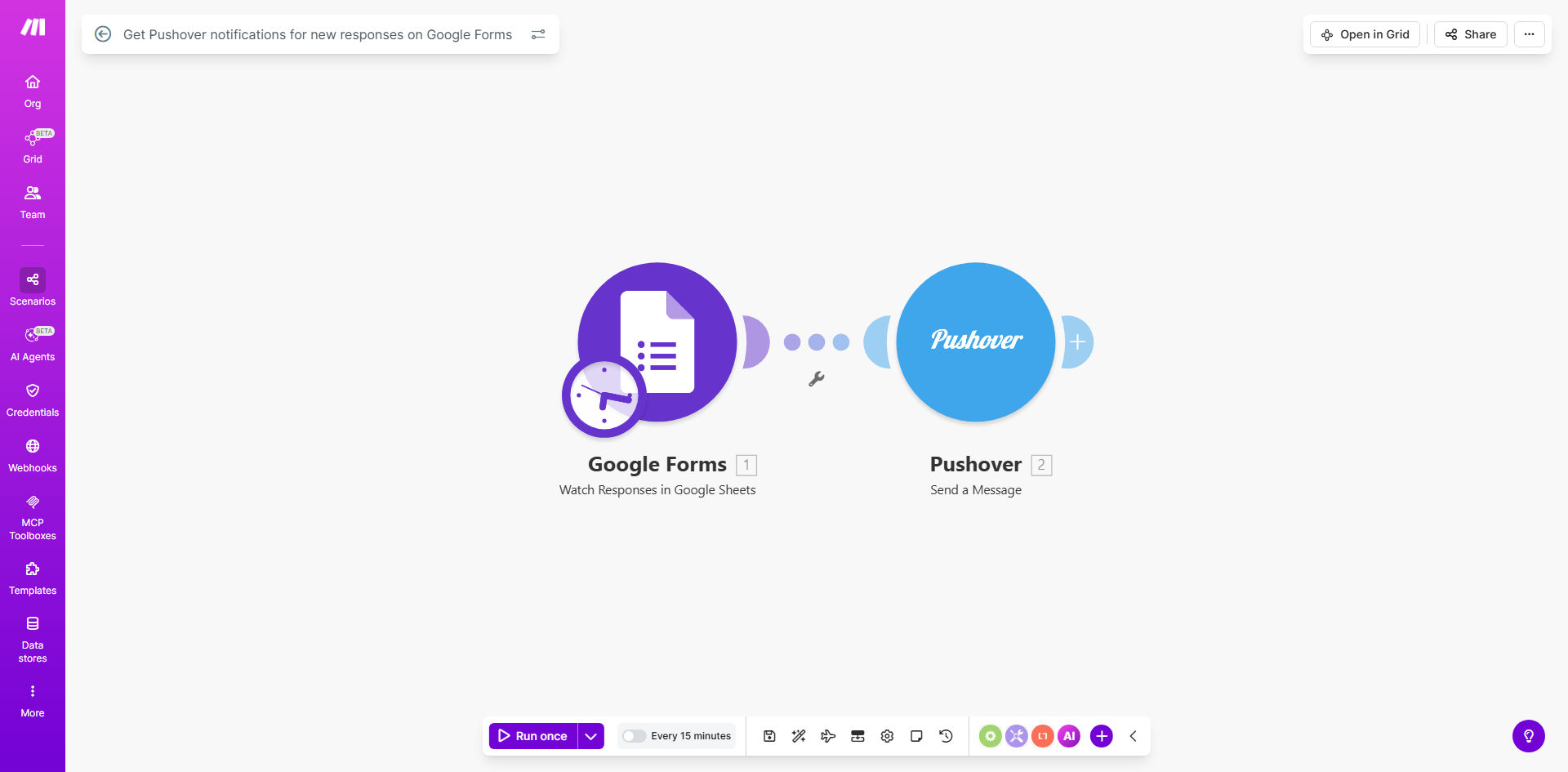
Google Forms to Pushover notification workflow diagram

What This Workflow Does

This automation solves the problem of delayed response to form submissions. Many businesses rely on Google Forms for customer feedback, applications, or surveys, but checking for new responses manually wastes time and risks missing time-sensitive submissions.

The workflow automatically detects new Google Forms responses and sends them as priority notifications through Pushover. Unlike email alerts that might get buried in your inbox, Pushover delivers instant mobile and desktop notifications you can't ignore.

How It Works

1. New response detection

The Make.com scenario continuously monitors your Google Form for new submissions. It checks at intervals you configure (from every minute to hourly).

2. Data processing

When a new response arrives, the workflow extracts key information like submission time, respondent details, and form answers. You can customize which fields to include in notifications.

3. Notification delivery

The system formats the response data into a clear Pushover message and sends it to your specified devices. Notifications include a direct link back to the form response for quick action.

Pro tip: Configure different notification sounds for different form types to instantly recognize priority submissions.

Who This Is For

This automation benefits anyone collecting time-sensitive information through Google Forms:

  • Customer support teams needing immediate notification of support requests
  • Event organizers tracking registrations in real-time
  • HR departments receiving job applications
  • Teachers collecting student assignments or feedback
  • Business owners running surveys or lead capture forms

What You'll Need

  1. A Google Forms form you want to monitor
  2. A Pushover account (free trial available)
  3. A Make.com account (free tier available)
  4. 5 minutes to set up the workflow

Quick Setup Guide

  1. Click "Get This Workflow" to copy the template to your Make.com account
  2. Connect your Google Forms account in the Make.com scenario
  3. Enter your Pushover API token and user key
  4. Select which form fields to include in notifications
  5. Activate the scenario and test with a form submission

Key Benefits

Never miss important responses with instant notifications delivered directly to your phone, tablet, and computer. Pushover's priority system ensures you see alerts immediately.

Save 30+ minutes daily by eliminating manual form checking. The automation handles monitoring so you can focus on responding to submissions.

Improve response times by acting on submissions within minutes rather than hours or days. Customers receive faster replies, improving satisfaction.

Customizable alerts let you include only the most relevant form data in notifications. Highlight key information without overwhelming details.

Reliable delivery bypasses email spam filters and inbox overload. Pushover notifications appear prominently on all your devices.

Frequently Asked Questions

Common questions about Google Forms notification automation

Instant notifications help you respond quickly to form submissions, improving customer service and engagement. Without automation, you might miss time-sensitive responses or waste time manually checking forms.

For example, a support ticket submitted through a form might require immediate attention. Automated notifications ensure your team sees it right away rather than discovering it hours later during routine checks.

Customer support forms, event registrations, job applications, and time-sensitive surveys benefit most. Any form where immediate response improves outcomes should use notification automation.

High-volume forms also benefit because notifications help prioritize responses. You can configure different alert levels based on form type or specific answers (like "urgent" support tickets).

Yes, you can include specific form responses in notifications. The template lets you customize which fields appear in alerts, prioritizing key information.

For a job application form, you might include the applicant's name and position applied for. For customer feedback, you could highlight the satisfaction rating while omitting less urgent details.

Pushover notifications are more reliable than email with instant delivery and higher visibility. They bypass email spam filters and appear directly on your devices.

Pushover also provides delivery confirmation and supports emergency-priority alerts that repeat until acknowledged. Email alerts can easily get lost in crowded inboxes.

Pushover works on iOS, Android, and desktop computers. Notifications sync across all devices where you've installed the Pushover app.

This means you'll get alerts whether you're at your desk or on the go. The notifications persist until dismissed and include actionable buttons when supported by your device.

This solution provides more customizable alerts with better delivery reliability. Unlike Google's basic email alerts, Pushover gives priority notifications with custom content.

Google's native notifications only tell you a response arrived without showing any details. This automation lets you see key response data immediately and respond faster.

Yes, GrowwStacks specializes in building custom notification systems. We can create tailored workflows for your specific forms, response handling, and notification preferences.

Our automation experts will design a solution that matches your business processes perfectly. We handle everything from initial consultation to implementation and ongoing support.

  • Custom notification rules based on form responses
  • Integration with your existing tools
  • Priority support and maintenance

Need a Custom Form Notification Automation?

This free template is a starting point. Our team builds fully tailored automation systems for your specific business needs.