What This Workflow Does
For sales teams, a new lead in the CRM is just the beginning. The real work—the follow-up—often gets lost in the shuffle between meetings, emails, and other tasks. Manually copying contact details from NetHunt into your to-do list is a repetitive, error-prone time sink that costs you deals.
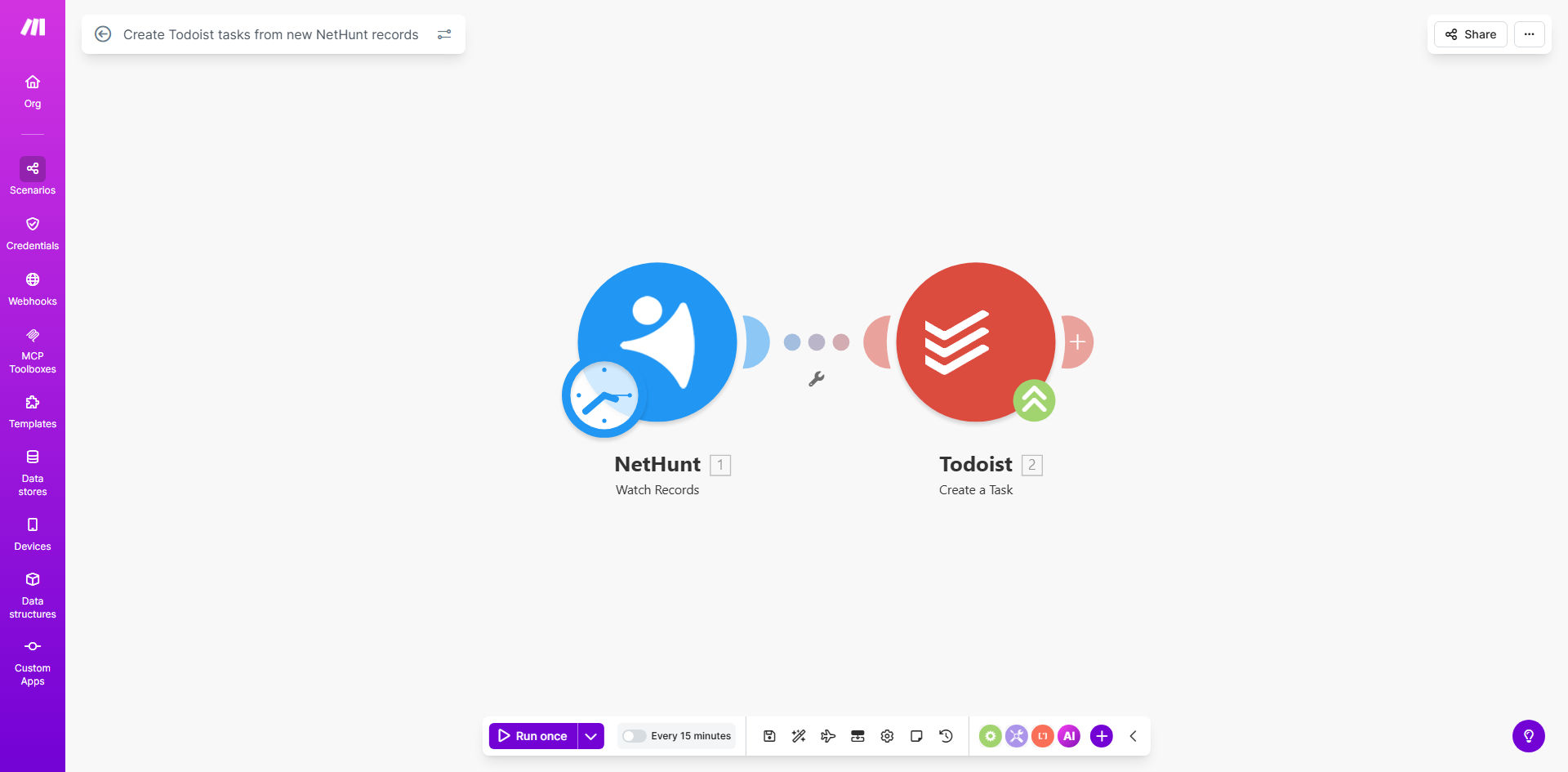
This automation solves that by creating a seamless bridge between your customer data and your action plan. Every time a new record is created in NetHunt CRM, this Make.com workflow instantly creates a corresponding, detailed task in Todoist. It transforms raw lead information into a clear, prioritized next step for your sales reps, ensuring every new opportunity is captured and acted upon immediately.
The business value is clear: reduced manual data entry, eliminated human forgetfulness, and accelerated sales cycles. By automating this critical handoff, you ensure your team spends time selling, not administrating.
How It Works
The workflow is a straightforward, trigger-action sequence that runs automatically in the background.
Step 1: A New Record Appears in NetHunt
The automation is triggered the moment a new contact, company, or deal is saved in your NetHunt CRM. This could be from a web form submission, an imported list, or manual entry by a team member. Make.com watches for this new record in real-time.
Step 2: Data is Extracted and Prepared
The workflow pulls key information from the NetHunt record. This typically includes the contact's name, email, company, deal stage, notes, and any custom fields you've defined (like "Budget" or "Next Contact Date"). This data is formatted and prepared for the next step.
Pro tip: Use NetHunt's custom fields to capture specific follow-up requirements (e.g., "Send proposal," "Call next Tuesday"). The automation can map these directly into the Todoist task description, creating hyper-contextual actions.
Step 3: A Task is Created in Todoist
Using the prepared data, the workflow creates a new task in your specified Todoist project. The task name can be dynamically generated, such as "Follow up with [Contact Name] at [Company]." The task description can contain all the relevant details from NetHunt, and you can even set a due date based on a "Next Action Date" field.
The entire process from lead creation to task assignment happens within seconds, far faster than any manual process could achieve.
Who This Is For
This automation is ideal for any business that relies on timely follow-ups to convert leads into customers.
Sales Teams & SMBs: Perfect for small to medium-sized sales teams using NetHunt as their CRM and Todoist for daily task management. It ensures every lead gets a timely touchpoint without requiring a manager to manually assign tasks.
Agencies & Freelancers: Client work often starts with a new inquiry. Automating the task creation from a new CRM entry ensures no potential client email goes unanswered and that proposal deadlines are never missed.
Real Estate Agents & Brokers: New property inquiries or buyer leads require immediate, organized follow-up. This workflow turns a lead into a scheduled call or property viewing task instantly, helping agents stay on top of a fast-paced market.
What You'll Need
- A Make.com Account: A free or paid Make.com account to host and run the automation scenario.
- NetHunt CRM Account: An active NetHunt workspace with API access enabled (typically available on paid plans).
- Todoist Account: A Todoist Premium or Business account to utilize the API for creating tasks (the API is not available on the free plan).
- Basic Field Mapping Plan: Decide which NetHunt fields (e.g., Contact Name, Email, Next Action) should populate which parts of the Todoist task (Title, Description, Due Date).
Quick Setup Guide
Getting started is a matter of connecting your accounts and mapping your data.
- Clone the Template: Click "Get This Workflow" to copy the template into your Make.com account.
- Connect NetHunt: In the Make.com scenario, authorize the NetHunt module by logging into your account. Select the specific NetHunt workspace you want to monitor.
- Connect Todoist: Similarly, authorize the Todoist module and select the project (e.g., "Sales Follow-ups") where new tasks should be created.
- Map Your Data: In the "Create a Task" module, map the fields. Drag the data from your NetHunt record (like `Contact Name`) into the Todoist task `Content` field. Set a due date if desired.
- Test & Activate: Turn on the scenario and create a test record in NetHunt. Within moments, check your specified Todoist project for the new, automatically generated task.
Key Benefits
Eliminate Manual Entry & Reduce Errors: Save 5-10 minutes per lead by removing the need to copy-paste information between apps. This also eliminates typos and missing details that can happen with manual data transfer.
Ensure Zero Lead Leakage: The most common sales pipeline leak is a lead that gets entered into the CRM but never receives a follow-up. This automation guarantees that every single new record triggers a visible, assigned task, making forgotten leads a thing of the past.
Accelerate Response Times: Speed wins deals. By creating a follow-up task instantly, you enable your team to contact hot leads within minutes of them expressing interest, significantly increasing your conversion chances compared to manual processes that can take hours or days.
Improve Team Accountability & Visibility: With tasks automatically created in a shared Todoist project, managers and team members have clear visibility into the pipeline and who is responsible for which follow-up, fostering better accountability and pipeline management.
Scale Your Process Without Adding Overhead: As your lead volume grows, your manual administrative burden does not. This automation handles the task creation work for 10 leads or 10,000 leads with the same reliability, allowing your team to scale efforts efficiently.