Make.com NetHunt CRM Slack Sales Automation Notifications

Get Slack Notifications for New Call Logs in NetHunt

Automatically alert your sales team in Slack every time a new call is logged in NetHunt CRM. Improve visibility, speed up follow-ups, and boost collaboration.

Get This Workflow → Make.com · NetHunt & Slack · Free Template
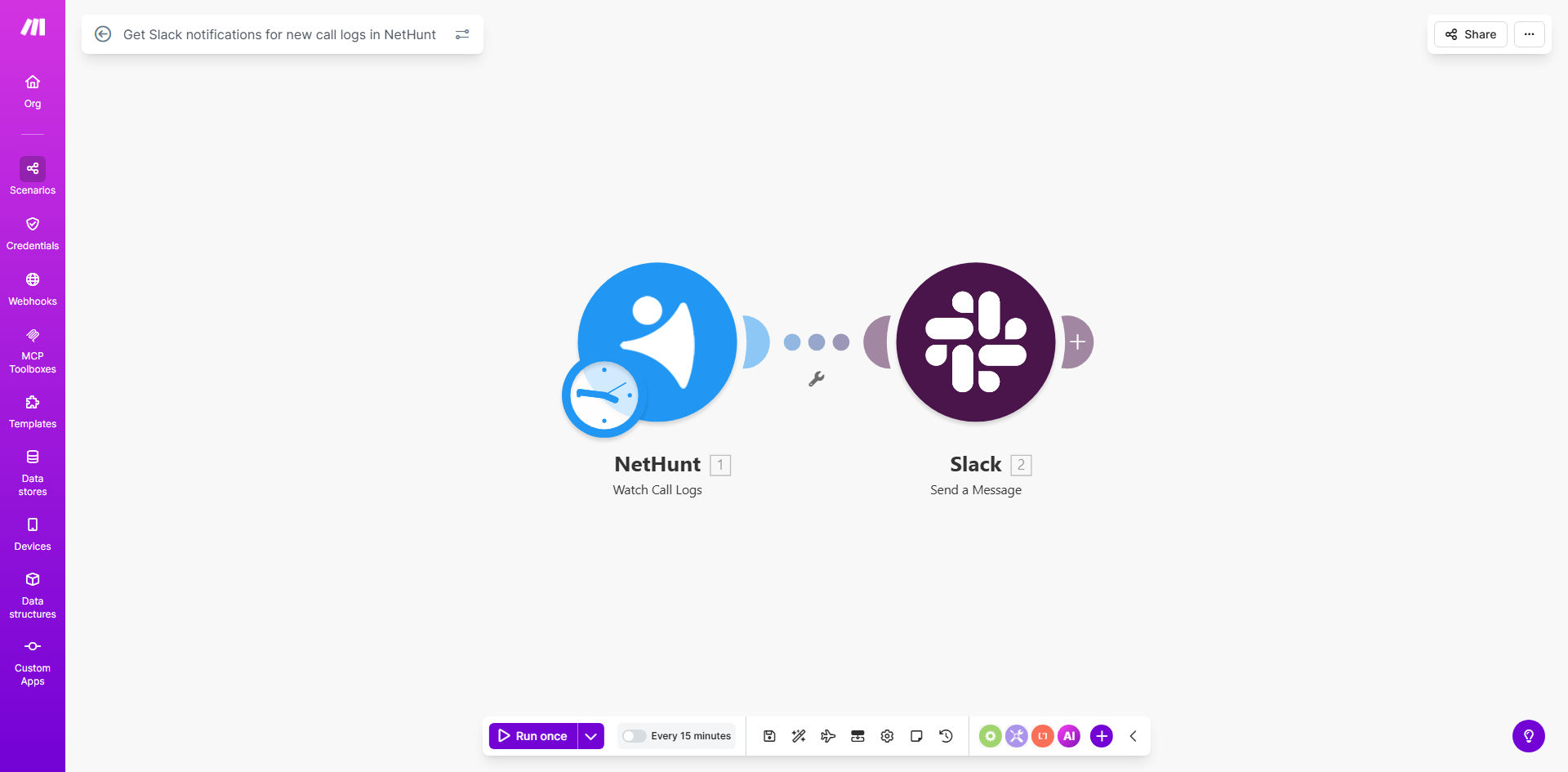
Make.com workflow diagram showing NetHunt triggering a Slack notification for a new call log

What This Workflow Does

In fast-paced sales environments, critical customer information often gets trapped inside your CRM. When a sales rep logs a call in NetHunt, managers and team members might not see it for hours or even days, leading to missed opportunities for collaboration and slow follow-ups. This delay can cost deals and frustrate customers who expect timely responses.

This automation solves that problem by creating a real-time bridge between NetHunt CRM and your team's communication hub, Slack. Every time a new call log is created—whether it's a discovery call, a negotiation, or a support check-in—the workflow instantly sends a formatted notification to a designated Slack channel or direct message. This ensures the entire team is immediately aware of key customer interactions, enabling faster decision-making and a more cohesive sales strategy.

How It Works

The workflow is a simple yet powerful trigger-action sequence built on Make.com. It monitors your NetHunt CRM and pushes updates directly to Slack without any manual intervention.

Step 1: Monitor NetHunt for New Call Logs

The scenario starts with a NetHunt module set to "Watch Call Logs." It continuously polls your NetHunt account for newly created call records. You can filter this to watch specific pipelines, users, or deal stages if needed.

Step 2: Format the Notification Message

Once a new call log is detected, Make extracts the relevant data: who the call was with, its duration, the outcome noted by the rep, and a direct link back to the contact or deal in NetHunt. This data is structured into a clear, readable message.

Step 3: Send the Alert to Slack

The formatted message is sent via the Slack "Send a Message" module. You configure it to post to a specific public channel, private channel, or even send a direct message to a team member or manager. The notification appears in Slack with all the context needed for quick action.

Pro tip: Customize your Slack message with emojis (e.g., 📞 for a new call, 🎯 for a qualified lead) and use Slack's formatting to make key details like the contact name or deal value stand out. This increases visibility and engagement from your team.

Who This Is For

This template is ideal for sales teams, customer success departments, and agencies that use NetHunt CRM and rely on Slack for daily communication. It's perfect for Sales Managers who need visibility into team activity, collaborative sales pods where multiple people work on an account, and remote teams that depend on digital tools to stay aligned. If your team's effectiveness depends on reacting quickly to customer conversations, this automation is for you.

What You'll Need

  1. A Make.com account (free tier available).
  2. A NetHunt CRM account with existing call logging activity.
  3. A Slack workspace where you have permission to create incoming webhooks or install apps.
  4. Admin access or the necessary API keys/tokens to connect Make.com to both NetHunt and Slack.

Quick Setup Guide

  1. Clone the Template: Click "Get This Workflow" to copy the scenario into your Make.com account.
  2. Connect NetHunt: In the first module, authorize Make.com to access your NetHunt account using your API credentials.
  3. Connect Slack: Authorize the Slack module to post messages to your chosen workspace. You'll need to create a Slack app or use a webhook.
  4. Configure the Channel: Set the Slack module to post to your desired channel (e.g., #sales-updates) or user.
  5. Customize the Message: Adjust the message template to include the call log fields most important to your team (contact, notes, duration, link).
  6. Test & Activate: Create a test call log in NetHunt and run the scenario once to ensure the notification appears correctly in Slack. Then, turn on the schedule to run automatically.

Key Benefits

Eliminate CRM Blind Spots: Get instant visibility into every customer interaction logged by your team, moving from passive CRM checking to proactive alerts.

Accelerate Response Times: When a manager sees a key call outcome instantly, they can provide coaching or approve next steps in minutes, not hours, keeping deals moving forward.

Foster Team Collaboration: Notifications in a shared channel allow other team members to offer insights, share relevant information, or celebrate wins, building a more connected team culture.

Reduce Manual Admin Work: Save each team member 10-15 minutes per day previously spent checking the CRM or sending manual update emails, freeing them for more selling.

Create an Audit Trail: Having call summaries posted in Slack creates a searchable, secondary record of customer interactions that complements your CRM data.

Frequently Asked Questions

Common questions about CRM-to-Slack automation and integration

Connecting NetHunt CRM with Slack creates a real-time feedback loop for your sales team. Instead of manually checking the CRM for updates, critical call information is pushed directly to your team's communication hub. This ensures immediate visibility for follow-ups, enables quick team collaboration on deals, and prevents important customer interactions from being missed or delayed in the sales process.

For example, when a sales rep logs a call where a prospect requests a proposal, the entire sales channel can see it instantly. The manager can approve it on the spot, and a supporting specialist can prepare materials, all within minutes instead of waiting for the next daily stand-up.

You can configure the automation to send rich, actionable details from NetHunt. This typically includes the contact's name and company, the call duration, the outcome or notes logged by the rep, and a direct link back to the CRM record. Sending this context allows the team to understand the situation at a glance without switching apps, making collaboration and handoffs much more efficient.

The key is to format these details concisely. A good Slack notification might read: "📞 John Doe at TechCorp | 25 min | Interested in Enterprise plan. Notes: Sent pricing. Link: [View in NetHunt]". This gives everyone the full picture instantly.

Automating this process saves each salesperson 10-15 minutes daily by eliminating manual check-ins. More importantly, it accelerates team response times. When a manager or supporting rep is instantly notified of a key customer call, they can jump in to help close a deal or address an issue immediately. This leads to faster sales cycles, higher customer satisfaction, and a more cohesive, data-driven team culture.

Performance improves through visibility and accountability. Managers can spot coaching opportunities in real-time, and reps know their activity is visible, which can positively influence behavior and adherence to best practices for logging calls.

Yes, with a slightly customized workflow, you can route notifications intelligently. For example, you could send high-value deal updates to a #sales-leads channel, support-related calls to a #customer-success channel, and internal coaching calls to a #sales-management channel. This ensures the right information reaches the right people, reducing channel noise and increasing the relevance and actionability of every alert.

This routing is done by adding a "Router" module in Make.com after the trigger. You set filters based on data from the call log, like the deal value, contact type, or a custom tag, and then send different messages to different Slack channels based on those conditions.

Absolutely. This notification can be the starting trigger for a powerful sales automation sequence. Beyond Slack, the creation of a call log could automatically schedule a follow-up task in your project tool, update a deal stage in NetHunt, send a summary email to the client, or log an activity in your accounting software for billing. This turns a simple notification into a multi-step workflow that enforces process and saves hours of manual work.

Think of it as the central nervous system for your sales ops. One customer action in the CRM can automatically trigger a coordinated response across your entire tech stack, ensuring nothing falls through the cracks.

Common pitfalls include sending too much raw data, causing alert fatigue. The key is to format messages concisely with only the essential details. Another mistake is not setting up proper error handling for when Slack or NetHunt is down. Also, teams often forget to secure the integration—ensure you're using dedicated Slack channels or user DMs for sensitive customer data to maintain privacy and compliance.

  • Alert Fatigue: Sending notifications for every minor update.
  • Poor Formatting: Messages are long blocks of text that get ignored.
  • No Error Handling: The workflow fails silently when an API changes.

Yes, GrowwStacks specializes in building tailored automation systems that connect your CRM with your team's communication tools. We can design a workflow that matches your specific sales process, filters notifications based on your rules, formats messages with your branding, and even connects additional steps like data enrichment or task creation. We handle the technical setup so your team can focus on selling.

Our consultants will work with you to map out your ideal notification flow, identify the key data points for your team, and build a robust, scalable automation that integrates seamlessly with your existing NetHunt and Slack setup. We also provide documentation and support to ensure your team gets maximum value.

Need a Custom CRM-to-Slack Automation?

This free template is a starting point. Our team builds fully tailored automation systems for your specific business needs.