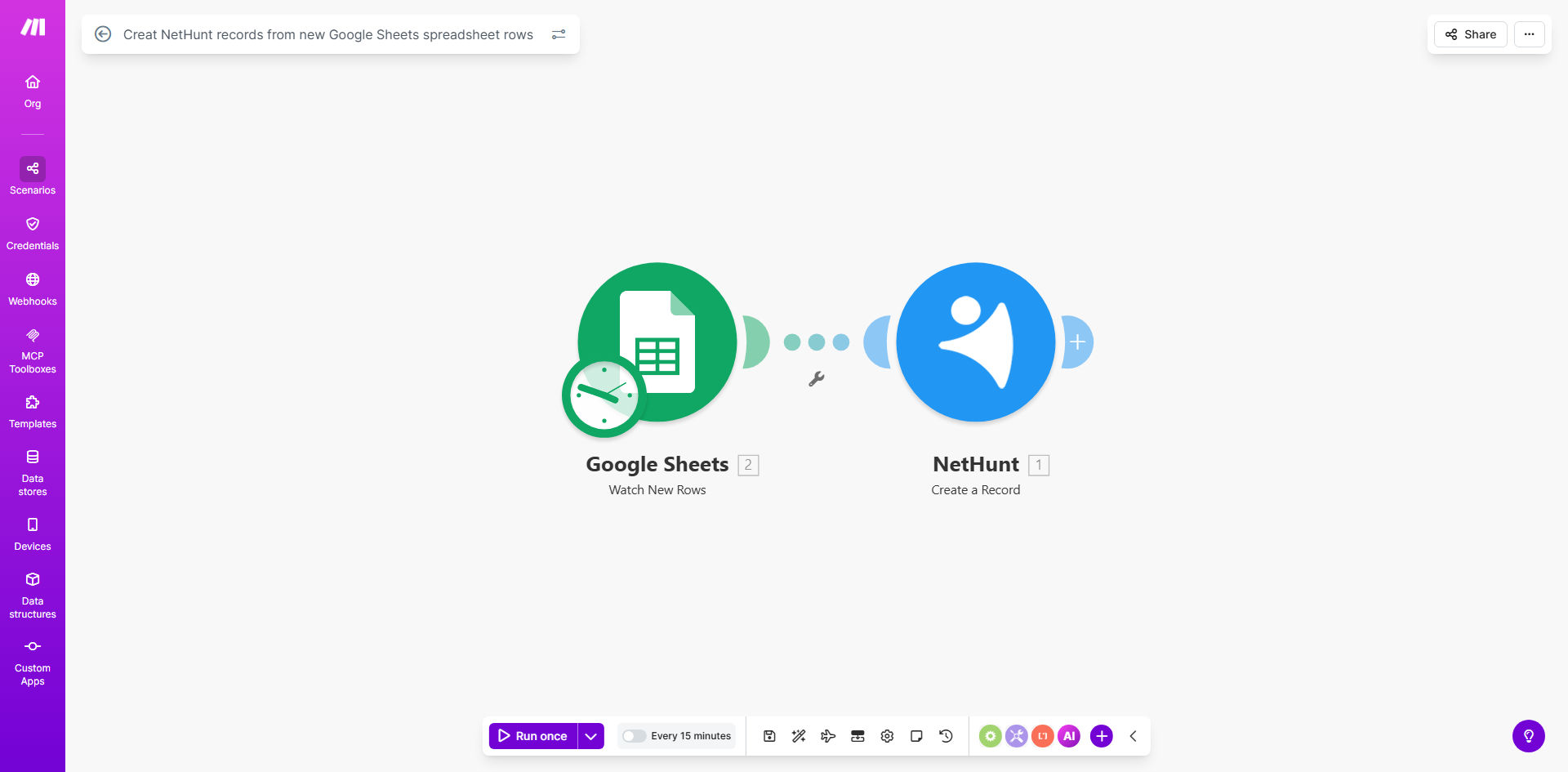
What This Workflow Does
For sales and marketing teams, data trapped in spreadsheets is a major bottleneck. New leads from events, web forms, or partner lists often land in a Google Sheet, requiring a team member to manually copy and paste each entry into the CRM. This process is not only tedious and time-consuming but also error-prone, leading to missed opportunities, delayed follow-ups, and an inaccurate sales pipeline.
This automated workflow solves that problem by creating a live, one-way bridge between Google Sheets and NetHunt CRM. Every time a new row is added to your designated spreadsheet—whether it's a single lead or a batch import—Make.com detects the change instantly and creates a corresponding, fully populated record in NetHunt. This ensures your sales team has immediate access to qualified leads without any manual intervention, turning your spreadsheet from a static list into a dynamic lead ingestion engine.
How It Works
The automation is triggered by new data and executes a precise sequence of actions to transfer and structure that information.
Step 1: Monitor the Google Sheet
The workflow starts by watching a specific Google Sheets spreadsheet for new rows. You can configure it to monitor an entire sheet or a specific range. Make.com checks for updates at regular intervals you define, ensuring near real-time syncing.
Step 2: Capture the New Row Data
When a new row is detected, Make.com captures all the data from each column. This typically includes lead details like Full Name, Email Address, Company, Phone Number, Lead Source, and any custom notes or qualification scores you track.
Pro tip: Structure your Google Sheet with clear, consistent column headers (e.g., "First Name," "Email," "Company"). This makes mapping the data to NetHunt fields foolproof and ensures every record is created correctly.
Step 3: Create the Record in NetHunt CRM
Make.com then takes the captured data and uses the NetHunt API to create a new contact or lead record. The workflow maps each column from your Sheet to the corresponding field in NetHunt. You can control which fields are populated, assign leads to specific pipelines or owners, and even add tags based on the data source.
Step 4: Confirm and Log (Optional)
For reliability, you can add modules to log each successful sync to another sheet or send a notification to a Slack channel. This creates an audit trail and provides peace of mind that your automation is running smoothly.
Who This Is For
This automation is a game-changer for any business that uses NetHunt CRM and collects lead data in Google Sheets. It's ideal for:
- Sales Teams & SDRs: Who need instant access to new leads from marketing campaigns, webinars, or content downloads to begin outreach immediately.
- Small Business Owners & Solopreneurs: Who wear multiple hats and can't afford to waste time on manual data entry between tools.
- Marketing Agencies: That manage client lead generation and need to seamlessly pass captured leads from forms or ads (often logged in Sheets) into the client's CRM.
- Event Organizers: Who collect attendee lists in Sheets and need to quickly import those contacts into NetHunt for post-event follow-up campaigns.
What You'll Need
- A Make.com account (free tier available).
- A Google Sheets spreadsheet with your lead data, preferably with standardized column headers.
- Admin access to a NetHunt CRM account and your API credentials.
- Basic understanding of your lead data structure (which columns correspond to which CRM fields).
Quick Setup Guide
You can have this automation running in under 15 minutes by following these steps:
- Get the Template: Click "Get This Workflow" to copy the pre-built scenario into your Make.com account.
- Connect Your Apps: In the Make.com scenario, authenticate and connect your Google Sheets and NetHunt CRM accounts.
- Select Your Spreadsheet: Point the Google Sheets module to the specific file and worksheet that contains your lead data.
- Map Your Fields: In the NetHunt module, map the columns from your Sheet (e.g., column B) to the correct NetHunt fields (e.g., "Email").
- Test and Activate: Add a test row to your Sheet, run the scenario once to see the record appear in NetHunt, then turn the scenario on to run automatically.
Key Benefits
Eliminate 5–10 hours of manual data entry per month. Free your team from the repetitive, low-value task of copying and pasting, allowing them to focus on engaging leads and closing sales.
Reduce lead response time from hours to seconds. The moment a lead enters your Sheet, it's in your CRM. This speed dramatically increases your chances of making a successful first contact and winning the business.
Ensure 100% data accuracy and consistency. Automated syncing removes human error from the equation. Every field is transferred exactly as it appears, creating clean, reliable records in NetHunt.
Scale your lead intake process effortlessly. Whether you add one lead or one thousand, the automation handles the volume instantly without any additional work from your team, supporting business growth seamlessly.
Maintain a single source of truth. Use Google Sheets for easy data collection and collaboration, while knowing that your primary sales tool, NetHunt, is always automatically updated and in sync.