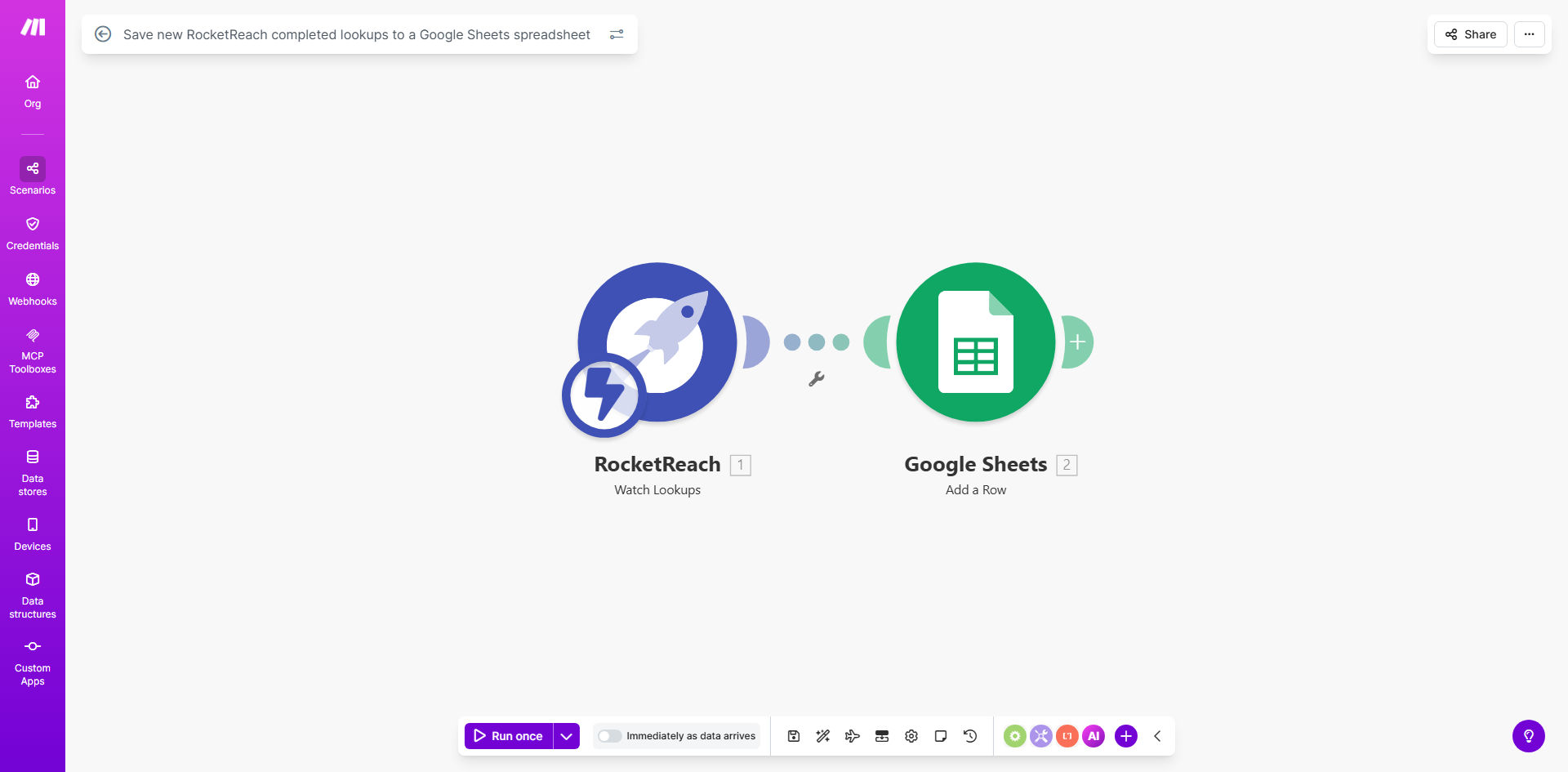
What This Workflow Does
Sales and recruiting teams spend valuable time manually copying contact information from prospecting tools like RocketReach into spreadsheets or CRMs. This process is not only tedious but also prone to errors and delays, causing missed opportunities when lead data isn't immediately accessible to the entire team.
This automation solves that problem by creating a seamless bridge between RocketReach and Google Sheets. Every time a new contact lookup is completed in RocketReach, the workflow automatically captures key details—like name, email, phone number, company, and job title—and adds them as a new row in your designated Google Sheets spreadsheet. This transforms your spreadsheet into a real-time, centralized database of prospect intelligence.
The business value is clear: you eliminate repetitive administrative work, ensure no lead data falls through the cracks, and give your team instant access to organized prospect information for follow-up campaigns, lead scoring, or market analysis.
How It Works
The workflow operates on a simple trigger-action principle, orchestrating data flow between two powerful platforms without any manual intervention.
Step 1: Trigger on New RocketReach Lookup
The automation is initiated the moment a "lookup" action is marked as completed within your RocketReach account. Make.com monitors your RocketReach activity via its API, waiting for this specific completion event.
Step 2: Extract and Structure the Contact Data
Once triggered, the workflow parses the completed lookup result. It extracts the relevant data points you've configured, such as the prospect's full name, professional email addresses, direct phone number, current position, company name, and social profile links.
Step 3: Format and Prepare for Google Sheets
The raw data is then formatted to match the column structure of your target Google Sheet. Dates are standardized, names are properly capitalized, and multiple data points (like several email addresses) are combined into a single cell if needed, ensuring clean, ready-to-use data.
Step 4: Add a New Row to Your Spreadsheet
Finally, the formatted data is sent to Google Sheets via the Sheets API. The workflow identifies the correct spreadsheet and worksheet, then appends a new row at the bottom with all the extracted contact information. A timestamp of when the lookup was saved is often added automatically for tracking.
Pro tip: Use a dedicated "Master Lead List" spreadsheet with separate tabs for different lead sources or stages (e.g., "Cold Leads," "Contacted," "Qualified"). This workflow can be duplicated and modified to add data to different tabs based on criteria like the prospect's seniority level or industry.
Who This Is For
This automation is a game-changer for any role or business that relies on systematic prospecting and needs to organize lead data efficiently.
Sales Development Representatives (SDRs) & Account Executives: Perfect for teams building outbound pipelines. It saves the 5-10 minutes per lead normally spent on manual entry, allowing reps to focus on outreach and closing.
Recruiters & Talent Acquisition Specialists: Ideal for sourcing candidates. Automatically populating a candidate tracker sheet with details from RocketReach searches streamlines the initial sourcing phase dramatically.
Marketing Agencies & Consultants: Great for agencies running lead generation campaigns for clients. It ensures all prospect data from outreach tools is consolidated into a single, shareable report for the client.
Startups & Small Business Owners: Anyone wearing multiple hats can benefit. This automation acts as a simple, cost-effective CRM for early-stage companies, keeping all prospect information neatly organized without expensive software.
What You'll Need
- A Make.com account (free tier available). This is the automation platform that will host and run the workflow.
- A RocketReach account with API access. You'll need your RocketReach API key to connect the service to Make.com.
- A Google Sheets spreadsheet set up with a header row. Prepare the columns you want to populate (e.g., First Name, Last Name, Email, Company, Title, Date Added).
- Google Cloud Project credentials (Service Account or OAuth 2.0). This grants Make.com permission to write to your specific Google Sheet.
Quick Setup Guide
You can have this automation running in less than 30 minutes by following these steps.
- Clone the Template: Click the "Get This Workflow" button above to open the template on Make.com. Press the "Copy" button to create your own private version of the scenario.
- Connect RocketReach: In the first module of your new scenario, click the RocketReach icon. Add a new connection and paste your API key from your RocketReach account settings when prompted.
- Connect Google Sheets: Click the Google Sheets module. Choose to connect via "Service Account" for server-to-server automation or "OAuth 2.0" for personal use. Follow Make.com's guide to authorize access to your Google Drive and Sheets.
- Configure Your Spreadsheet: In the Google Sheets module settings, paste the URL of your target spreadsheet and select the specific worksheet (tab) name where data should be added.
- Map the Data Fields: The template has pre-mapped common fields. Review each mapping (e.g., map "RocketReach Email" to "Column C" in your sheet) to ensure they align with your spreadsheet's column order.
- Test and Activate: Run a single test execution by completing a lookup in RocketReach. Check if a new row appears in your sheet. Once confirmed, turn the scenario "ON" to let it run automatically.
Key Benefits
Eliminate 100% of manual data entry for prospecting. This automation completely removes the need to switch tabs, copy, and paste information. What used to be a 5-minute task per lead now happens in the background in seconds, freeing up hours per week for your sales team.
Create a single, searchable source of truth for all prospect data. Instead of data being scattered across individual team members' notes or separate tools, every lookup is automatically logged in a centralized Google Sheet. This improves collaboration, prevents duplicate efforts, and makes lead reporting and analysis effortless.
Improve data accuracy and consistency. Manual entry leads to typos, missed fields, and inconsistent formatting. Automation ensures every data point is captured exactly as provided by RocketReach and entered into your sheet according to a predefined, consistent structure.
Speed up your sales cycle with instant data availability. The moment a prospect is identified, their information is ready in your shared system. This allows for faster follow-up emails or calls, which is critical in competitive markets where response time directly impacts conversion rates.
Build a scalable foundation for advanced automation. This Google Sheet becomes a powerful hub. You can easily connect it to other tools—like sending new rows to your CRM, triggering email sequences, or creating tasks in your project management software—creating a fully automated lead management system.