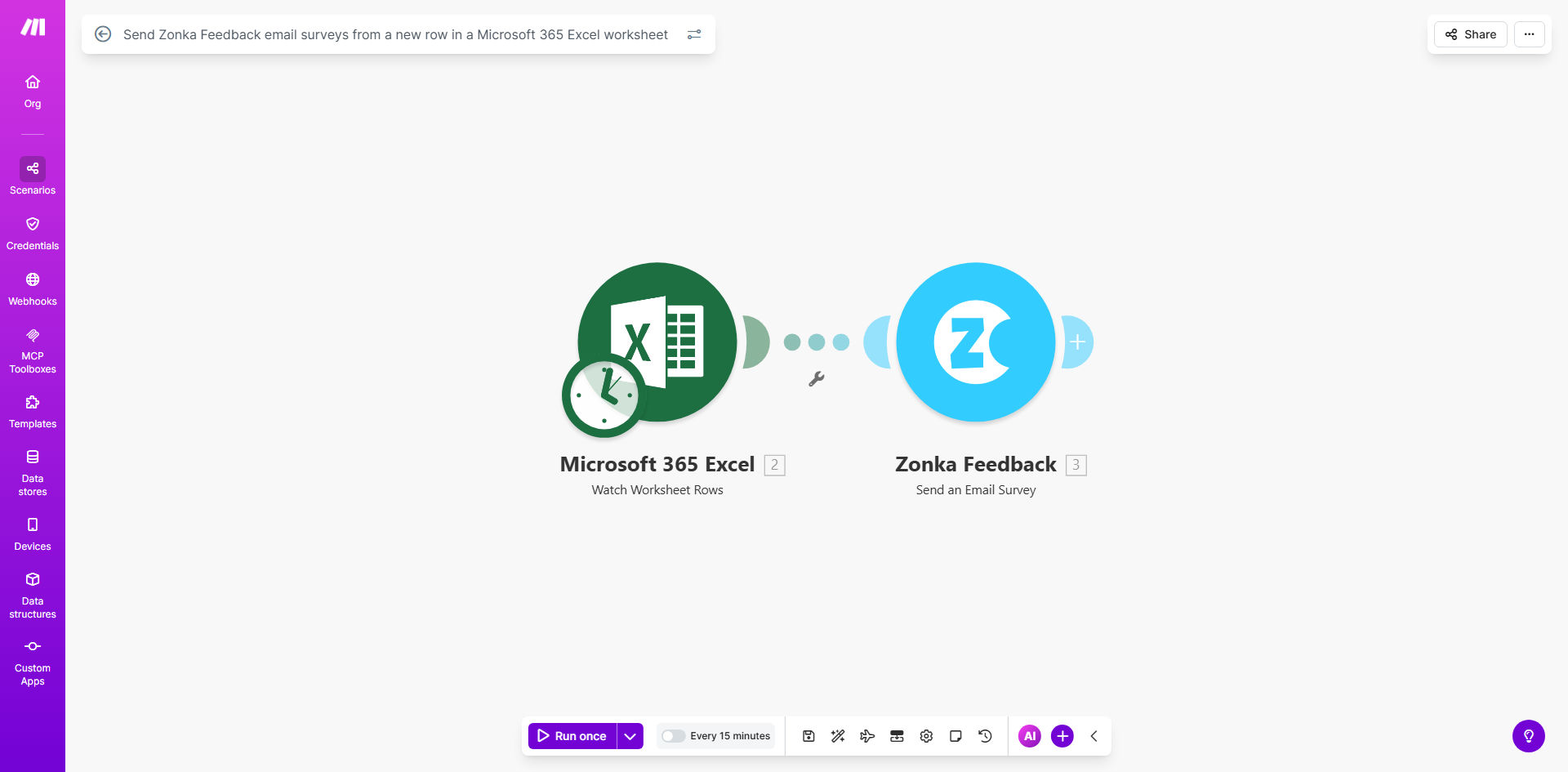
What This Workflow Does
Manually sending feedback surveys is a time-consuming and error-prone task. You have to export customer lists, copy-paste email addresses, and remember to follow up—a process that often gets delayed or forgotten. This results in low response rates, stale feedback, and missed opportunities to improve customer experience.
This automation solves that by creating a direct pipeline between your Microsoft 365 Excel worksheet and Zonka Feedback. Every time you or your team adds a new row with customer details (like name and email), the workflow instantly triggers and sends a personalized email survey. It turns your static spreadsheet into a dynamic feedback collection engine, ensuring every customer is heard promptly and consistently.
How It Works
The workflow is built on Make.com and acts as a smart bridge between your data and your survey platform.
Step 1: Monitor Your Excel Worksheet
The automation constantly watches a specific Microsoft 365 Excel worksheet for new rows. It's designed to work with a structured sheet that has clear headers, such as "Customer Name," "Email," and "Product Purchased."
Step 2: Capture the New Row Data
When a new row is added, Make immediately captures all the data from that row. It parses each column, preparing the information to be used in the next step. This ensures no manual data transfer is needed.
Step 3: Send the Survey via Zonka Feedback
Using the captured data, the workflow connects to your Zonka Feedback account. It creates and dispatches a personalized email survey to the customer's email address, often including their name for a tailored touch. The survey is sent within moments of the row being added.
Pro tip: Use this workflow not just for post-purchase feedback, but also for onboarding sequences, service follow-ups, or event satisfaction surveys. Simply adjust the trigger Excel sheet and the Zonka Feedback survey template.
Who This Is For
This template is ideal for any business or team that relies on customer feedback but struggles with manual processes.
- Customer Success Teams: Automatically survey users after support tickets or onboarding calls.
- E-commerce Managers: Send post-purchase NPS or product reviews requests directly from order lists.
- Service-Based Businesses: Follow up with clients after a project delivery or consultation.
- Marketing Agencies: Gather feedback on campaign performance or client satisfaction.
- Small Business Owners: Anyone who maintains a customer list in Excel and wants professional, automated feedback without a complex CRM setup.
What You'll Need
- A Make.com account (free tier available).
- A Microsoft 365 (Office 365) account with access to Excel Online.
- A Zonka Feedback account with an active survey and email sending permissions.
- An Excel worksheet with clearly defined column headers (e.g., "Email," "Full Name").
- The customer data you wish to use for personalization in your survey.
Quick Setup Guide
You can have this automation running in under 15 minutes.
- Clone the Template: Click "Get This Workflow" and duplicate the scenario into your Make.com account.
- Connect Microsoft 365: In the first module, authorize Make.com to access your Excel Online file. Select the specific workbook and worksheet you want to monitor.
- Connect Zonka Feedback: In the survey-sending module, authorize your Zonka Feedback account and select the specific email survey you want to send.
- Map Your Data: Link the Excel column headers (like `Email` and `Customer Name`) to the corresponding fields in Zonka Feedback (like recipient email and personalization tokens).
- Test and Activate: Add a test row to your Excel sheet and run the scenario once to ensure the survey sends correctly. Then, schedule the scenario to run automatically (e.g., every hour) or turn on instant webhook triggers if available.
Key Benefits
Eliminate Manual Entry & Reduce Errors: Stop copying and pasting email addresses between systems. The automation pulls data directly from your source of truth, ensuring 100% accuracy and freeing up hours per week.
Improve Feedback Response Rates: Surveys are sent immediately while the customer interaction is still fresh in their mind. This timeliness can increase open and completion rates by up to 3x compared to delayed, manual sends.
Scale Your Feedback Process Effortlessly: Whether you have 10 new customers a week or 1000, the workflow handles the volume without any additional effort from your team. It grows with your business.
Gain Faster, Actionable Insights: By automating the collection, you get feedback data flowing into Zonka Feedback in real-time. This allows for quicker analysis, trend spotting, and proactive customer service interventions.
Maintain a Professional, Consistent Image: Every customer receives a timely, professionally formatted survey directly from your feedback platform, enhancing your brand's credibility and commitment to listening.