Make.com Prestashop Gmail Ecommerce Order Automation

Automate Prestashop Order Notifications via Gmail

Get instant email confirmations sent automatically for every new order in your Prestashop store

Get This Workflow → Make.com · Prestashop · Free Template
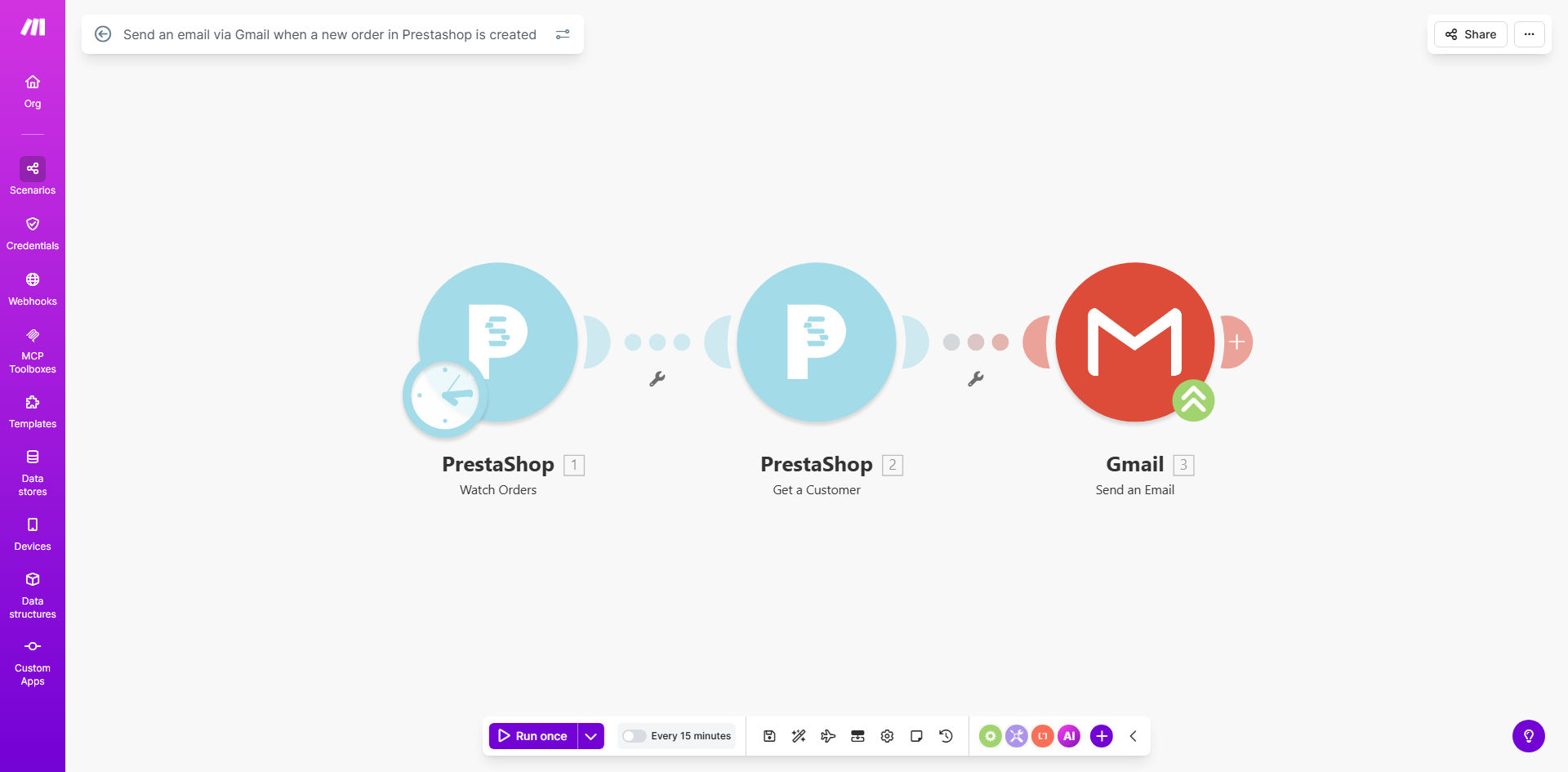
Prestashop to Gmail order notification workflow diagram

What This Workflow Does

This automation solves a critical pain point for ecommerce businesses using Prestashop - the need to manually notify customers about their orders. Every time a customer completes a purchase, the workflow automatically triggers a personalized email through Gmail, confirming their order details.

The solution eliminates the risk of forgetting to send order confirmations, ensures consistent communication, and saves store owners hours of manual work each week. It's particularly valuable for stores processing multiple orders daily, where manual email sending becomes impractical.

How It Works

1. New Order Detection

The workflow constantly monitors your Prestashop store for new orders through Make.com's Prestashop integration. As soon as an order is placed, the system detects it instantly.

2. Data Extraction

Key order details like customer information, products ordered, quantities, prices, and shipping information are extracted from Prestashop's order records.

3. Email Composition

The workflow composes a professional email using your Gmail account, populating a template with the specific order details. You can customize the email design and content to match your brand.

4. Automated Sending

Gmail sends the notification immediately to the customer's email address. The system logs each sent email for tracking purposes.

Pro tip: Add a second email trigger for order status changes (like shipping updates) to create a complete customer communication system.

Who This Is For

This workflow is ideal for:

  • Prestashop store owners who manually send order confirmations
  • Businesses experiencing order confirmation delays due to manual processes
  • Stores wanting to improve customer experience with instant order updates
  • Ecommerce teams looking to reduce administrative workload
  • Businesses using Gmail for customer communication

What You'll Need

  1. An active Prestashop store with API access
  2. A Gmail account (G Suite or personal)
  3. A Make.com account (free tier available)
  4. Basic understanding of Prestashop's order data structure

Quick Setup Guide

  1. Copy this template to your Make.com account
  2. Connect your Prestashop store using API credentials
  3. Authorize Gmail access for email sending
  4. Customize the email template with your branding
  5. Test with a sample order to verify delivery
  6. Activate the scenario to go live

Key Benefits

Save 5-10 hours weekly by eliminating manual order confirmation emails, allowing you to focus on growing your business.

Improve customer satisfaction with immediate order acknowledgments that reduce uncertainty and support queries.

Reduce human errors by automating a repetitive task where mistakes in order details can easily occur.

Professionalize communications with consistent, branded emails for every customer regardless of order volume.

Scalable solution that handles order spikes during promotions without additional staff workload.

Frequently Asked Questions

Common questions about Prestashop and Gmail integration

Automating order notifications saves significant time for ecommerce businesses by eliminating manual email sending. It ensures immediate customer confirmation for every order, improving satisfaction and reducing support queries about order status.

For stores processing 20+ orders daily, this can reclaim 1-2 hours of staff time daily while providing more reliable communication than manual processes prone to human error or oversight.

You can include order details like product names, quantities, prices, customer information, shipping address, and order totals. The template can be customized to include any data available in your Prestashop order records.

Advanced implementations can add personalized product recommendations, loyalty program updates, or estimated delivery dates pulled from shipping integrations.

Make.com automations are highly reliable for high-volume stores, processing hundreds of orders per hour without delays. The system includes error handling to retry failed notifications automatically.

For stores with 500+ daily orders, we recommend implementing queue management and monitoring to ensure optimal performance during traffic spikes.

Yes, you can fully customize the email content, design, and branding to match your store's style. The workflow supports HTML emails with images, logos, and personalized content.

Many stores create templates that mirror their website design for consistency, including product images, promotional banners, and social media links.

The workflow includes error handling to alert you if email sending fails. You can configure alternative notification methods like Slack alerts while resolving any Gmail authentication issues.

For critical operations, we recommend setting up a backup SMTP service and implementing multi-channel notifications (SMS, app alerts) for high-value orders.

This solution offers more flexibility than Prestashop's default emails. You can use Gmail's superior deliverability, add richer content, and trigger additional actions like updating CRMs or notifying teams.

Unlike Prestashop's basic templates, you control the entire email design, timing, and can integrate order data with other business systems automatically.

Yes, GrowwStacks specializes in custom ecommerce automations. We can build tailored solutions integrating Prestashop with your CRM, accounting software, inventory systems, and other business tools for complete workflow automation.

Our implementations typically include:

  • Custom order processing workflows
  • Multi-channel notifications
  • Real-time inventory updates
  • Automated post-purchase sequences

Need a Custom Prestashop Automation?

This free template is a starting point. Our team builds fully tailored automation systems for your specific business needs.