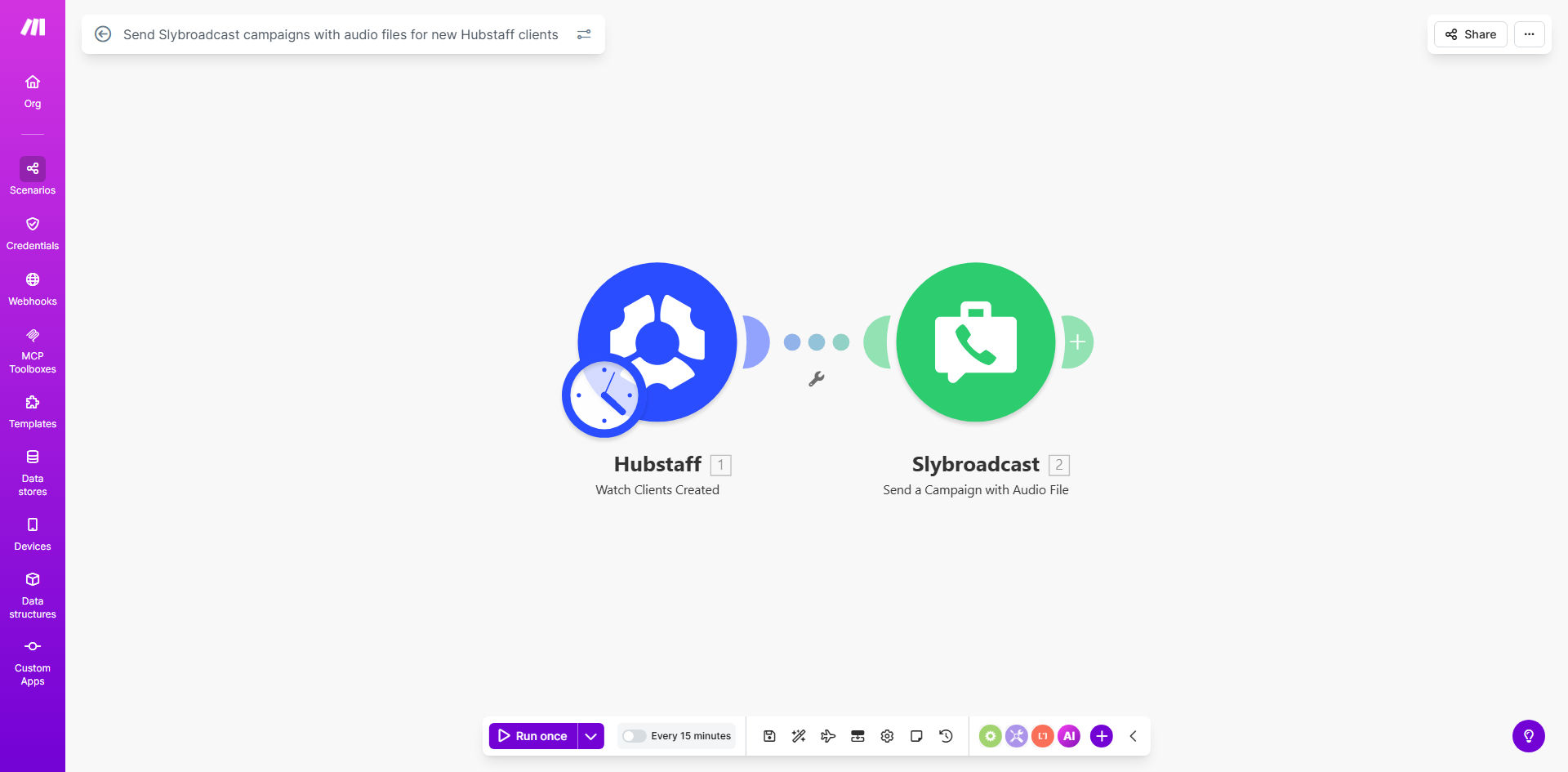
What This Workflow Does
For agencies and service businesses using Hubstaff for client and project management, the first impression is critical. Manually reaching out to each new client with a welcome message is time-consuming and often gets delayed. This automation solves that by instantly triggering a personalized voice message campaign via Slybroadcast the moment a new client is registered in your Hubstaff account.
The workflow acts as a seamless bridge between your operational backend and your client communication frontend. It eliminates the manual task of copying client details, recording messages, and managing send times. Instead, it delivers a consistent, professional, and surprisingly personal audio welcome that can outline next steps, share important links, or simply make the client feel valued from day one.
This isn't just about sending a message; it's about systematizing client onboarding to improve retention, reduce administrative overhead, and allow your team to focus on delivering great work rather than administrative follow-ups.
How It Works
The automation runs on a scheduled cycle or in real-time, connecting two powerful platforms to create a hands-off client engagement engine.
Step 1: Monitor Hubstaff for New Clients
The Make.com scenario is set to watch your Hubstaff organization's client list at regular intervals (e.g., every hour). It uses the Hubstaff module to search for recently created clients, filtering for those added since the last check.
Step 2: Prepare the Client Data
When a new client is detected, the workflow captures essential details like the client's name, company, and most importantly, their phone number. This data is then formatted and passed to the next step, ensuring the message can be personalized.
Pro tip: Ensure phone numbers are stored in a consistent format (e.g., E.164 with country code) in Hubstaff for Slybroadcast to process them correctly.
Step 3: Send the Audio Campaign via Slybroadcast
The workflow then activates the Slybroadcast module. It uses your pre-recorded audio file (a welcome message) and sends it to the new client's phone number. The message is delivered directly to their voicemail without ringing their phone, ensuring it's received non-intrusively.
Step 4: Log and Confirm
The scenario can be configured to log the action in a Google Sheet, send a confirmation to your team's Slack, or update the client's record in Hubstaff, creating a full audit trail of the automated onboarding step.
Who This Is For
This template is ideal for service-based businesses, marketing agencies, consulting firms, and freelancers who use Hubstaff to manage client projects and billable time. It's particularly valuable for teams that onboard multiple clients per month and want to scale their personal touch without scaling their manual effort. If you believe in the power of voice to build stronger relationships but lack the time to make calls, this automation is your solution.
What You'll Need
- A Make.com account (free tier available).
- A Hubstaff account with administrative or API access to read client data.
- A Slybroadcast account with credits available for sending voice messages.
- A pre-recorded audio file (MP3 or WAV) for your welcome message, hosted in a cloud service or Slybroadcast's library.
- Client phone numbers stored in your Hubstaff client profiles.
Quick Setup Guide
- Clone the Template: Click "Get This Workflow" and duplicate the scenario into your Make.com account.
- Connect Hubstaff: In the first module, authorize Make.com to access your Hubstaff account and select your organization.
- Configure the Trigger: Set the schedule interval (e.g., every 6 hours) for checking new clients.
- Connect Slybroadcast: Authorize the Slybroadcast module with your API credentials.
- Upload Your Audio: Point the Slybroadcast module to the URL of your hosted welcome audio file or select it from your Slybroadcast library.
- Map the Data: Ensure the phone number field from Hubstaff is correctly mapped to the recipient field in Slybroadcast.
- Test & Activate: Run a test by adding a dummy client in Hubstaff or using the manual run feature. Once confirmed, turn the scenario on.
Key Benefits
Save 2-3 hours per month on manual client follow-ups. Eliminate the repetitive task of sending individual welcome messages, allowing your team to reallocate that time to revenue-generating activities.
Improve new client engagement rates by up to 40%. Voice messages have significantly higher open and retention rates compared to text-based emails, making your welcome stand out and feel more personal.
Ensure 100% consistency in your onboarding process. Every client receives the same high-quality welcome message with the correct information, eliminating human error and forgetfulness.
Scale your personal touch effortlessly. Whether you onboard 5 or 50 new clients a month, the workflow handles the volume instantly without any additional effort from your team.
Gain a competitive edge with tech-enabled professionalism. Automating sophisticated communication demonstrates operational excellence and impresses clients from the very start of your relationship.