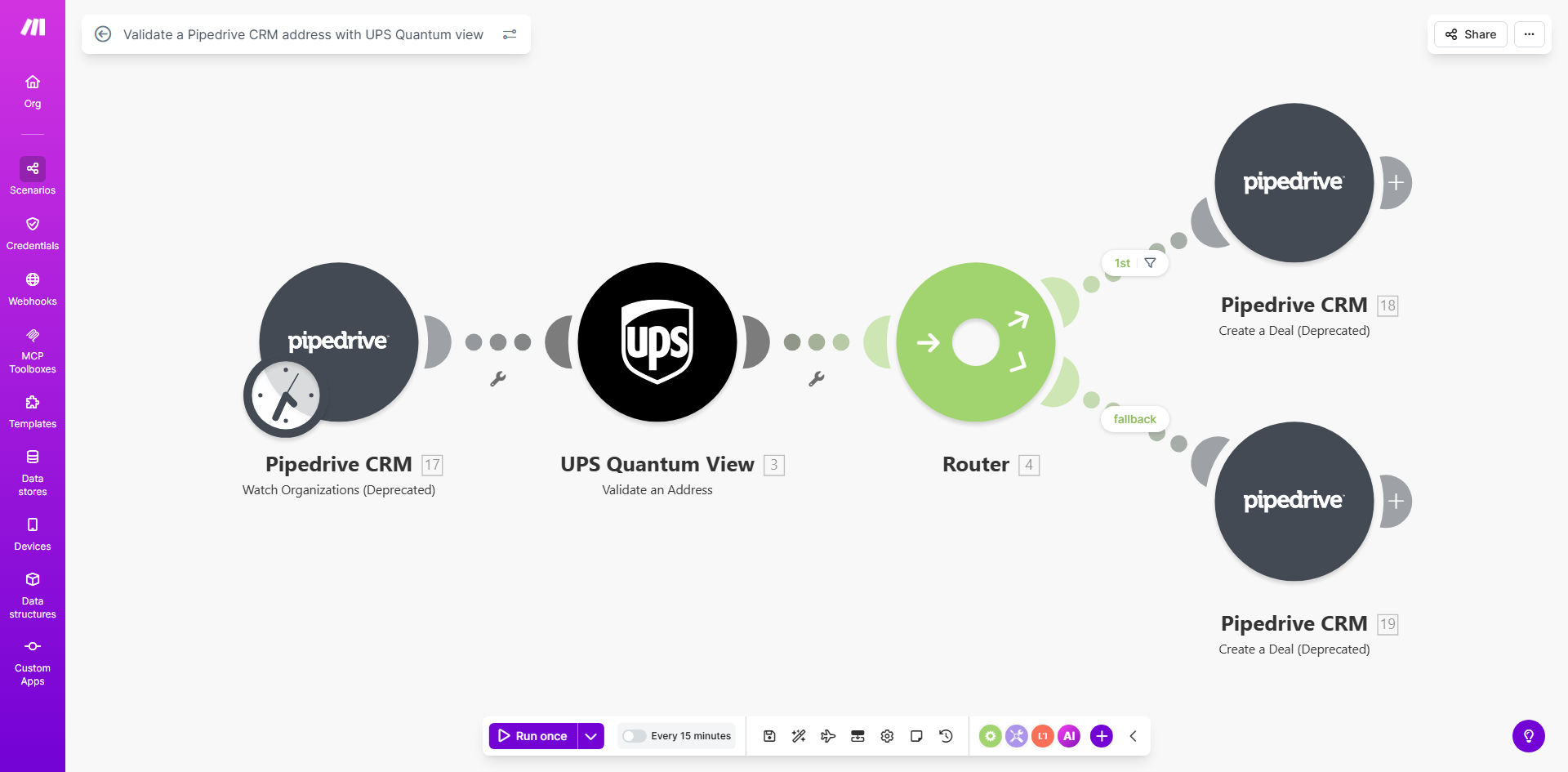
What This Workflow Does
For businesses that ship products or send marketing materials, an incorrect address in your CRM is more than a typo—it’s a direct hit to your bottom line. Failed deliveries, wasted postage, and frustrated customers are the direct results of bad address data. Manually checking each new prospect’s address is time-consuming and prone to error, slowing down your sales team and hurting operational efficiency.
This automated workflow solves that problem instantly. Every time a new deal is created in Pipedrive CRM, the system automatically sends the prospect’s address to UPS Quantum View for validation. The address is checked against official postal databases, corrected if possible, and flagged if undeliverable. The result is clean, verified address data flowing into your pipeline without any manual effort.
Beyond just validation, this automation can update the deal record, notify your team of issues, and ensure that every customer interaction starts on solid ground. It turns a potential point of failure into a seamless, automated quality check.
How It Works
The workflow connects your Pipedrive account to UPS’s powerful address verification service using Make.com’s visual automation platform.
Step 1: Trigger on New Pipedrive Deal
The automation watches your Pipedrive pipeline. The moment a sales rep creates a new deal and adds an address, the workflow is triggered. It captures all relevant deal and contact information, including the full address fields.
Step 2: Send Address to UPS Quantum View
The captured address data is formatted and sent securely to the UPS Quantum View API. This service performs a real-time lookup, checking the address for completeness, formatting, and deliverability according to global postal standards.
Pro tip: Configure the workflow to only validate addresses for deals in specific pipeline stages (e.g., "Qualified" or "Proposal Sent") to focus resources on high-potential prospects.
Step 3: Process the Validation Response
UPS returns a detailed response. If the address is valid and corrected (e.g., a missing ZIP code added), the workflow can update the Pipedrive deal with the standardized address. If the address is invalid or requires review, the workflow can tag the deal, add a note, or move it to a "Needs Review" stage.
Step 4: Notify & Log
Finally, the automation can send a notification—via email, Slack, or within Pipedrive—to the relevant team member about the validation outcome. A log of all validations is also recorded for auditing and process improvement.
Who This Is For
This automation is a game-changer for any business that uses Pipedrive and deals with physical shipping or mailing. E-commerce companies can ensure accurate delivery addresses before fulfilling orders. B2B service providers can verify client locations for accurate quoting and scheduling. Marketing teams can clean their mailing lists in real-time. Sales teams can qualify leads faster by knowing a prospect is in a deliverable region. Essentially, if your business success depends on getting things to the right place, this workflow is for you.
What You'll Need
- A Pipedrive account with deals containing address fields.
- A Make.com account (free tier available).
- A UPS Developer Kit account to access the Quantum View APIs (registration is free for UPS customers).
- The address fields in Pipedrive should be consistently mapped (Street, City, State, Postal Code, Country).
Quick Setup Guide
You can have this automation running in under 30 minutes.
- Clone the Template: Use the "Get This Workflow" button to copy the free template into your Make.com account.
- Connect Pipedrive: Authorize Make.com to access your Pipedrive account and select the pipeline you want to monitor.
- Configure UPS Module: Add your UPS Developer Kit credentials (API Key) to the UPS Quantum View module in Make.
- Map Address Fields: Ensure the address data from Pipedrive is correctly mapped to the fields required by UPS (street address, city, postal code, etc.).
- Set Up Actions: Decide what happens after validation. Do you update the deal? Send a Slack alert? Configure these actions in the subsequent Make modules.
- Test & Activate: Create a test deal in Pipedrive and run the scenario once to verify the flow. Then, turn the automation on.
Key Benefits
Eliminate Costly Shipping Errors: Invalid addresses are a major source of wasted shipping costs and customer dissatisfaction. This automation acts as a pre-shipment guardrail, potentially saving thousands in redelivery fees and lost inventory.
Save Hours of Manual Data Cleaning: Free your sales and operations teams from the tedious task of manually verifying addresses. What used to take minutes per deal now happens instantly and reliably in the background.
Improve Deal Velocity and Accuracy: Clean data means faster processing. Sales reps can proceed with confidence, and fulfillment teams get accurate information from the start, speeding up the entire customer journey.
Enhance Customer Experience: Nothing frustrates a customer like a delivery delay due to an address error. By validating upfront, you ensure a smooth, professional experience from the first interaction.
Scale Your Operations Confidently: As your deal volume grows, manual checks become impossible. This automated system scales effortlessly, handling one address or ten thousand with the same accuracy and speed.