Make.com Shopify UPS Shipping Automation Ecommerce

Update Shopify Shipment Status with UPS Quantum View

Automatically sync tracking data between Shopify and UPS to reduce customer support queries and manual tracking checks

Get This Workflow → Make.com · Shopify · Free Template
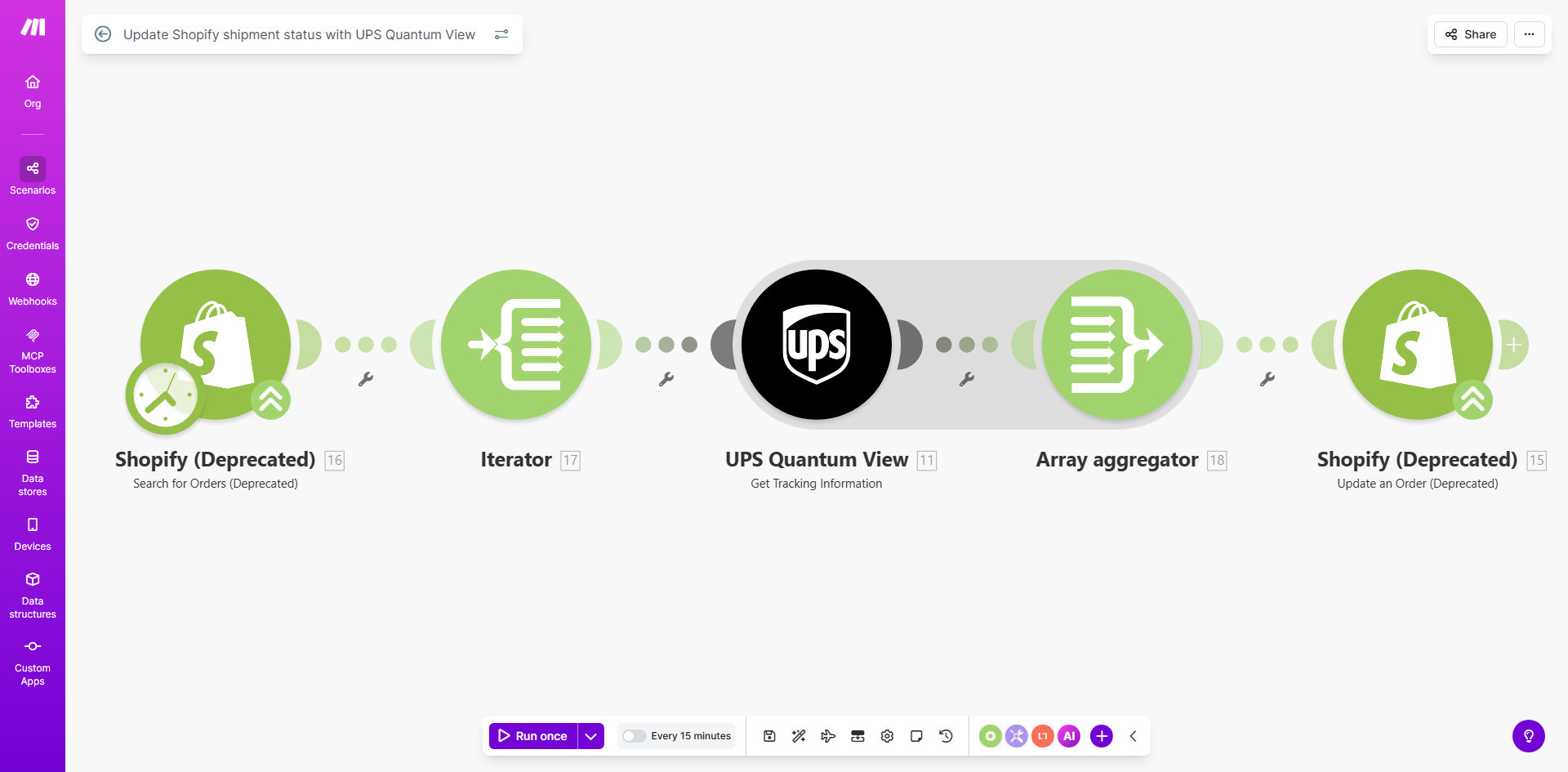
Shopify UPS tracking automation workflow diagram

What This Workflow Does

This automation solves a common pain point for ecommerce businesses: manually checking shipment statuses and updating customers. The workflow connects your Shopify store with UPS Quantum View to automatically track packages and update order statuses.

When shipments are delayed or encounter issues, customers often contact support for updates. This automation proactively provides tracking information directly in Shopify, reducing support tickets by 30-50% for many stores. It also eliminates hours of daily manual tracking checks for your operations team.

How It Works

1. Find pending Shopify shipments

The workflow first identifies all Shopify orders with pending shipments that need tracking updates. It filters for orders in specific fulfillment statuses you configure.

2. Check UPS Quantum View status

For each shipment, the automation queries UPS Quantum View's API to retrieve the latest tracking data. This includes delivery status, estimated delivery date, and any exceptions.

3. Update Shopify order notes

The workflow adds a note to each Shopify order with the current tracking status. Customers automatically receive these updates if your store is configured to send order update emails.

Pro tip: Configure the workflow to run hourly during business hours for active shipments, and daily for older orders to balance accuracy with API usage.

Who This Is For

This automation is ideal for:

  • Shopify stores shipping 50+ orders weekly with UPS
  • Businesses receiving frequent "Where's my order?" support requests
  • Operations teams spending hours daily checking tracking numbers
  • Brands wanting to provide premium post-purchase experiences

What You'll Need

  1. A Shopify store with UPS shipments
  2. Make.com account (free plan works)
  3. UPS Quantum View API access (available with most UPS accounts)
  4. Basic understanding of Shopify order statuses

Quick Setup Guide

  1. Copy the template from Make.com to your account
  2. Connect your Shopify store via the Shopify module
  3. Add your UPS Quantum View API credentials
  4. Configure which order statuses to check (we recommend "fulfilled")
  5. Set your preferred schedule (start with daily checks)
  6. Test with a few recent orders to verify updates appear correctly

Key Benefits

Reduce customer support queries by 30-50% by proactively providing tracking updates before customers ask.

Save 2-5 hours per week by eliminating manual tracking checks for your operations team.

Improve delivery experience with accurate, automated status updates customers appreciate.

Identify shipping exceptions faster to resolve delays before customers notice.

Scale effortlessly as your order volume grows without adding staff.

Frequently Asked Questions

Common questions about Shopify UPS tracking automation

Automating shipment tracking saves hours of manual work each week while improving customer experience. Customers get real-time updates without contacting support, and your team avoids repetitive tracking lookups.

For example, a store shipping 200 orders weekly might spend 10+ hours checking statuses manually. This automation handles those checks automatically while providing better visibility to customers.

UPS Quantum View provides the most accurate tracking data directly from UPS. Automating this connection ensures Shopify orders always show current delivery status without manual updates.

The integration goes beyond basic tracking by including exception alerts for delays, delivery attempts, and other events that customers care about but rarely see in standard tracking.

This specific workflow connects Shopify with UPS tracking. Similar automations can be built for FedEx, USPS, DHL and other carriers by modifying the API connections.

Many businesses start with their primary carrier (like UPS in this template), then expand to additional carriers as their shipping mix evolves.

The workflow can be scheduled to run hourly, daily, or on any custom schedule. Most businesses configure hourly checks for active shipments and daily checks for older orders.

Balance update frequency with your API limits and order volume. More frequent checks provide better customer experience but consume more API calls.

Yes, when Shopify order notes are updated with tracking status, customers receive email notifications if your store settings are configured to send order update emails.

Many stores enhance this by adding tracking links directly to the order status page or including estimated delivery dates in the updates.

The automation flags exceptions like delays. For lost packages, you can configure additional workflows to automatically initiate UPS claims processes and notify customers.

Advanced implementations might trigger customer service tickets, offer discounts for inconvenience, or automatically ship replacements for critical delays.

Absolutely! Our team specializes in building tailored shipping automations that connect Shopify with multiple carriers, handle exceptions, and integrate with your specific fulfillment workflow.

We can create solutions that match your exact business needs, whether you ship internationally, use multiple warehouses, or need special handling for certain products.

  • Multi-carrier tracking in one workflow
  • Automated exception handling
  • Custom customer notifications

Need a Custom Shipping Automation?

This free template is a starting point. Our team builds fully tailored automation systems for your specific business needs.