Make.com CRM Automation Voice Messaging Lead Engagement noCRM.io

Automate Slybroadcast Voice Campaigns for noCRM.io Leads

Send personalized audio messages automatically when new leads are assigned in your CRM

Get This Workflow Make.com · CRM · Free Template
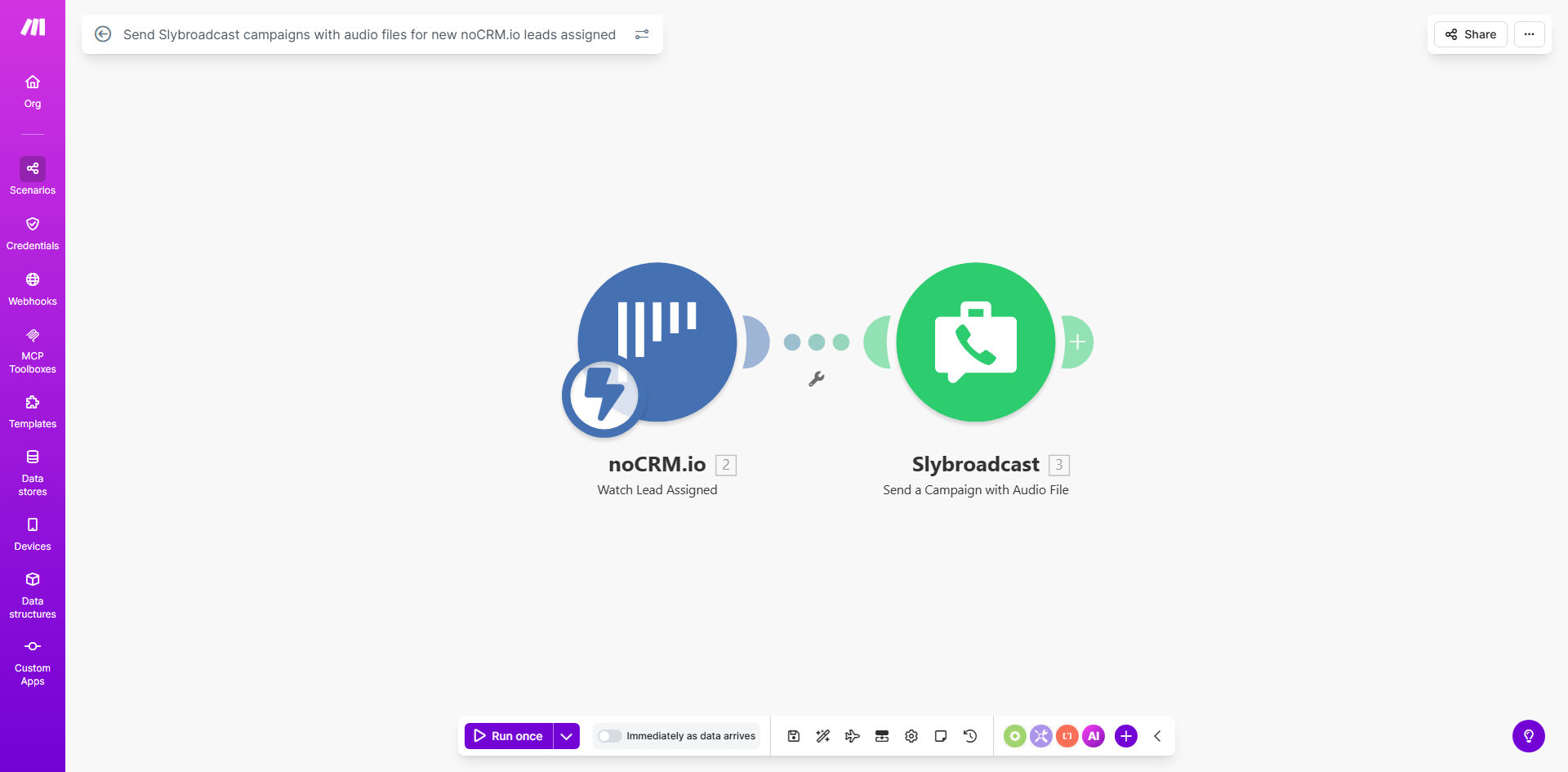
Automation workflow diagram connecting noCRM.io and Slybroadcast

What This Workflow Does

This automation solves the challenge of immediate, personalized follow-up with new leads in your sales pipeline. When sales teams manually call every new lead, they waste hours on dialing and voicemails while struggling to maintain consistency.

The workflow automatically triggers a Slybroadcast voice campaign whenever a new lead is assigned in noCRM.io. It sends a pre-recorded audio message (or converts text to speech) containing the lead's name and relevant details, creating instant personal connection at scale.

How It Works

1. Lead assignment trigger

Make.com monitors your noCRM.io account for new lead assignments through real-time API connections.

2. Data enrichment

The workflow extracts lead details (name, phone, custom fields) and matches them with your preferred audio message template.

3. Voice message delivery

Slybroadcast receives the lead data and initiates a personalized voice campaign using your selected audio file or text-to-speech conversion.

4. Engagement tracking

Response data flows back to your CRM, showing which leads listened to messages and for how long.

Who This Is For

This automation delivers the most value for:

  • Sales teams handling 50+ leads per week
  • Real estate agents managing buyer inquiries
  • Financial advisors onboarding new clients
  • Service businesses with time-sensitive leads
  • Teams wanting to stand out from email-only competitors

What You'll Need

  1. Active noCRM.io account with API access enabled
  2. Slybroadcast subscription with available credits
  3. Pre-recorded audio files or text scripts for messages
  4. Make.com account (free tier works for basic setup)

Quick Setup Guide

  1. Connect your noCRM.io account to Make.com using OAuth
  2. Authorize Slybroadcast API access in Make
  3. Map your CRM fields to Slybroadcast campaign parameters
  4. Upload audio files or configure text-to-speech templates
  5. Test with sample lead data before activating live

Pro tip: Create 3-5 different audio message variations and A/B test them. Track which versions get the highest listen rates and conversions.

Key Benefits

8x faster lead follow-up - Messages go out within minutes of lead assignment instead of hours or days waiting for manual calls.

40-60% higher response rates compared to email-only sequences, according to Slybroadcast customer data.

15+ hours saved weekly for sales teams handling 100+ leads, eliminating manual dialing and voicemails.

Consistent brand messaging with professionally recorded audio instead of varying agent performances.

Scalable personalization - Each lead hears their name and relevant details without manual effort.

Frequently Asked Questions

Common questions about voice messaging automation and CRM integration

Voice messages have 8x higher engagement than text messages. Personalized audio creates human connection immediately after lead assignment, increasing response rates by 40-60% compared to email-only follow-ups.

Unlike emails that get buried, voice messages stand out in the recipient's call log. They convey tone and emotion that text cannot, building trust faster in the sales process.

Slybroadcast connects via API to popular CRMs like noCRM.io. When a new lead is assigned, it triggers an automated voice message campaign using pre-recorded audio files or text-to-speech conversion.

The integration passes all relevant lead data (name, phone, custom fields) to personalize each message. You can create different message flows based on lead source, product interest, or other CRM criteria.

Sales teams, real estate agencies, financial advisors, and service businesses see the highest impact. Any industry where personal connection improves conversion benefits from immediate voice follow-ups.

Businesses with time-sensitive leads (like home services or event planning) gain particular advantage from same-day voice outreach that email can't match for urgency.

Yes, Slybroadcast provides detailed analytics showing which leads listened to messages, call duration, and response rates. This data syncs back to your CRM for complete tracking.

You'll see exactly which messages perform best, optimal send times, and which lead segments engage most. These insights help refine both your messaging and lead qualification process.

Keep messages under 30 seconds, use the lead's name, focus on one clear value proposition, and include a specific call-to-action. Test different scripts to optimize performance.

Record in a quiet space with natural conversational tone. Avoid sounding scripted - imagine you're leaving a voicemail for a colleague. Include pauses for listener processing.

  • Open with the recipient's name
  • State your purpose immediately
  • End with clear next steps

Automated voice campaigns cost 80-90% less than manual calls while maintaining personalization. A sales team handling 100 leads/week saves 15+ hours with equivalent engagement.

Factor in the opportunity cost - those saved hours become revenue-generating activities. The ROI typically justifies the automation within 1-2 months based on increased lead conversion rates.

Absolutely. Our team at GrowwStacks specializes in building tailored voice messaging workflows integrated with your CRM, call tracking, and analytics systems. We'll design a solution matching your sales process.

Custom automations can incorporate lead scoring, multi-step voice sequences, and integration with your other tools. We handle the technical implementation so you can focus on conversions.

  • Free consultation to assess your needs
  • CRM-specific implementation
  • Ongoing optimization support

Need a Custom Voice Messaging Automation?

This free template is a starting point. Our team builds fully tailored automation systems for your specific business needs.