What This Workflow Does
In today's competitive landscape, the first touchpoint with a new lead can make or break a deal. Traditional email follow-ups often get lost in crowded inboxes, leading to missed opportunities and cold leads. This automation solves that problem by leveraging the power of the human voice.
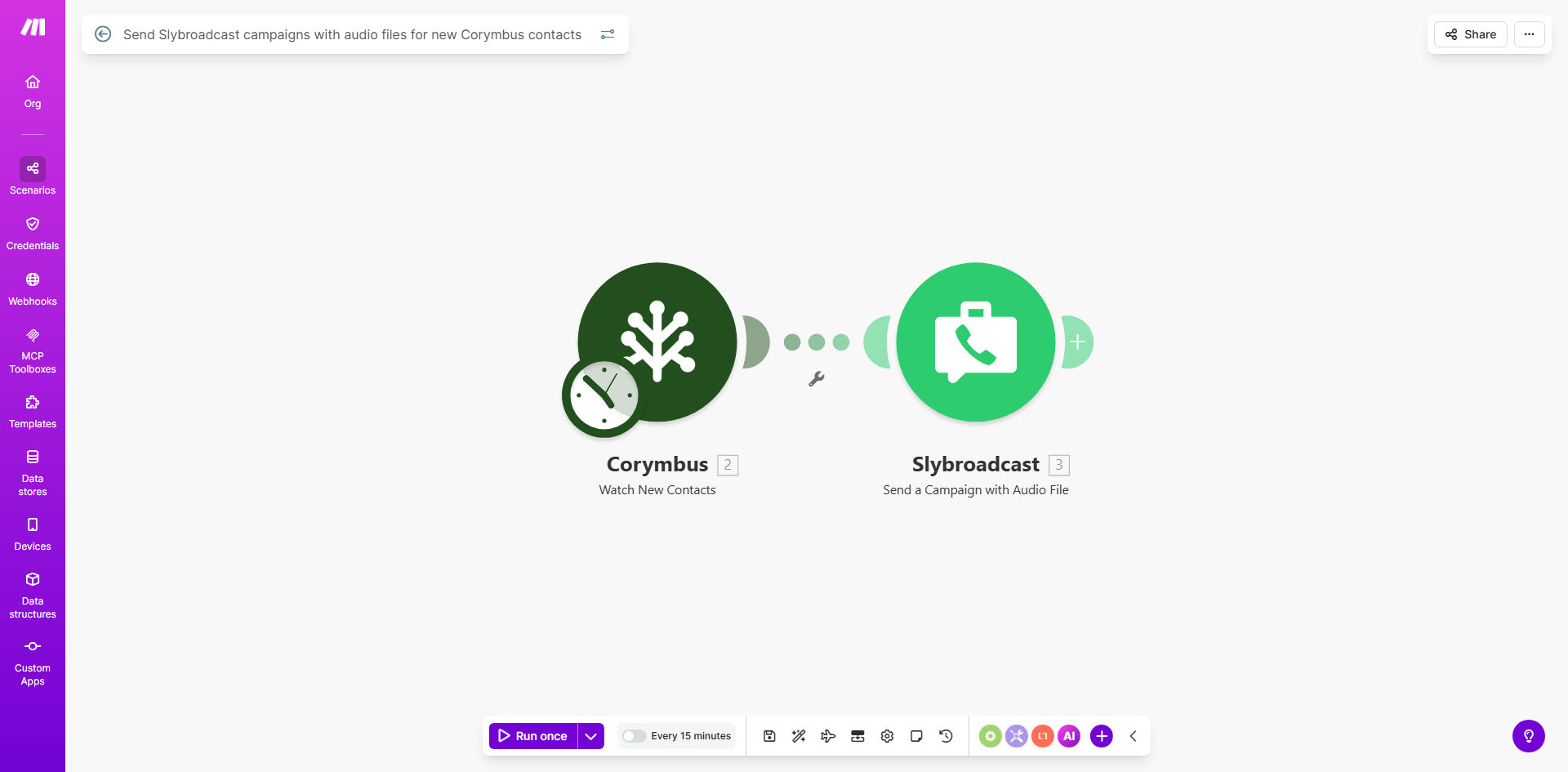
This workflow connects your Corymbus CRM to Slybroadcast, a voice messaging platform. Every time a new contact is added to Corymbus, the system automatically triggers a personalized audio message to be sent via Slybroadcast. This transforms your lead follow-up from a manual, delayed task into an instant, personal, and scalable communication channel.
The core value lies in its immediacy and personal touch. Instead of a salesperson needing to remember to call or send an email, the lead receives a warm, recorded voice message within minutes of expressing interest. This dramatically increases the likelihood of engagement, helping you stand out and build rapport faster than competitors relying solely on digital text.
How It Works
The automation runs on a reliable, clockwork schedule, ensuring no new contact slips through the cracks.
Step 1: Monitor New Corymbus Contacts
The workflow is set to check your Corymbus account at regular intervals (e.g., every 15 minutes). It searches for contacts that have been created since the last check. This "watchdog" module is the trigger for the entire sequence.
Step 2: Prepare Contact & Campaign Data
For each new contact found, the automation gathers relevant data. This can include the contact's name, phone number, company, and any custom fields you use for segmentation (like lead source or product interest). This data is formatted and prepared for the next step.
Step 3: Send Audio Campaign via Slybroadcast
The workflow then connects to your Slybroadcast account. It uses the prepared contact data to select or reference the appropriate audio file (which you've pre-recorded or dynamically generated). It initiates a campaign, sending the personalized voice message directly to the lead's phone number.
Step 4: Log & Confirm Delivery
Finally, the system can log the action—recording which contact received which message and when—back into Corymbus or a separate spreadsheet. This creates an audit trail for your sales team and confirms the automated follow-up was executed successfully.
Pro tip: Record multiple versions of your welcome audio message tailored to different lead sources (e.g., webinar attendees vs. website downloads). The automation can be extended to choose the right message based on data from Corymbus, making your outreach hyper-relevant.
Who This Is For
This automation is a game-changer for sales and marketing teams where personal connection and speed are critical. It's ideal for:
- Real Estate Agents & Brokers: Immediately follow up with potential buyers or sellers who fill out a contact form, making your service feel attentive and personal.
- Financial Advisors & Insurance Brokers: Reach out to new prospects with a trustworthy voice message to discuss their needs, building confidence from the first interaction.
- B2B Service Providers & Agencies: Stand out to new inbound leads with a memorable audio introduction that cuts through the noise of generic sales emails.
- High-Volume Sales Teams: Automate the initial "touch" for all new leads, ensuring 100% follow-up rate and freeing up reps to focus on qualified, engaged conversations.
- Small Business Owners: Compete with larger companies by automating professional, personal outreach without needing a full-time sales assistant.
What You'll Need
To implement this workflow, you'll need the following accounts and assets set up:
- A Make.com account (free or paid plan) to host and run the automation.
- An active Corymbus CRM account with contacts being added (manually or via forms).
- A Slybroadcast account with credits available for sending voice messages.
- At least one pre-recorded audio file (MP3 or WAV) uploaded to Slybroadcast to use as your campaign message.
- The phone numbers for your new contacts must be stored in a compatible format within Corymbus.
Quick Setup Guide
You can have this automation running in under 30 minutes by following these steps:
- Get the Template: Click "Get This Workflow" to copy the ready-made scenario into your Make.com account.
- Connect Corymbus: In the first module, authorize Make.com to access your Corymbus account. Set the "Watch" interval (e.g., every 15 minutes).
- Connect Slybroadcast: In the Slybroadcast module, authorize the connection and select the specific audio file you want to send for new contacts.
- Map the Data: Ensure the phone number field from Corymbus is correctly mapped to the recipient field in Slybroadcast. Add any personalization (like using the contact's first name in a dynamic audio script if supported).
- Test & Activate: Turn on the scenario and create a test contact in Corymbus. Verify that the audio message is sent correctly. Once confirmed, your automation is live.
Key Benefits
Increase lead engagement by up to 300%. Voice messages have significantly higher open and response rates compared to email, ensuring your first impression is both heard and remembered.
Eliminate manual follow-up delays. Automate the initial contact to happen within minutes, not hours or days, capitalizing on the peak of a lead's interest and dramatically reducing lead cooling time.
Free up 5-10 hours per week for sales teams. By automating the repetitive task of initial outreach, your sales representatives can redirect their energy towards closing deals and having meaningful conversations with warm leads.
Ensure 100% follow-up consistency. Never miss a new lead again. The system works around the clock, providing reliable, uniform outreach that doesn't depend on human memory or availability.
Build stronger personal connections at scale. Deliver the sincerity and tone of a human voice to hundreds of leads simultaneously, creating a scalable personal touch that fosters trust and improves conversion rates.