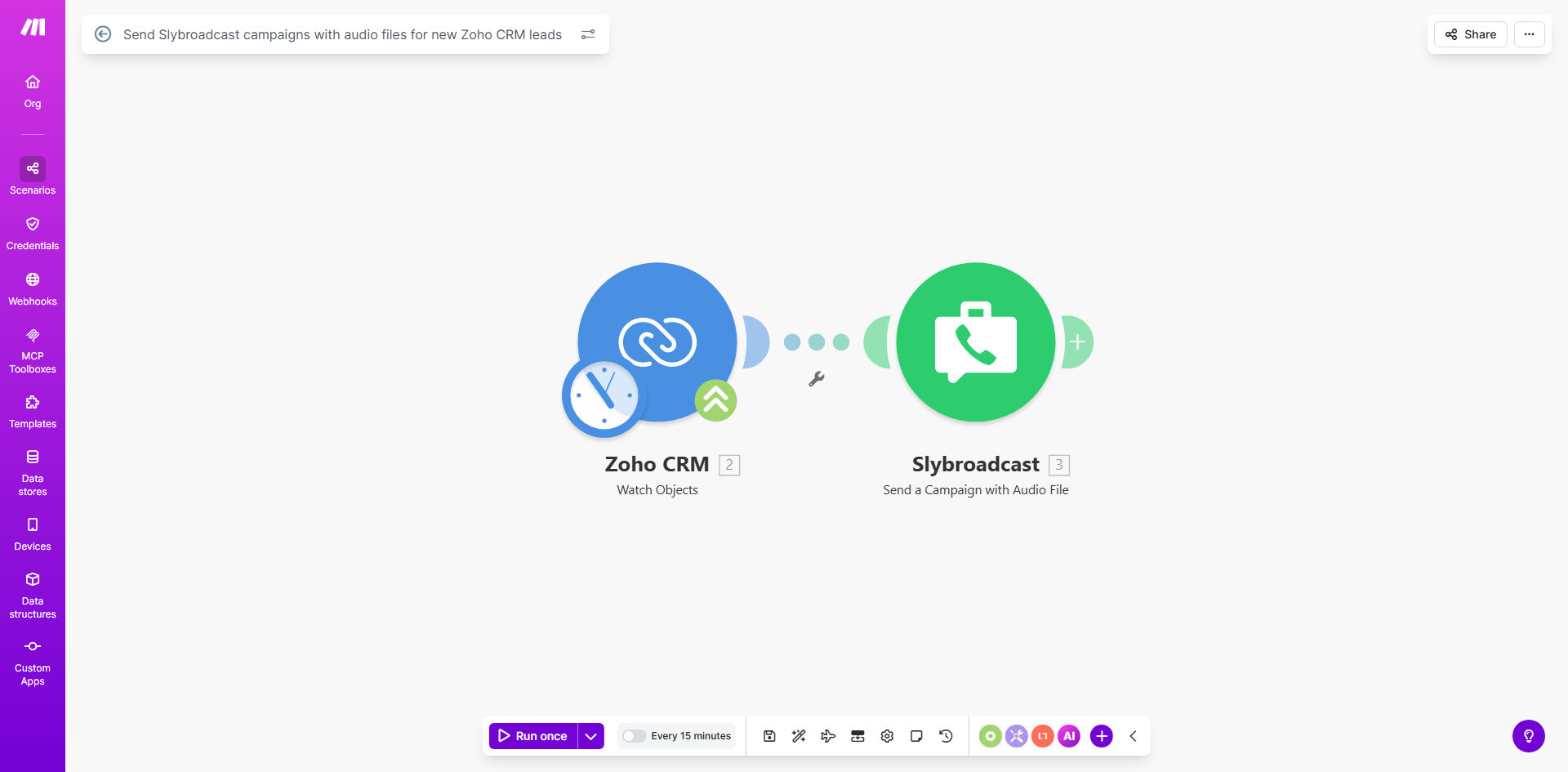
What This Workflow Does
In today's competitive sales environment, the first touchpoint with a lead is critical. Most businesses rely on slow, impersonal emails or texts that get lost in the noise. This results in missed opportunities, low engagement rates, and sales teams wasting precious time on manual, repetitive outreach.
This automation solves that by creating an instant, personal connection. The moment a new lead is added to your Zoho CRM, it automatically triggers a personalized voice message sent via Slybroadcast. This human touch cuts through digital clutter, significantly increasing the likelihood of a response. It transforms your lead follow-up from a passive, forgettable task into an active, memorable engagement strategy.
How It Works
The workflow acts as a intelligent bridge between your CRM and your communication platform, operating silently in the background to ensure no lead is ever left waiting.
Step 1: Monitor Zoho CRM for New Leads
The Make.com scenario is set to watch a specific Zoho CRM module (like Leads or Contacts) at regular intervals. It uses a "Watch Records" module to detect any new entries that match your criteria, such as leads from a web form or a specific campaign.
Step 2: Prepare Lead Data & Audio Campaign
Once a new lead is detected, the workflow pulls relevant data like the lead's name, phone number, and any custom fields. This data can be used to personalize the audio message. The scenario then prepares the Slybroadcast API call, attaching the correct audio file and mapping the lead's phone number as the recipient.
Step 3: Send the Voice Message via Slybroadcast
The core action: Slybroadcast receives the API request and immediately places a call to the lead's phone number, delivering your pre-recorded audio message. The lead hears a friendly, personalized voice message from your business within minutes of expressing interest.
Step 4: Log Results & Handle Errors
The workflow can log the success or failure of the send back to Zoho CRM as a note or update a custom field. If the send fails (e.g., invalid number), it can trigger an alternative action, like notifying your team via email or Slack, ensuring you never miss a follow-up opportunity.
Pro tip: Record multiple versions of your welcome message for different lead sources (e.g., one for webinar sign-ups, another for ebook downloads). Use router logic in Make.com to send the most relevant audio, increasing personalization and impact.
Who This Is For
This automation is a game-changer for sales-driven organizations and individuals who value personal connection. It's ideal for:
- Real Estate Agents & Brokers: Immediately follow up with new property inquiries with a warm, trustworthy voice.
- Insurance Agencies & Financial Advisors: Build instant rapport with potential clients who have submitted quotes or contact forms.
- B2B Sales Teams & SaaS Companies: Engage trial sign-ups or demo requests with a personal touch that stands out.
- High-Volume Local Service Businesses: Plumbers, roofers, and HVAC companies can instantly confirm leads and schedule appointments faster.
- Marketing Agencies: Offer a premium, high-touch follow-up service for their own clients' leads.
What You'll Need
- A Make.com account (free tier available to get started).
- An active Zoho CRM account with API access enabled.
- A Slybroadcast account with credits available for sending voice messages.
- At least one pre-recorded audio file (MP3 or WAV format) uploaded to your Slybroadcast media library.
- The phone numbers of your new leads stored in a field within Zoho CRM.
Quick Setup Guide
You can have this automation running in under 30 minutes. Follow these steps after clicking "Get This Workflow".
- Clone the Template: In Make.com, use the provided link to create a copy of the scenario in your own workspace.
- Connect Zoho CRM: In the first module, authorize your Zoho CRM account and select the specific module (e.g., "Leads") you want to monitor for new records.
- Connect Slybroadcast: Authorize your Slybroadcast account in the subsequent module. Select the audio file you wish to send from your media library.
- Map Data Fields: Ensure the phone number field from Zoho CRM is correctly mapped to the recipient field in the Slybroadcast "Send Voice Message" action.
- Set Schedule & Activate: Configure how often the scenario checks for new leads (e.g., every 15 minutes). Turn the scenario ON. It will now run automatically.
Key Benefits
Increase lead response rates by 3-5x. A personal voice message is far more engaging than another text or email, leading to significantly higher open and callback rates.
Eliminate manual follow-up for new leads, saving 5-10 hours per week. Your sales team is freed from the tedious task of initial outreach, allowing them to focus on qualified conversations and closing deals.
Ensure 100% consistency in your first-touch strategy. Every single lead receives the same high-quality, timely welcome message, building a professional and reliable brand impression.
Shorten your sales cycle. By engaging leads when their interest is hottest—within minutes of them contacting you—you accelerate them through the funnel towards a conversation or sale.
Gain a competitive edge with innovative outreach. While your competitors rely on slow email, you're building personal relationships instantly, making your business the memorable choice.