Make.com GitLab Pastebin Developer Tools Code Sharing

Create Pastebin Pastes from New GitLab Issues

Automatically convert GitLab issues to shareable Pastebin pastes with this Make.com workflow template

Get This Workflow → Make.com · GitLab · Free Template
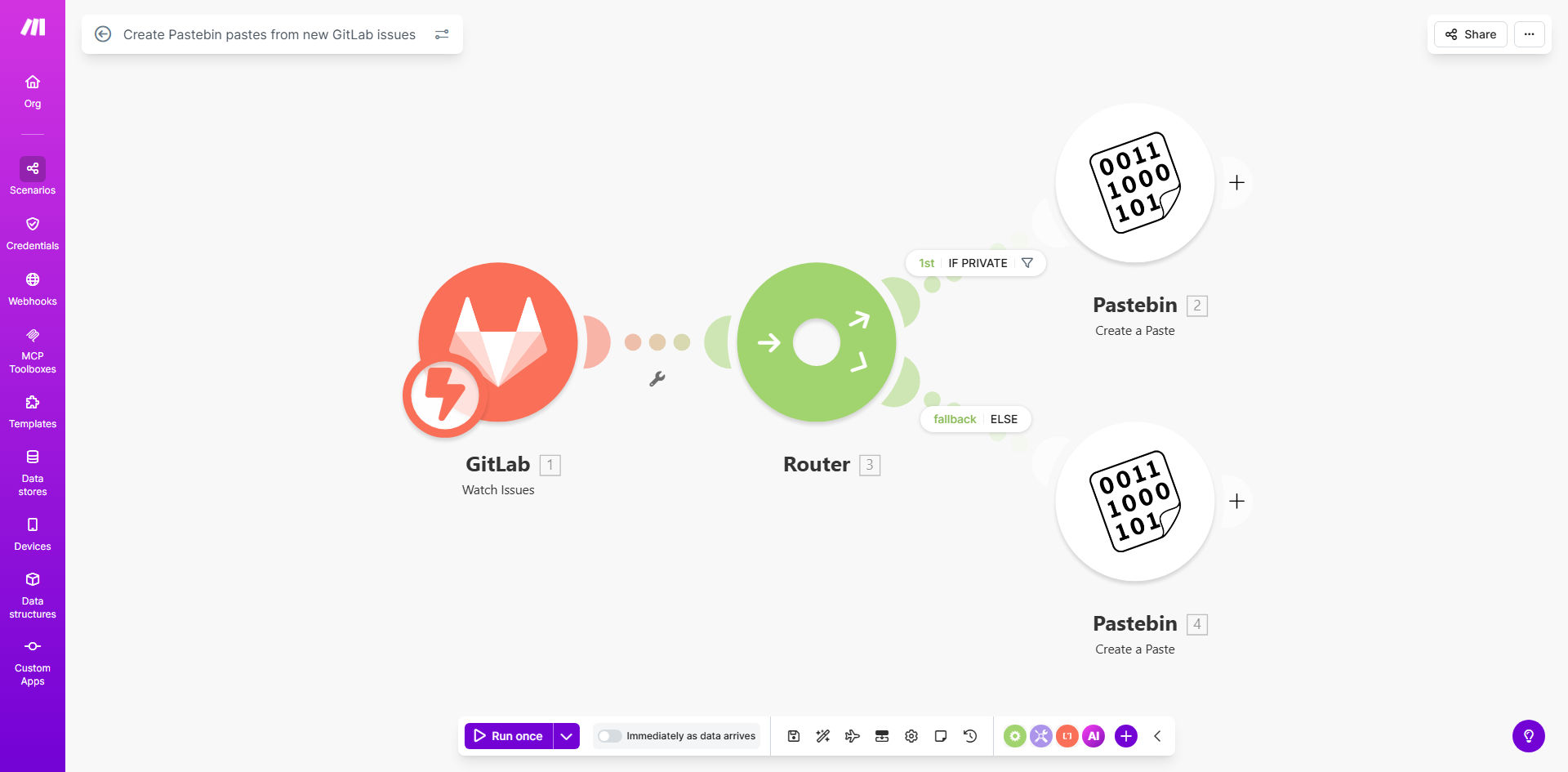
Make.com workflow diagram showing GitLab to Pastebin automation

What This Workflow Does

This automation solves a common pain point for development teams using GitLab for issue tracking. When developers create issues containing code snippets (like bug reports or feature implementations), team members often need to share these code segments externally for debugging or collaboration purposes.

The workflow automatically detects new GitLab issues, extracts any code blocks or relevant content, and creates corresponding Pastebin pastes. It intelligently handles privacy settings - creating private pastes for confidential issues and public ones for regular issues. This eliminates manual copying while maintaining proper access controls.

How It Works

1. New GitLab Issue Detection

The workflow monitors your GitLab repository for new issues using webhooks or API polling. When a new issue is created, Make.com receives the complete issue details including description, labels, and confidentiality status.

2. Content Extraction & Formatting

The system parses the issue content to identify code blocks (marked with ) or other specified content patterns. It formats this content with appropriate syntax highlighting based on the language specified in the code block.

3. Pastebin Creation

Using Pastebin's API, the workflow creates a new paste with the extracted content. The paste's privacy setting automatically matches the GitLab issue's confidentiality status. The paste includes reference back to the original GitLab issue for traceability.

4. Notification & Logging

The system can optionally notify team members via Slack, email, or GitLab comments about the created paste. It also logs all actions for audit purposes, including paste URLs and creation timestamps.

Pro tip: Configure the workflow to add your team's standard header/footer to pastes, including disclaimer text, contact information, or expiration dates for sensitive code.

Who This Is For

This automation delivers the most value for:

  • Development teams using GitLab for issue tracking
  • Open source projects that need to share code snippets with contributors
  • QA teams that frequently share bug reproduction steps
  • Technical support teams handling customer-reported issues
  • Engineering managers who want to streamline code review processes

What You'll Need

  1. A GitLab account with API access to your repositories
  2. A Pastebin account with API credentials (Pro account recommended for private pastes)
  3. A Make.com account (free tier works for basic usage)
  4. Webhook access to your GitLab instance (for real-time triggering)

Quick Setup Guide

  1. Install the template from Make.com's template library
  2. Connect your GitLab account in Make.com's connections panel
  3. Add your Pastebin API credentials in the workflow settings
  4. Configure which GitLab projects to monitor for new issues
  5. Set your default paste format preferences (syntax highlighting, expiration, etc.)
  6. Test with a sample GitLab issue to verify paste creation
  7. Deploy the workflow to begin automatic processing

Key Benefits

Saves 5-10 minutes per issue by eliminating manual copying of code to Pastebin. Developers can focus on solving problems rather than administrative tasks.

Reduces sharing errors by automatically matching paste privacy to issue confidentiality. No more accidental public sharing of sensitive code.

Improves team collaboration with standardized paste formatting that includes issue references and proper syntax highlighting.

Creates audit trails by logging all paste creations with timestamps and user references for compliance purposes.

Scales with your team by handling any volume of GitLab issues without additional manual effort.

Frequently Asked Questions

Common questions about GitLab-Pastebin automation and integration

Automating Pastebin creation from GitLab issues helps developers quickly share code snippets with team members or external collaborators without manual copying. It maintains version control while enabling easy sharing of specific code segments for debugging or discussion purposes.

For example, when a developer reports a bug with reproduction code, the automation instantly creates a shareable paste that QA can use across different environments, without needing access to the full repository.

This automation saves developers 5-10 minutes per issue by eliminating manual copying of code to Pastebin. It ensures consistent formatting and automatically handles privacy settings based on the original issue's confidentiality, reducing human error in sharing sensitive code.

The standardized output also makes it easier for team members to quickly understand and work with shared code snippets, as they follow a predictable format with proper syntax highlighting and contextual information.

This workflow works particularly well for bug reports containing code snippets, feature requests with example implementations, or any issue where developers need to share executable code segments for discussion or troubleshooting purposes.

It's less valuable for purely textual issues without code blocks, though you can configure it to create pastes from any issue content if desired. The template includes filters to only process issues with specific labels or in certain projects.

Yes, the Make.com template allows customization of the Pastebin content format. You can include issue metadata, format code with syntax highlighting, add contextual comments, or modify the privacy settings to match your team's collaboration needs.

Common customizations include adding team branding, setting default expiration for sensitive pastes, including clickable links back to the original issue, or prepending standard warning text for confidential code.

The workflow respects GitLab's confidentiality settings, automatically creating private pastes for confidential issues. All connections use API authentication, and you can configure additional security measures like IP restrictions or expiration dates for sensitive pastes.

For maximum security, use Pastebin Pro accounts (required for private pastes), enable two-factor authentication on both GitLab and Pastebin, and regularly audit your paste creation logs. The template can be modified to require manager approval for certain confidential pastes.

You can modify the template to use other code sharing platforms like GitHub Gists, CodePen, or internal documentation systems. The core workflow of extracting code from issues remains similar, just changing the destination platform's API integration.

Each alternative has different tradeoffs: GitHub Gists offer better version control integration but less anonymity, while internal systems provide maximum security but require more setup. The template structure adapts easily to these variations.

Yes, GrowwStacks specializes in building custom automation solutions for developer workflows. We can create tailored GitLab-Pastebin integrations with your specific formatting rules, approval workflows, security requirements, and team collaboration features.

Our typical customizations include adding multi-level approval for sensitive pastes, integrating with your internal authentication systems, creating detailed audit logs, or building dashboards to track paste usage across teams. We'll design a solution that fits precisely into your existing development processes.

  • Custom approval workflows for sensitive code
  • Integration with internal security systems
  • Usage analytics and reporting dashboards

Need a Custom GitLab-Pastebin Automation?

This free template is a starting point. Our team builds fully tailored automation systems for your specific business needs.