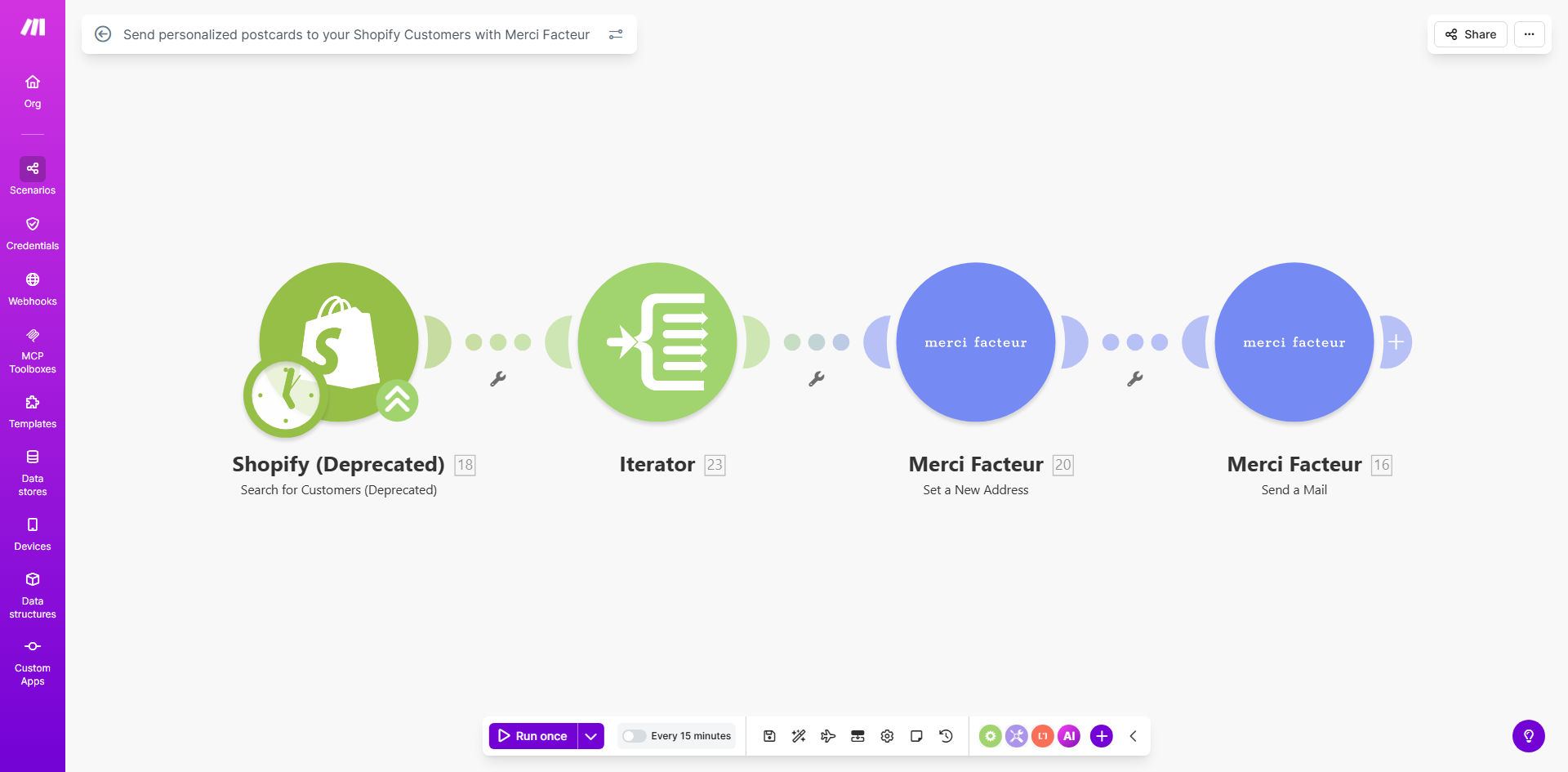
What This Workflow Does
In the crowded world of digital marketing, a physical postcard can be a breath of fresh air for your customers. This automated workflow solves the problem of manual, time-consuming direct mail campaigns by seamlessly connecting your Shopify store to Merci Facteur, a leading online printing and mailing service.
The automation listens for specific customer events in Shopify—like a completed purchase, a birthday, or a period of inactivity—and automatically triggers the creation and sending of a personalized postcard. This transforms a traditionally slow, labor-intensive process into a scalable marketing channel that builds genuine customer relationships and drives repeat business.
Instead of exporting CSV files, manually designing cards, and managing postal logistics, this system handles everything from data transfer to mail delivery with a single, automated trigger. It ensures your thoughtful gestures are never forgotten in the daily hustle, turning customer data into tangible moments of connection.
How It Works
The workflow acts as a smart bridge between your e-commerce data and physical mail delivery. Here’s the step-by-step process:
Step 1: Trigger from Shopify
The automation is initiated by a specific event in your Shopify store. This could be a new order being placed, a customer's birthday field being updated, or a filter identifying customers who haven't purchased in a set timeframe.
Step 2: Fetch Customer Data
Make.com retrieves the relevant customer details from Shopify, including their full name, shipping address, order value, and any other custom properties you wish to use for personalization.
Step 3: Design Personalization
The customer data is mapped into a pre-designed postcard template within Merci Facteur. Variables like the customer's first name, order number, or a special offer code are dynamically inserted, making each postcard unique.
Step 4: Automate the Send Order
Make.com sends the finalized design and the customer's verified address to Merci Facteur via its API. Merci Facteur then takes over, handling the printing, stamping, and physical mailing of the postcard.
Step 5: Log & Confirm
The workflow can log each sent postcard in a Google Sheet or notify your team via Slack, providing a clear audit trail and confirming that the touchpoint was executed.
Pro tip: Start with a simple "Thank You" campaign for new customers. The ROI is clear, and it sets a positive tone for the relationship. Once that's running smoothly, add more complex triggers like win-back or birthday campaigns.
Who This Is For
This automation is ideal for any Shopify store owner or marketer looking to add a high-impact, personal touch to their customer experience strategy. It's particularly valuable for:
DTC (Direct-to-Consumer) Brands: Companies selling physical products where unboxing and physical mail align with the brand ethos. A postcard can enhance the post-purchase experience.
Subscription Box Services: Businesses that rely on recurring revenue and customer loyalty. Automated birthday or renewal reminder postcards can significantly reduce churn.
Boutique & Niche E-commerce Stores: Smaller shops where customer relationships are paramount. Sending a personalized thank-you note can differentiate you from large marketplaces.
Marketing Teams tired of purely digital ad spend and seeking a tangible channel with higher engagement rates to reactivate lapsed customers or reward VIPs.
What You'll Need
To implement this workflow successfully, ensure you have the following set up:
- A Shopify Store with admin access to create API credentials or install a Make.com integration app.
- An active account with Merci Facteur, including access to their API keys for automation.
- A Make.com account (free tier may suffice for low volume).
- Clean and validated customer address data in Shopify. International sends require proper formatting.
- Pre-designed postcard templates in your Merci Facteur account, with placeholder fields for personalization.
- A clear campaign goal (e.g., thank you, birthday, win-back) to define your automation trigger and message.
Quick Setup Guide
Follow these steps to get your postcard automation live in under an hour:
- Duplicate the Template: Click "Get This Workflow" to copy the ready-made scenario into your Make.com account.
- Connect Your Apps: In the Make.com scenario, authorize the connections to your Shopify store and your Merci Facteur account using the provided API keys.
- Define Your Trigger: Configure the first Shopify module. Choose your trigger event (e.g., "Updated Customer" for birthdays, or "Watch Orders" for post-purchase thank-yous).
- Map the Data: In the Merci Facteur module, map the Shopify customer fields (name, address) to the corresponding fields in your chosen postcard template.
- Set a Filter (Optional): Add a filter before the send action to control costs. For example, only send to customers in a specific country or with a minimum order value.
- Test Thoroughly: Run a test with a controlled trigger (e.g., a test order or a specific customer) and verify a postcard is created in your Merci Facteur dashboard.
- Activate & Monitor: Turn the scenario on and monitor the logs for the first few sends. Adjust design or messaging based on initial results.
Key Benefits
Turn Customer Data into Tangible Loyalty. Every postcard sent is a direct application of your customer data, creating a personalized experience that digital ads cannot match, significantly boosting customer lifetime value.
Eliminate Manual Grunt Work. Automate the entire process from data extraction to mail delivery. What used to take hours of manual labor per campaign now runs unattended, saving 5-10 hours per month for a moderate-sized store.
Scale Your Personal Touch. You can maintain a "small shop" feel even as your customer base grows into the thousands. The automation ensures no customer milestone or purchase goes uncelebrated.
Improve Marketing ROI with Hybrid Campaigns. Combine physical postcards with email or SMS follow-ups. A postcard can drive a customer back online with a unique offer, creating a trackable omnichannel loop that increases overall campaign effectiveness.
Gain a Competitive Edge. In a market saturated with emails, a well-timed, physical piece of mail stands out. This automation makes it cost-effective to use direct mail as a consistent retention tool, not just a one-off campaign.