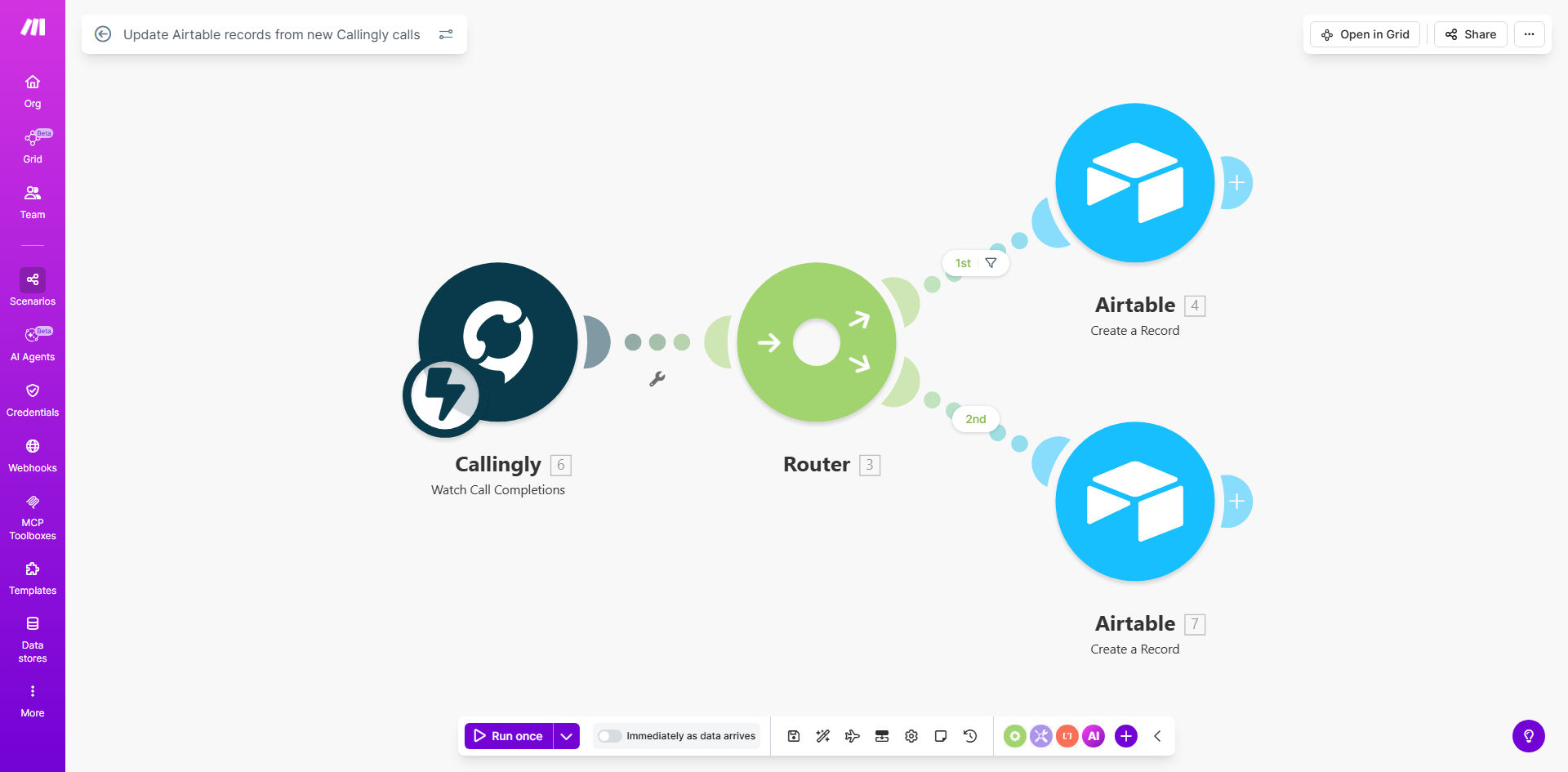
What This Workflow Does
For sales and customer support teams, every call is a valuable piece of data that needs to be captured accurately and promptly. Manually transferring call details from a phone system like Callingly into your CRM (Airtable) is tedious, error-prone, and steals time from revenue-generating activities. This automation solves that problem completely.
This Make.com workflow acts as a seamless bridge between your communication platform and your customer database. Every time a new call is received, answered, or missed in Callingly, the workflow instantly triggers. It captures all relevant call metadata—such as caller ID, duration, timestamp, and status—and creates or updates a corresponding record in your designated Airtable base. This ensures your team has a real-time, accurate log of all customer interactions without lifting a finger.
The business value is immediate: reduced administrative overhead, improved data accuracy for reporting and forecasting, and faster response times since follow-up actions can be automated based on the call outcome logged in Airtable.
How It Works
The automation follows a clear, reliable sequence to ensure no call data falls through the cracks.
Step 1: Callingly Triggers the Workflow
The workflow is activated by a "Watch Events" module in Make.com connected to your Callingly account. The moment a call event (new, answered, completed, missed) occurs, Callingly sends a webhook with the call's details to Make.com, kicking off the automation process.
Step 2: Data is Parsed and Prepared
Make.com receives the raw call data. This step involves parsing the information—extracting the caller's phone number, name (if available), call duration, time, and any custom notes or tags from Callingly. The data is formatted to match the field structure of your target Airtable table.
Pro tip: Use this step to enrich the data. You could add a step to look up the caller in your existing Airtable contacts first, or append the local time zone based on the area code.
Step 3: Airtable Record is Updated or Created
The workflow then searches your specified Airtable base and table for an existing contact record matching the caller's information (typically by phone number or email). If a record is found, it updates that record, appending the new call log to a history field or updating a "Last Contact" date. If no record exists, it can create a new contact record, effectively building your CRM from inbound calls.
Who This Is For
This template is a game-changer for any business that relies on phone communication for customer relationships.
- Sales Teams: Track outbound and inbound sales calls, log deal stages, and automate follow-up tasks based on call outcomes.
- Customer Support: Maintain a support ticket history linked to phone calls, track resolution times, and improve customer service metrics.
- Small Business Owners: Who wear multiple hats and need a simple, automated way to keep track of all client conversations without a complex CRM setup.
- Agencies & Consultants: To log billable client communications automatically, ensuring accurate time tracking and project history.
What You'll Need
To implement this workflow, you only need a few accounts and a clear plan for your data.
- A Make.com account (free tier available).
- An active Callingly account with admin access to generate API credentials.
- An Airtable account with a base ready to receive call data. The template uses the "Sales CRM" example, but any base will work.
- A clear mapping of which Callingly data fields (caller number, duration, etc.) should go into which Airtable columns.
Quick Setup Guide
You can have this automation running in under 30 minutes by following these steps.
- Clone the Template: Click "Get This Workflow" to copy the template into your Make.com account.
- Connect Callingly: In the first module, authorize Make.com to access your Callingly account using your API key from the Callingly settings.
- Configure Airtable: In the Airtable module, connect your Airtable account and select the specific Base and Table where call records should be logged.
- Map Your Fields: This is the crucial step. Drag and drop data from the Callingly module into the corresponding fields in Airtable (e.g., map "Caller Number" to Airtable's "Phone" field).
- Test and Activate: Turn on the scenario and make a test call to your Callingly number. Check your Airtable base within seconds to confirm the record was created or updated successfully.
Key Benefits
Eliminate 5–10 hours of manual data entry per month per team member. Your sales and support reps can focus entirely on the conversation, not on post-call paperwork. This directly translates to more calls made and more issues resolved.
Achieve 100% call logging accuracy. Automated systems don't forget to log calls or make typos. Your CRM data becomes a reliable source of truth for performance analysis, forecasting, and customer history.
Enable real-time sales management and coaching. With calls instantly appearing in Airtable, managers can build live dashboards to monitor team activity, spot trends, and provide timely coaching based on actual call volume and outcomes.
Trigger sophisticated follow-up sequences. Once a call is logged as "needs follow-up" in Airtable, you can chain additional automations to send an email, schedule a task, or notify a manager—closing the loop faster and increasing conversion rates.
Scale your operations without adding administrative staff. As call volume grows, the automation handles the increased load effortlessly. There's no additional per-call cost or time investment, making growth more efficient and profitable.