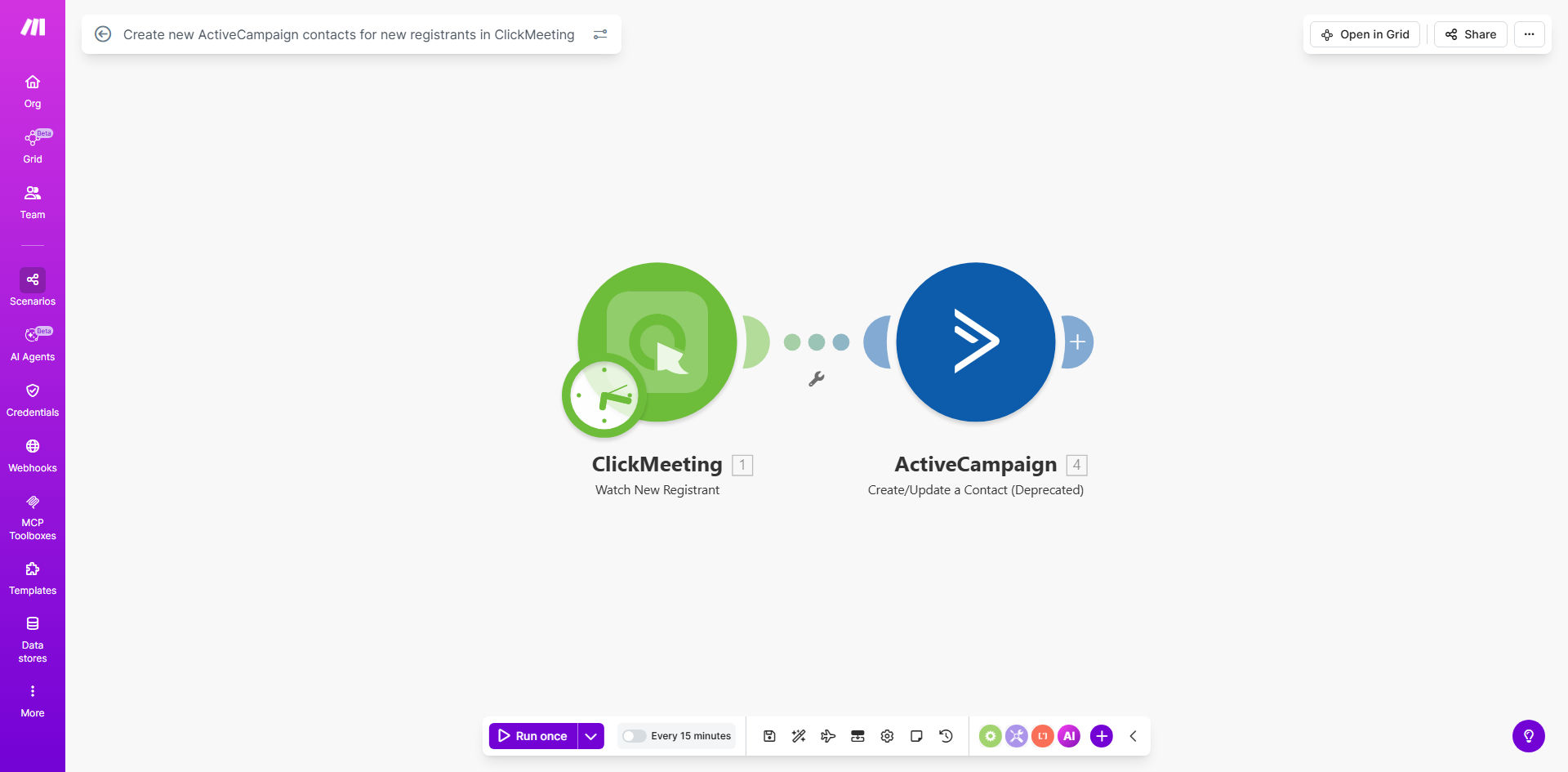
What This Workflow Does
Hosting webinars and online events is a powerful lead generation strategy, but the real value is lost if registrant data sits siloed in your event platform. Manually exporting lists and importing them into your email marketing tool is tedious, error-prone, and creates a critical delay in follow-up. This automation solves that problem by creating a seamless bridge between ClickMeeting and ActiveCampaign.
Every time a new person registers for your webinar, workshop, or meeting in ClickMeeting, this Make.com workflow triggers instantly. It captures the attendee's details—like their name, email, and company—and automatically creates a corresponding contact record in your ActiveCampaign account. This means your sales and marketing teams can begin nurturing that lead immediately with targeted emails, without lifting a finger.
How It Works
The workflow is a straightforward, reliable automation that acts as your digital data assistant.
Step 1: New Registration Detection
The scenario starts with a ClickMeeting module set to watch for the "New Registration" event. The moment a registration form is submitted, Make.com receives a webhook with all the submitted attendee data.
Step 2: Data Parsing and Preparation
Make.com processes the incoming data, mapping the relevant fields from ClickMeeting (e.g., email, first name, last name) to the correct field format expected by ActiveCampaign. You can also add logic here, such as applying a specific tag like "Webinar-Registrant-March".
Pro tip: Use this step to enrich the data. You can add the webinar title as a custom field in ActiveCampaign, allowing for hyper-segmented email campaigns later.
Step 3: ActiveCampaign Contact Creation
The final module uses your ActiveCampaign connection to create or update a contact. The new lead is seamlessly added to your chosen list, ready to be entered into an automation sequence, such as a pre-webinar reminder series or a post-event follow-up campaign.
Who This Is For
This automation is essential for marketers, coaches, consultants, and SaaS businesses that run regular online events.
- Marketing Teams: Who need to maximize lead conversion from webinars and ensure no registrant falls through the cracks.
- Solopreneurs & Coaches: Who host workshops and can't afford the time for manual admin work between sessions.
- Sales Teams: Who rely on fast, hot lead follow-up to book demos and close deals.
- Event Managers: Organizing virtual summits or multi-session events who need clean, automated attendee management.
What You'll Need
- A Make.com account (formerly Integromat). The free plan is sufficient to run this automation.
- A ClickMeeting account with events set up where you are collecting registrations.
- An ActiveCampaign account with an API key and at least one list ready to receive new contacts.
- The API credentials or OAuth connections for both ClickMeeting and ActiveCampaign to authorize the Make.com scenario.
Quick Setup Guide
You can have this automation running in under 15 minutes.
- Clone the Template: Click the "Get This Workflow" button to open the template in your Make.com account and create a copy.
- Connect Your Apps: Authorize Make.com to access your ClickMeeting and ActiveCampaign accounts by entering your API keys or logging in via OAuth.
- Configure the Trigger: In the ClickMeeting module, select the specific event or room you want to monitor for new registrations.
- Map the Data: In the ActiveCampaign "Create a Contact" module, map the ClickMeeting fields (like
registrant.email) to the corresponding ActiveCampaign contact fields. - Test & Activate: Use the "Run once" feature to test with a recent registration. Confirm the contact appears in ActiveCampaign, then turn the scenario to "ON".
Key Benefits
Eliminate 100% of manual data entry. Free your team from the repetitive, low-value task of copying and pasting email addresses between platforms. This can save 2-5 hours of work per event, which adds up to dozens of saved workdays per year.
Speed up lead follow-up time from hours to seconds. The moment a lead expresses interest by registering, they are in your marketing system. This allows you to send a confirmation or pre-event nurture email immediately, dramatically increasing engagement and conversion rates.
Ensure 100% data accuracy and completeness. Automated syncs remove human error. You no longer risk missing a lead due to a typo, a forgotten CSV export, or an import error. Every registrant is captured reliably.
Enable sophisticated, segmented email campaigns. By automatically tagging contacts or adding them to lists based on the webinar they attended, you can create highly personalized email sequences that resonate better and drive more action.
Scale your event marketing effortlessly. Whether you host one webinar a month or ten, the automation handles the workload seamlessly. You can grow your audience without proportionally increasing your administrative overhead.