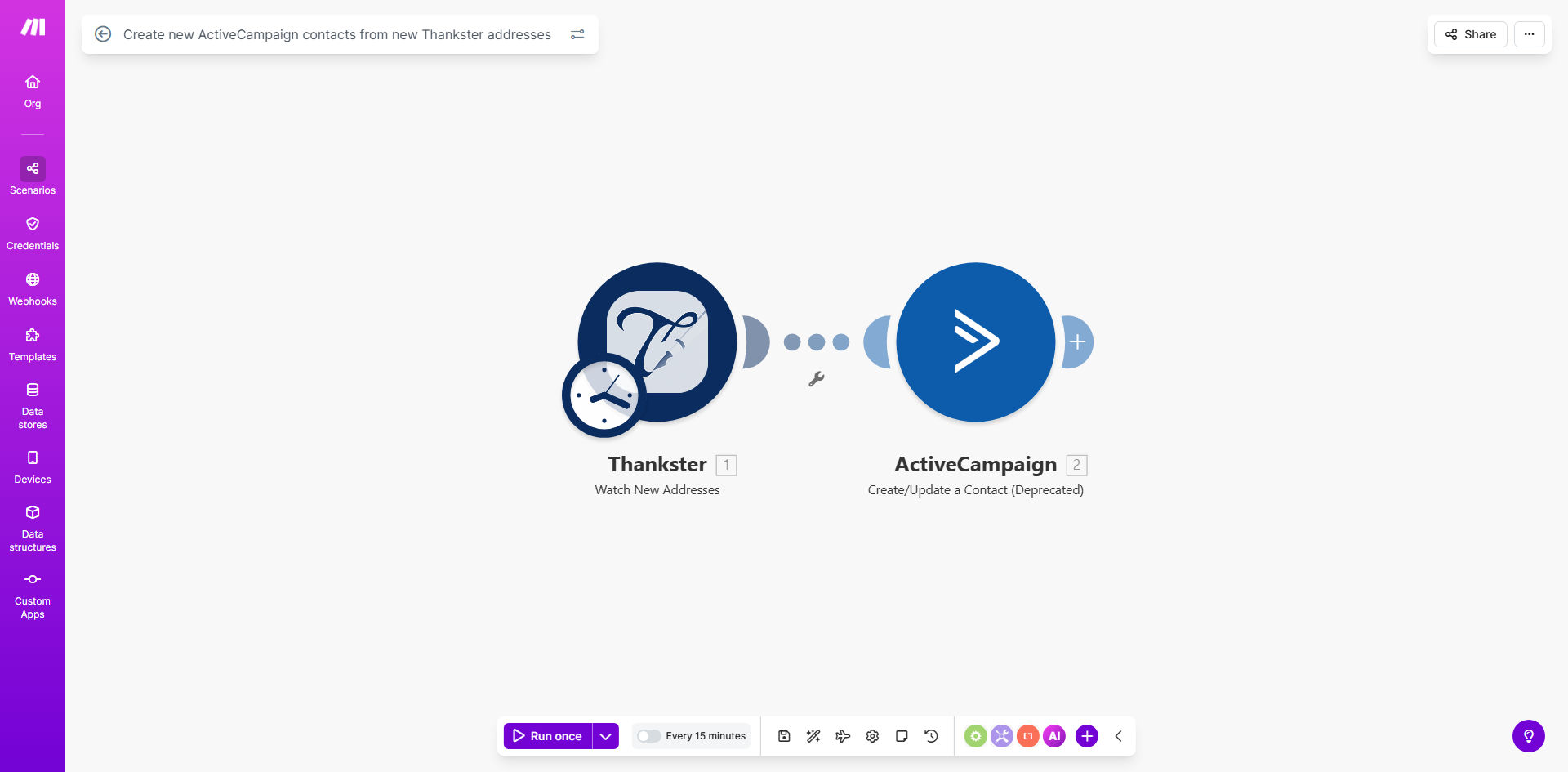
What This Workflow Does
If you use Thankster for creating and sending personalized greeting cards, you know that every order represents a valuable customer or recipient. But that data often sits isolated in your Thankster account, disconnected from your primary marketing tool, ActiveCampaign. Manually exporting lists and importing contacts is a repetitive, error-prone task that steals time from growing your business.
This automation solves that disconnect. It acts as a real-time bridge between Thankster and ActiveCampaign. Every time a new address is created in Thankster—whether from a new customer purchase or a gift recipient—this workflow instantly captures that information and creates a corresponding contact in your ActiveCampaign list. It turns a manual administrative chore into a seamless, automatic process that ensures no potential lead ever falls through the cracks.
How It Works
The workflow runs on Make.com, monitoring Thankster for new activity and pushing data to ActiveCampaign with precision.
Step 1: Watch for New Thankster Addresses
The scenario starts with a "Watch Addresses" module in Thankster. It sits idle until a new address record is created. This trigger could be from a completed checkout, a saved address book entry, or a recipient added by a customer.
Step 2: Structure the Contact Data
Make.com receives the raw data from Thankster, which includes fields like name, email, and postal address. In this step, the workflow maps these fields to the correct format expected by ActiveCampaign. You can customize this mapping to include custom fields for the occasion, card type, or order value.
Step 3: Create or Update the ActiveCampaign Contact
The final action is the "Create a Contact" module in ActiveCampaign. The workflow sends the formatted data, and a new contact is instantly added to your specified list. Advanced setups can include a search step first to check for duplicates, updating existing contacts instead of creating duplicates.
Pro tip: Add a tag in ActiveCampaign like "Source: Thankster" to all contacts created through this automation. This allows you to easily segment and report on the performance of this customer channel.
Who This Is For
This template is ideal for small to medium-sized businesses, solopreneurs, and marketing teams that use Thankster for sales and ActiveCampaign for customer relationship management.
- E-commerce stores selling personalized cards who want to nurture buyers with post-purchase sequences.
- Marketing agencies managing client campaigns who need to unify customer data from multiple touchpoints.
- Non-profits using Thankster for donor acknowledgments and wanting to add those donors to their newsletter list.
- Any business tired of copying and pasting contact information between platforms.
What You'll Need
- A Make.com account (free tier available).
- An ActiveCampaign account with API access enabled.
- A Thankster account where you are collecting customer or recipient addresses.
- API credentials for both ActiveCampaign and Thankster (available in your account settings).
- An ActiveCampaign list ready to receive the new contacts.
Quick Setup Guide
Get your automation live in under 15 minutes.
- Clone the template: Click "Get This Workflow" above to open the template in your Make.com account and create a copy.
- Connect your apps: In the Make.com scenario, click on the Thankster and ActiveCampaign modules to authenticate each with your API keys.
- Configure the trigger: Ensure the Thankster module is set to watch the correct "Address" event.
- Map your fields: Review the data mapping between Thankster and ActiveCampaign. Adjust the field names if your data structure differs.
- Set the target list: In the ActiveCampaign module, select the specific list where new contacts should be added.
- Test and activate: Turn on the scenario and create a test address in Thankster to verify a contact appears in ActiveCampaign.
Key Benefits
Eliminate manual data entry forever. This automation removes a tedious, low-value task from your or your team's workload. What used to require logging into two systems and copying data now happens silently in the background.
Improve marketing speed and relevance. Contacts are added to ActiveCampaign in real-time. This means you can trigger a welcome or thank-you email sequence within minutes of a purchase, dramatically increasing engagement and perceived customer care.
Maintain a 100% accurate contact list. Automated syncs prevent human errors like typos in email addresses or missed entries. Your ActiveCampaign list becomes a real-time reflection of your actual Thankster customer base.
Gain better customer insights. By having all contacts in one central hub (ActiveCampaign), you can track their full journey—from first card purchase through email engagement to potential repeat buys—enabling smarter segmentation and retargeting.
Scale your operations effortlessly. Whether you get 10 orders a day or 100, the automation handles the volume instantly without any additional work or cost on your part, allowing your business to grow without administrative bottlenecks.