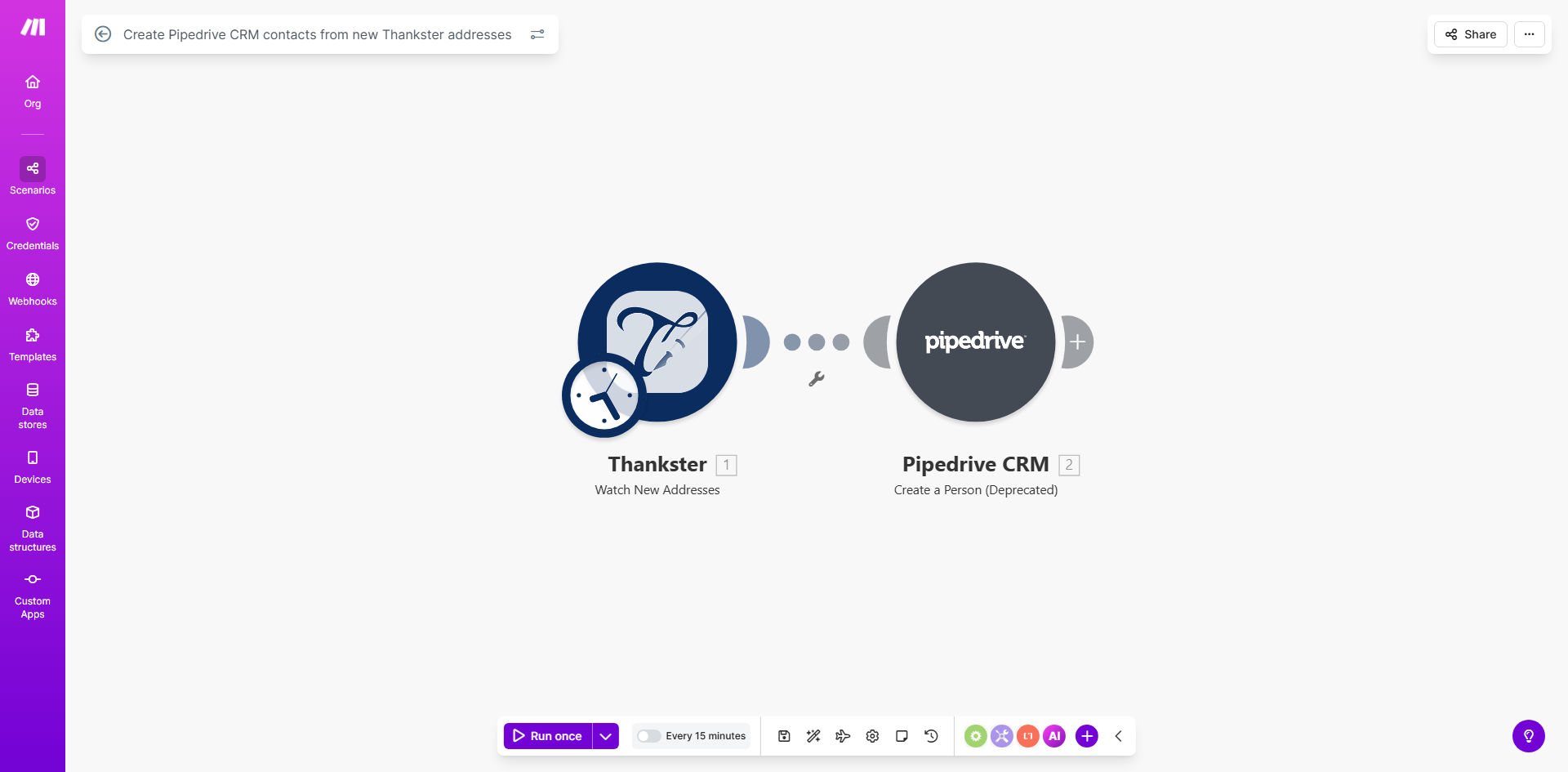
What This Workflow Does
If you use Thankster for direct mail or gifting campaigns, you're collecting valuable address data from potential leads, customers, or partners. However, that data often sits siloed in Thankster, disconnected from your sales team's primary tool: Pipedrive CRM. Manually transferring each new address is a tedious, error-prone task that slows down your sales cycle and leads to missed opportunities.
This automation solves that problem completely. It acts as a seamless bridge between Thankster and Pipedrive. Whenever a new address is created in your Thankster account, this workflow triggers automatically. It captures all the relevant details—name, address, email, notes—and uses them to create a fully-formed contact record in your Pipedrive CRM. Your sales team gets instant, automatic visibility into new leads without lifting a finger.
How It Works
The workflow is built on Make.com and follows a simple, reliable sequence. Once set up, it runs continuously in the background, monitoring for new data and acting upon it.
Step 1: Monitor Thankster for New Addresses
The workflow starts by watching your Thankster account. Using the "Watch Addresses" module, it polls Thankster at regular intervals. The moment a new address entry is detected, the automation captures the entire data packet and passes it to the next step.
Step 2: Map and Format the Contact Data
Make.com then processes the raw data from Thankster. It maps fields like "First Name," "Company," "Street Address," and "Email" to the corresponding field names in Pipedrive. This step ensures clean, consistent data transfer and can include logic to handle missing information or apply custom tags.
Pro tip: Use this step to add a custom lead source tag like "Thankster Campaign" to every new contact. This helps your sales team prioritize follow-ups and track campaign ROI directly in Pipedrive.
Step 3: Create the Contact in Pipedrive
The formatted data is sent to Pipedrive via the "Create a Person" module. A new contact is instantly created in your specified Pipedrive pipeline. The workflow can also assign the contact to a specific owner, add it to an organization, or trigger a notification for immediate follow-up.
Who This Is For
This automation is a game-changer for sales-driven businesses and marketing teams that leverage Thankster for lead generation or customer engagement.
Sales Teams & SDRs: Stop wasting time on data entry. Get hot leads from Thankster campaigns delivered directly into your sales pipeline, ready to call.
Marketing Agencies: Demonstrate clear ROI to clients by showing how direct mail campaigns directly feed into their CRM and generate trackable leads.
E-commerce & DTC Brands: Automatically add customers who receive gift packages via Thankster to your CRM for upsell, cross-sell, and loyalty campaigns.
Business Development Reps: Ensure every new partnership or prospect address collected through gifting is logged and followed up on systematically.
What You'll Need
- A Make.com account (free or paid plan).
- An active Thankster account with API access enabled.
- A Pipedrive CRM account with admin permissions to generate an API key.
- The API keys or login credentials for both Thankster and Pipedrive to authenticate the connection in Make.com.
Quick Setup Guide
You can have this automation live in under 15 minutes. Follow these steps after clicking "Get This Workflow."
- Import the Template: Click the link above to open the template in your Make.com account. Press the "Copy" button to duplicate it into your own workspace.
- Connect Your Accounts: In the new scenario, click on the Thankster module and authenticate by logging into your Thankster account. Repeat the process for the Pipedrive module, connecting it to your CRM.
- Configure Field Mapping (Optional): Review the data mapping between Thankster and Pipedrive. Adjust which fields are transferred or add custom values if needed.
- Test the Flow: Turn the scenario on and create a test address in Thankster. Watch as Make.com processes it and creates a corresponding contact in Pipedrive.
- Go Live: Once testing is successful, your automation is active. It will now run automatically, syncing new addresses 24/7.
Key Benefits
Eliminate 100% of manual data entry between Thankster and Pipedrive. This reclaims 2-5 hours per week for your sales or marketing staff, time better spent on high-value activities like closing deals.
Accelerate your sales cycle by ensuring leads are contacted minutes after they submit their address, not days later when someone gets around to manual entry. Faster response times significantly increase conversion rates.
Guarantee data accuracy and consistency. Automated transfers prevent typos, missing fields, and duplicate entries that are common with manual processes, leading to a cleaner, more reliable CRM database.
Gain clear campaign attribution. By automatically tagging contacts from Thankster, you can easily measure the ROI of your direct mail or gifting campaigns directly within Pipedrive's reporting.
Scale your lead capture process effortlessly. Whether you receive 10 or 1,000 new addresses per day, the automation handles the volume without any additional effort or cost from your team.