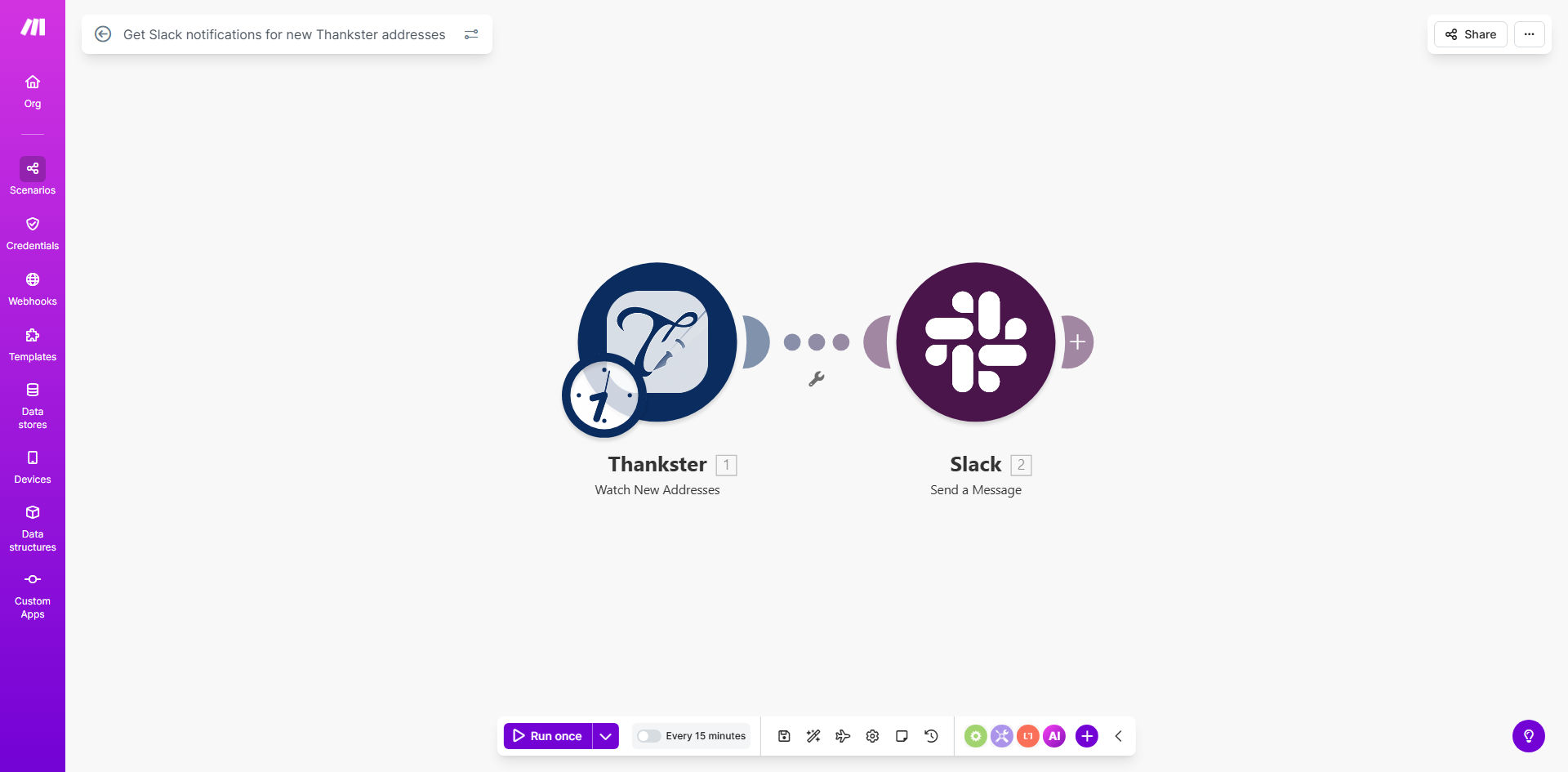
What This Workflow Does
For businesses using Thankster to manage gift orders and shipments, manually checking for new customer addresses creates delays and operational blind spots. Team members might miss updates, leading to slower processing, shipping errors, and frustrated customers waiting for their gifts. This disconnect between the address database and team communication slows down your entire fulfillment pipeline.
This automation solves that by creating a direct, real-time bridge between Thankster and Slack. Every time a new address is saved in Thankster, the workflow instantly captures that event and posts a detailed notification to a designated Slack channel or direct message. Your shipping, logistics, or customer service team receives the information immediately, within their primary communication tool, enabling them to act without delay.
The value is clear: reduced manual oversight, eliminated data transfer errors, and accelerated order fulfillment. It turns a passive data entry point into an active alert system, ensuring your team is always informed and ready to proceed with the next step in the customer journey.
How It Works
Step 1: Monitoring Thankster for New Addresses
The workflow begins by setting up a trigger in Make.com that watches your Thankster account for specific events. It is configured to detect the creation of a new address record. Make.com polls Thankster periodically or uses a webhook (if available) to catch these updates in real-time, ensuring no new address slips through unnoticed.
Step 2: Extracting Key Address Details
When a new address is detected, the automation retrieves the relevant data from Thankster. This includes the customer's name, the complete shipping address (street, city, state, ZIP code, country), and often associated metadata like the order reference or gift type. This data is structured and prepared for the next step.
Pro tip: Configure the workflow to also capture the timestamp of address creation. Including this in the Slack message helps teams prioritize based on urgency.
Step 3: Formatting and Sending the Slack Message
The workflow then routes the extracted data to a Slack module. It formats the information into a clear, readable message. You can customize the message to include labels, emojis for visual cues, and even break the address into separate lines for easy copying. The message is automatically posted to your chosen Slack channel, group, or individual chat.
Step 4: Completion and Logging
After the Slack message is sent successfully, the workflow completes its cycle. Make.com logs the execution, allowing you to monitor reliability and volume. The entire process runs silently in the background, requiring no manual intervention, and repeats indefinitely for every new address added.
Who This Is For
This workflow is ideal for any business or team that relies on Thankster for gift management and needs to coordinate shipping logistics. E-commerce stores selling physical gifts, corporate gifting services, and non-profit organizations sending donor thank-you packages will benefit significantly. It's particularly valuable for teams where multiple people handle fulfillment—such as shipping departments, operations managers, and customer support agents—who all need immediate visibility into new destination information.
If you experience delays between receiving an address and starting shipment processing, or if your team frequently asks "Has the address been updated?", this automation provides the answer instantly. It's also perfect for scaling operations during peak seasons like holidays, where address volume increases and manual tracking becomes impractical.
What You'll Need
To implement this template successfully, you will need:
- A Make.com account (free or paid plan) to build and run the automation.
- A Thankster account with API access or webhook capabilities to allow Make.com to read new address data.
- A Slack workspace where you have permission to create incoming webhooks or use the Slack app integration to post messages to a channel or chat.
- Basic understanding of the data fields in Thankster (like address object structure) to correctly map information to the Slack message.
- The target Slack channel name or user ID where notifications should be delivered.
Quick Setup Guide
Follow these steps to get your automation live in minutes:
- Import the Template: Click the "Get This Workflow" button above to open the template on Make.com. Use the "Copy" function to duplicate it into your own Make.com scenario.
- Connect Thankster: In the first module of your copied scenario, add your Thankster account connection. Authorize Make.com to access your Thankster data, typically using API keys provided in your Thankster settings.
- Configure the Trigger: Set the trigger module to watch for the "Address Created" event. Adjust the polling interval if necessary, or set up a webhook if Thankster supports it for real-time triggers.
- Connect Slack: In the Slack module, add your Slack workspace connection. Choose the method (webhook or Slack app) and specify the exact channel, private group, or user who should receive the notifications.
- Customize the Message: Edit the Slack message template. Include the address details you want to show—customer name, full address, order ID—and format it for clarity. You can add a custom icon or a specific keyword for filtering.
- Test and Activate: Run a test execution by manually creating a dummy address in Thankster or using the scenario's test feature. Verify that the notification appears correctly in Slack. Once confirmed, activate the scenario to run automatically.
Key Benefits
Instant Team Awareness: Eliminate the lag between address entry and team notification. Your shipping department sees new information as soon as it's saved, reducing fulfillment lead time by hours or even days.
Error Reduction: Manual copying of addresses from one system to another is prone to mistakes. This automated transfer ensures data integrity, delivering the exact address details as recorded in Thankster directly to Slack.
Operational Scalability: The workflow handles any volume of addresses without additional effort. During high-volume periods like Christmas, it ensures every address is communicated reliably, preventing backlog and confusion.
Centralized Communication: By bringing address alerts into Slack, you keep all relevant discussions and actions in one platform. Team members can immediately comment, assign tasks, or confirm shipping plans right in the notification thread.
Proactive Customer Service: Faster address processing means faster shipping. Customers receive their gifts sooner, improving satisfaction and potentially increasing repeat orders and positive reviews.