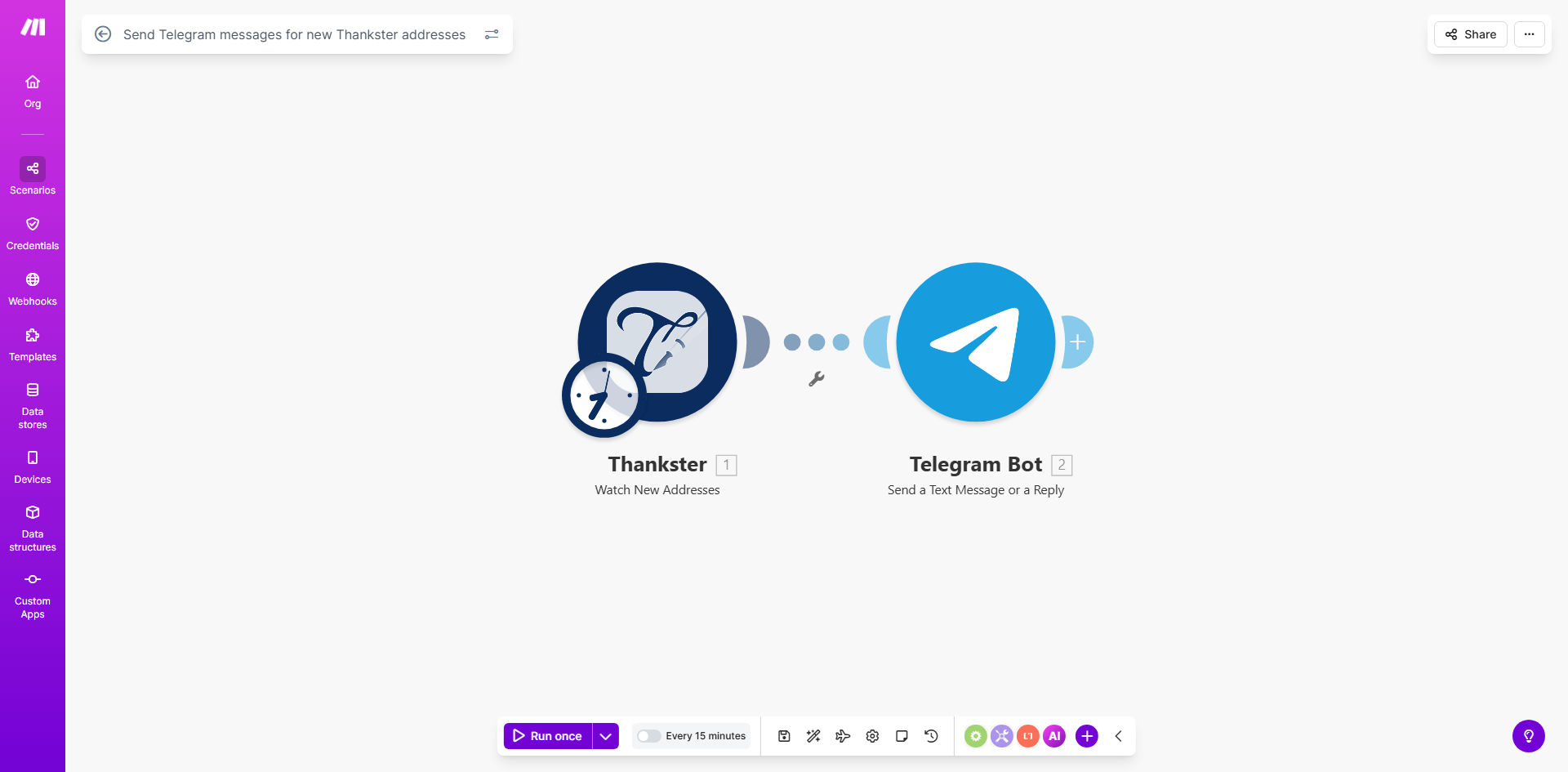
What This Workflow Does
For businesses using Thankster to manage personalized greeting cards and gifts, every new customer address is a time-sensitive opportunity. Manually checking the platform for new entries is inefficient and can lead to delays in fulfillment, especially during peak seasons like holidays.
This automation solves that problem by creating a direct, real-time bridge between Thankster and Telegram. The moment a customer completes an order and submits their shipping details, a formatted notification is instantly sent to a designated Telegram chat, group, or channel. This eliminates the need for constant dashboard monitoring, ensures your team is always in the loop, and significantly accelerates your order-to-dispatch timeline.
The business value is clear: faster response times, reduced operational overhead, and fewer missed orders. By automating this simple yet critical alert, you free up your team to focus on customer service and quality control, rather than data monitoring.
How It Works
The workflow is built on Make.com and operates on a straightforward trigger-action principle. It requires minimal setup and runs reliably in the background.
Step 1: Monitoring Thankster for New Addresses
The scenario starts by watching your Thankster account for specific events. You can configure it to trigger whenever a new "address" or "recipient" record is created. Make.com polls the Thankster API at regular intervals to catch these new entries instantly.
Step 2: Extracting and Formatting the Data
Once a new address is detected, the workflow pulls the relevant details. This typically includes the customer's name, the full shipping address, the associated order ID, and sometimes the occasion (e.g., Birthday, Anniversary). The data is then structured into a clear, readable format.
Step 3: Sending the Instant Telegram Alert
The formatted information is sent as a message to your pre-configured Telegram bot. The message appears directly in the chosen chat, providing your fulfillment, customer service, or logistics team with all the information they need to act immediately.
Pro tip: Customize your Telegram message to include emojis (📬 for a new address) and direct links. You can even add a button that links back to the specific order in Thankster for one-click access.
Who This Is For
This template is ideal for any business or team that relies on Thankster for managing customer addresses and needs to act on that information quickly.
- Greeting Card & Gift Businesses: Teams that need to print and ship physical cards immediately after an order is placed.
- Small Fulfillment Operations: Managers and packers who must be notified of new shipping details without delay.
- Customer Service Teams: Agents who can use the instant alert to send a quick order confirmation or follow-up message to the customer.
- Solo Entrepreneurs: Owners who wear multiple hats and can't afford to miss a new order while away from their computer.
What You'll Need
To implement this workflow, you'll need a few accounts and connections ready:
- A Make.com account (free tier available).
- An active Thankster account with API access (usually available on paid plans).
- A Telegram account and a Telegram Bot created via @BotFather. You'll need the Bot Token.
- The Chat ID of the Telegram group, channel, or private chat where you want the notifications to appear.
Quick Setup Guide
You can have this automation running in under 15 minutes by following these steps:
- Clone the Template: Click the "Get This Workflow" button above to open the template on Make.com and create a copy in your own account.
- Connect Thankster: In the first module, authorize Make.com to access your Thankster account using your API credentials.
- Connect Telegram: In the Telegram module, add your Bot Token and the target Chat ID where messages should be sent.
- Test the Flow: Create a test address in your Thankster account. The workflow should run and send a message to your Telegram within moments.
- Activate & Forget: Turn the scenario on. It will now run automatically, monitoring for new addresses 24/7.
Key Benefits
Eliminate Manual Checking: Save 30-60 minutes per day previously spent logging into Thankster to check for new orders. Your team's attention is redirected to higher-value tasks.
Accelerate Order Fulfillment: Reduce the time between an order being placed and your team being aware of it from hours to seconds. This can shave an entire business day off your shipping timeline.
Improve Team Coordination: With alerts going directly to a shared Telegram group, everyone responsible for fulfillment is simultaneously informed, preventing tasks from falling through the cracks.
Reduce Human Error: Automatically pulling address data from Thankster into the notification removes the risk of typos or miscommunication that can happen with manual copy-pasting.
Scale Operations Effortlessly: This workflow handles one address or one thousand addresses with the same reliability. It's a set-and-forget system that grows with your business without requiring additional manpower.