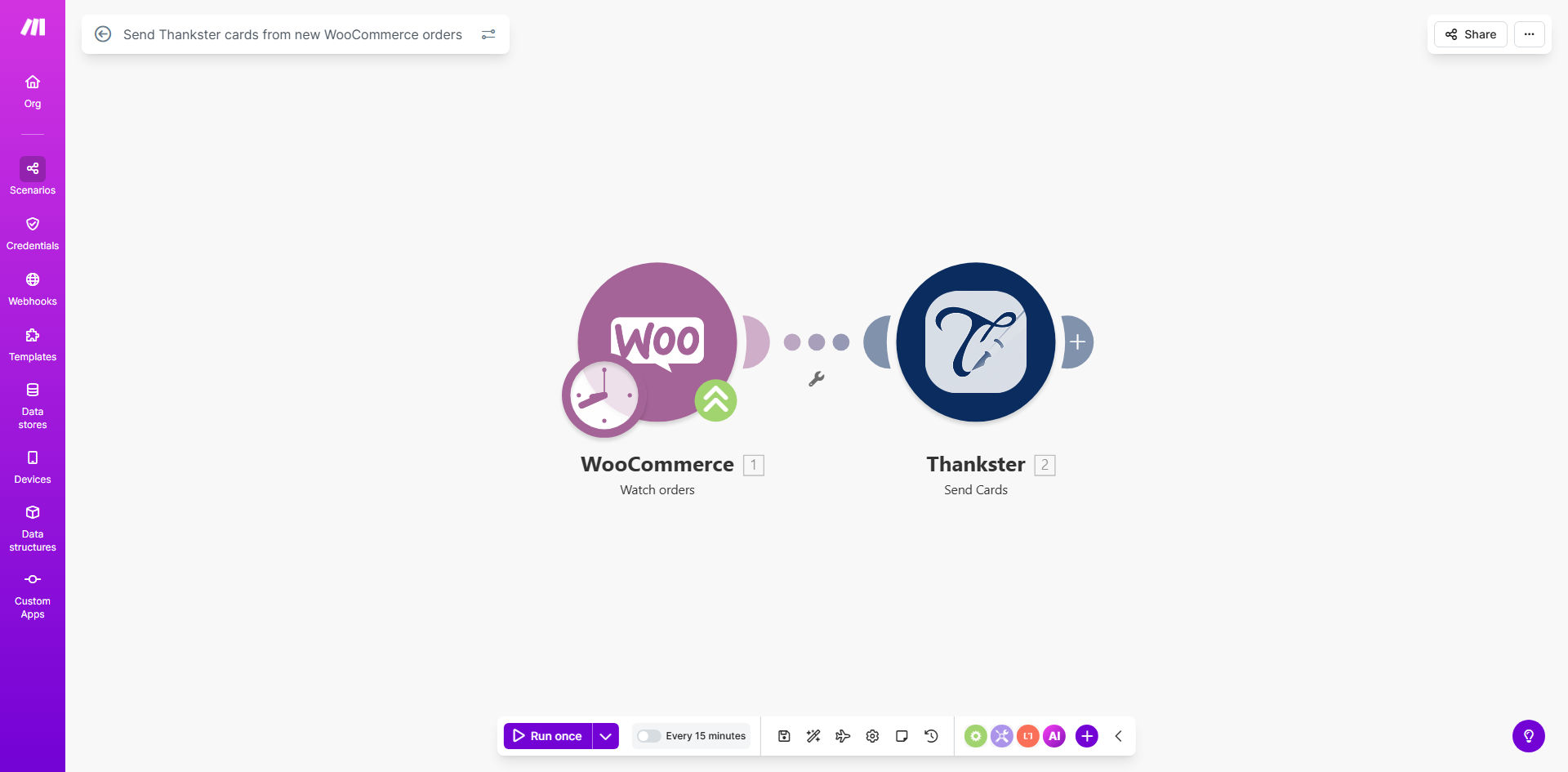
What This Workflow Does
In the competitive world of e-commerce, the transaction doesn't end at checkout. The post-purchase experience is where lasting customer relationships are built. Manually sending thank-you notes is a powerful gesture, but it's time-consuming and impossible to scale. This automation solves that by instantly transforming every new WooCommerce order into a personalized Thankster greeting card.
The workflow listens for new orders in your WooCommerce store. When an order is placed, it automatically captures the customer's shipping details and order information, then uses Thankster's API to create and mail a beautiful, physical card directly to your customer. This hands-off process ensures no customer is missed and delivers a tangible token of appreciation that stands out in a digital world, dramatically increasing customer satisfaction and repeat business.
Pro tip: Use this automation for high-value orders or first-time customers to maximize impact. A simple, unexpected physical card can have a much higher perceived value than a standard email receipt.
How It Works
The automation is a seamless bridge between your online store and your customer's mailbox. Here’s the step-by-step process:
Step 1: Trigger on New WooCommerce Order
The workflow is activated the moment a new order's status changes to "Processing" or "Completed" in WooCommerce. Make.com receives a webhook with the full order payload, including the customer's name, shipping address, email, and items purchased.
Step 2: Format Customer Data for Thankster
The automation parses the WooCommerce data, extracting and structuring the necessary fields for Thankster: the recipient's full name, street address, city, state, ZIP code, and country. It can also prepare a personalized message that includes the order number or a thank-you note from your brand.
Step 3: Create and Send the Card via Thankster
Using the formatted data, the workflow calls the Thankster API to create a new card project. It selects your pre-designed card template, populates the recipient's address and your custom message, and instructs Thankster to print and mail the physical card. A confirmation is usually logged for your records.
Who This Is For
This automation is ideal for any business using WooCommerce that wants to elevate its customer experience without adding manual labor.
- Direct-to-Consumer (DTC) Brands: Build a premium, personal brand identity that customers remember.
- Small & Medium E-commerce Stores: Compete with larger retailers by offering a surprisingly personal touch.
- Subscription Box Companies: Send a welcome card with the first box to increase retention.
- Merchants Selling High-Ticket or Handmade Items: Add a layer of appreciation that justifies the value and care behind the product.
- Marketing Managers: Automate a key touchpoint in the customer loyalty journey to improve LTV metrics.
What You'll Need
- A WooCommerce store with administrative access to generate API keys.
- A Thankster account with an active subscription or credits to send cards.
- A Make.com account (free tier available) to host and run the automation.
- A designed card template within your Thankster account that you want to send automatically.
- The customer's shipping address must be collected and valid within the WooCommerce order.
Quick Setup Guide
You can have this automation running in under 30 minutes.
- Clone the Template: Click "Get This Workflow" to copy the template into your Make.com account.
- Connect WooCommerce: In the first module, authenticate your WooCommerce store by entering your store URL and generated API keys.
- Connect Thankster: In the Thankster module, log in with your Thankster API credentials (found in your account settings).
- Map the Data: Ensure the WooCommerce customer fields (Name, Address, etc.) are correctly mapped to the corresponding Thankster fields.
- Choose Your Card Design: Select the specific Thankster card template ID you wish to use for all automated sends.
- Test & Activate: Run a test with a recent order to ensure a card is created successfully, then turn the scenario on. It will now run automatically for all new orders.
Key Benefits
Eliminate 10+ hours of manual work per month. No more copying addresses, designing individual cards, or managing shipments. The automation handles everything instantly after an order is placed, freeing your team for strategic tasks.
Boost customer retention by up to 30%. A physical thank-you card creates an emotional connection and memorable unboxing experience. This personal touch significantly increases the likelihood of a customer returning to make another purchase.
Ensure 100% consistency in your post-purchase communication. Every single customer receives the same high-quality, on-brand thank-you gesture. Automation removes the risk of human forgetfulness or error, guaranteeing your loyalty program is executed flawlessly.
Scale your personalization efforts effortlessly. Whether you have 10 orders or 1,000 orders a month, the system works identically. You can maintain a personal relationship with your customer base without proportional increases in overhead or staff.
Gain a measurable competitive advantage. In a world of automated emails, a physical card cuts through the noise. It differentiates your brand, generates positive social media mentions, and can directly lead to increased average order value from grateful customers.