What This Workflow Does
Manual form processing is a silent productivity killer. When an employee submits a promotion request, an IT ticket, or client feedback via Typeform, that information often gets stuck—lost in an email inbox, forgotten on a spreadsheet, or delayed until someone manually checks. This creates frustration, slows down critical operations, and leads to missed opportunities.
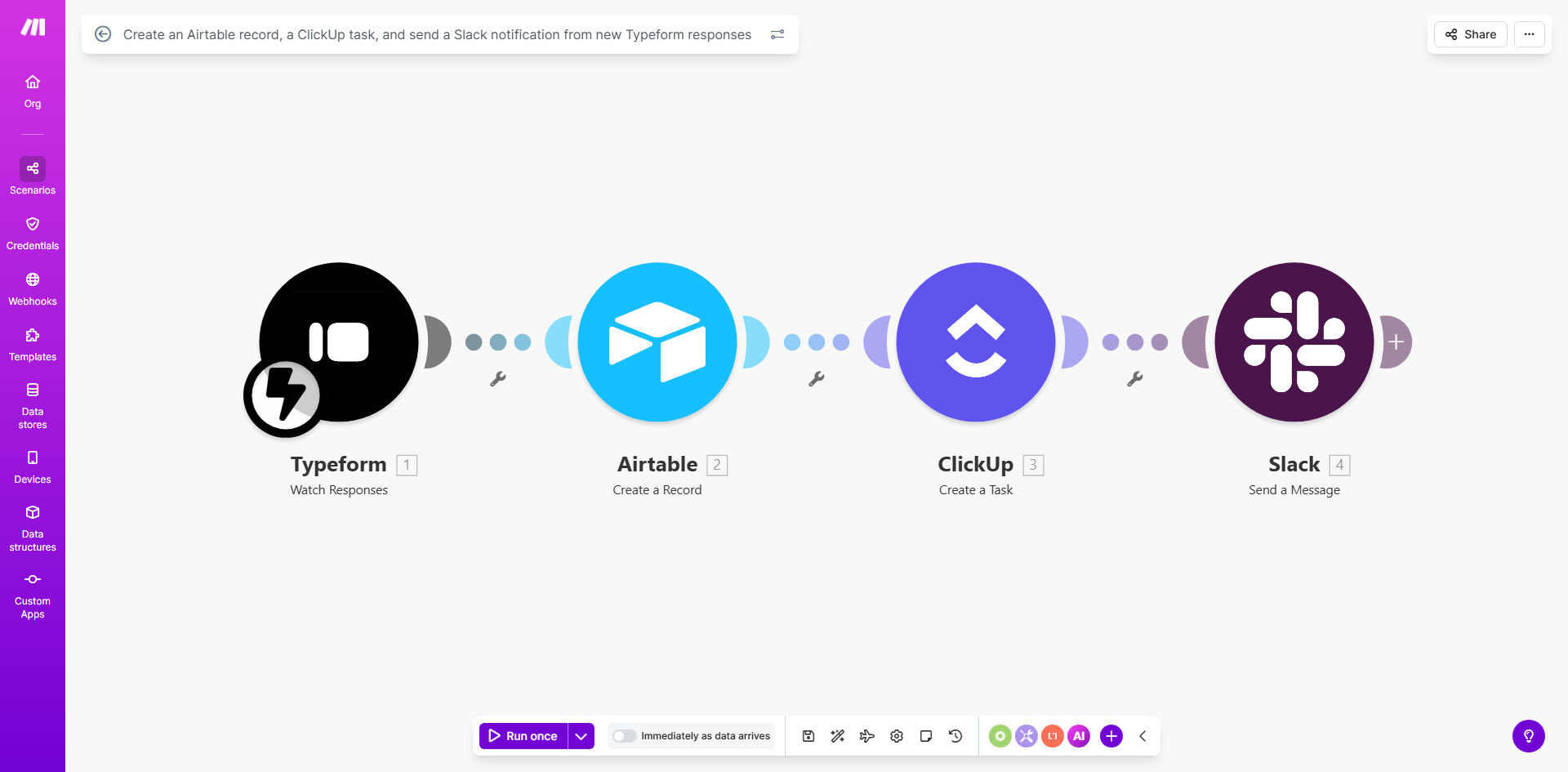
This automation solves that by creating a seamless, instant pipeline from submission to action. The moment a Typeform is submitted, three crucial things happen simultaneously: a permanent record is logged in Airtable for audit trails and reporting, an actionable task is created in ClickUp for the responsible person, and an immediate notification is sent to a Slack channel or person to ensure visibility. It turns a static form into a dynamic workflow engine.
The business value is profound. HR managers can process employee requests faster. IT teams can triage support tickets immediately. Managers can track internal feedback without chasing emails. By eliminating the manual "middleman," you save hours per week, ensure 100% submission capture, and dramatically improve your team's response time and accountability.
How It Works
The workflow is triggered by a new submission in your Typeform. It then orchestrates data to three powerful platforms in a logical sequence.
Step 1: Capture the Response
The Make.com scenario watches your specified Typeform for new entries. When one arrives, it instantly captures all the submitted data—every answer to every question—and prepares it for distribution. This is the foundational trigger that sets everything else in motion.
Step 2: Create a Permanent Record in Airtable
The data is first sent to a designated Airtable base. A new record is created, populating fields like submitter name, date, request details, and status. This becomes your single source of truth—a searchable, filterable database for all historical submissions, perfect for analytics, compliance, and record-keeping.
Pro tip: Use Airtable's linked record field to connect this new submission to an existing employee or client record in another table, creating a rich, relational data model automatically.
Step 3: Generate an Actionable Task in ClickUp
Next, the workflow creates a task in your chosen ClickUp list. It maps the form data to task properties: the request becomes the task name, details go into the description, and it can be automatically assigned to a specific team member (e.g., the HR manager for promotion requests). You can even set a due date based on the submission time.
Step 4: Send a Real-Time Alert via Slack
Finally, a formatted message is posted to a Slack channel or sent via direct message. This notification includes key details and often a link to the new ClickUp task or Airtable record. It serves as an immediate ping to the team, ensuring no request sits idle waiting for someone to log into ClickUp or Airtable.
Who This Is For
This template is a game-changer for any team that relies on forms to initiate internal processes. HR and People Operations teams can automate intake for employee requests, feedback surveys, or onboarding paperwork. IT and Support departments can turn a Typeform into an instant ticketing system. Managers and Team Leads can streamline project requests, vacation approvals, or budget proposals.
It's also ideal for small businesses and agencies that don't have dedicated administrative staff to manually process forms. If your process involves "fill out this form and we'll get back to you," this automation removes the lag and uncertainty from that promise.
What You'll Need
- A Typeform account with an active form you want to automate.
- An Airtable account with a base and table ready to receive records. You should know the field names you want to populate.
- A ClickUp account with a specific Space, Folder, and List where new tasks should be created. You'll need appropriate permissions to create tasks via API.
- A Slack workspace where you have permission to post messages to a channel or send direct messages via an app.
- A Make.com account (free tier works) to host and run the automation scenario.
Quick Setup Guide
Getting this automation live takes about 15-20 minutes if your accounts are ready.
- Get the Template: Click "Get This Workflow" to copy the scenario into your Make.com account.
- Connect Your Apps: In the Make.com editor, authorize the four modules (Typeform, Airtable, ClickUp, Slack) by logging into each service when prompted.
- Configure the Trigger: Select your specific Typeform from the dropdown in the first module.
- Map Your Data: In the Airtable module, select your base and table, then map the Typeform answer fields to the corresponding Airtable column names. Repeat this mapping for the ClickUp task fields (name, description, assignee).
- Set Up Your Slack Alert: Choose the Slack channel or user for the notification and customize the message text using data from the previous steps (e.g., include the submitter's name).
- Test and Activate: Turn on the scenario and submit a test entry to your Typeform. Verify that a record appears in Airtable, a task is created in ClickUp, and a message arrives in Slack.
Pro tip: Start by testing with a hidden test field in your Typeform or a dedicated test Airtable base and ClickUp list to avoid cluttering your live data during setup.
Key Benefits
Eliminate manual data entry and save 5-10 hours per month. Your team will never have to copy-paste form responses into a spreadsheet or task manager again. This time can be redirected to higher-value strategic work.
Achieve 100% submission capture with zero delays. The instant a form is submitted, the workflow kicks off. There's no human-dependent step where a request can be overlooked, forgotten in an inbox, or delayed until "later."
Improve accountability and transparency across teams. With every request logged in Airtable and turned into a tracked ClickUp task, there's clear ownership and a visible audit trail. Managers can easily see status and volume.
Accelerate response times and improve internal satisfaction. When employees or clients submit a request and see immediate, automated acknowledgment and action, it builds trust and enhances the perception of your team's efficiency.
Create a scalable foundation for process improvement. Once this data is flowing automatically into Airtable, you can build dashboards, run reports, and identify trends to continuously optimize your internal operations.