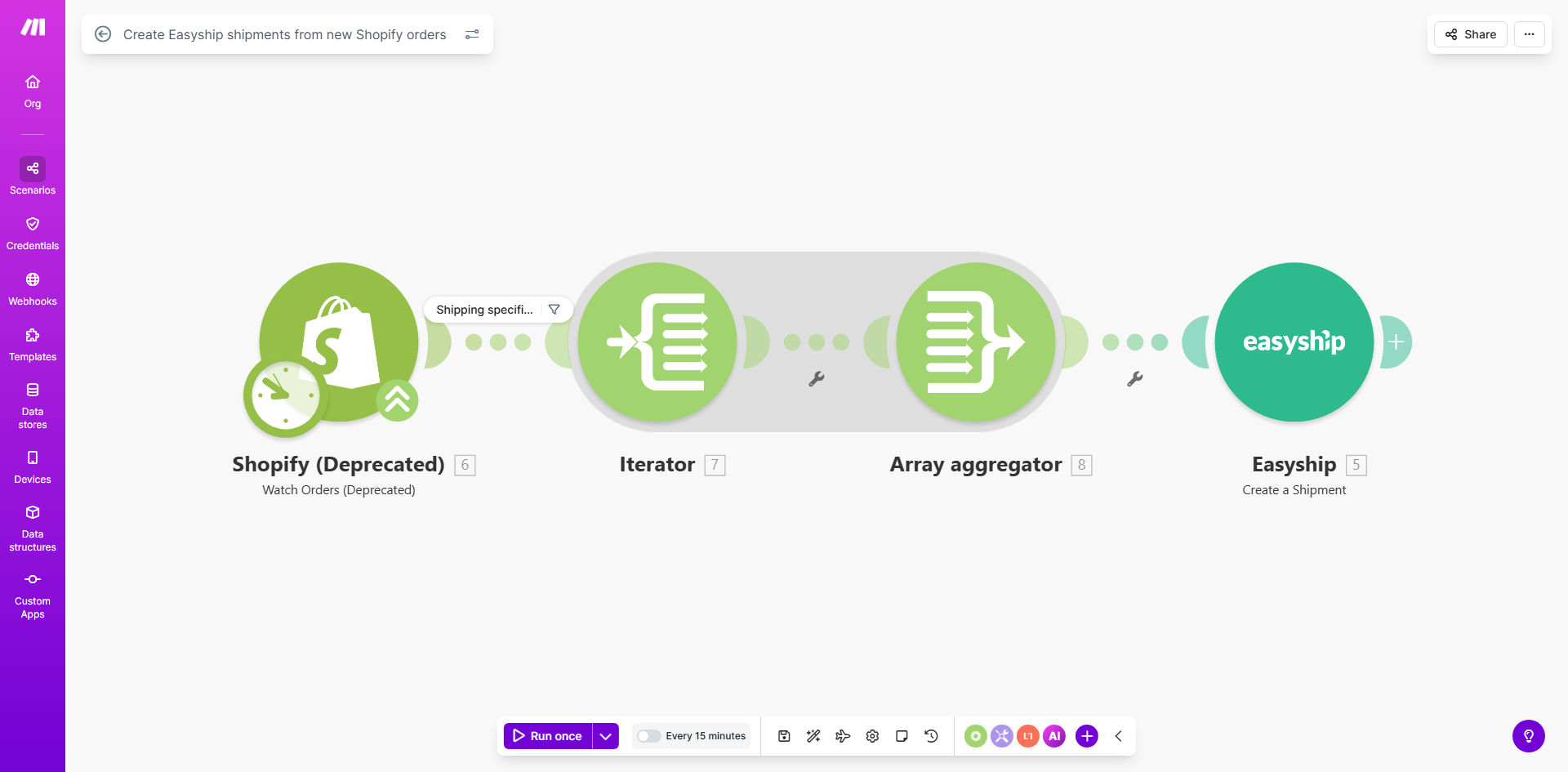
What This Workflow Does
For e-commerce businesses, the gap between receiving an order and getting it out the door is filled with manual, error-prone tasks. Copying customer addresses, comparing carrier rates, generating labels, and updating tracking information can consume hours every day. This manual process slows down fulfillment, increases the chance of shipping errors, and prevents your team from focusing on growth activities.
This automated workflow solves that by creating a seamless bridge between your Shopify store and Easyship. Every time a new order is placed, the system automatically captures all necessary details—customer information, products, weights, and shipping preferences—and uses them to create a ready-to-print shipment in Easyship. It selects the optimal carrier based on your rules, calculates the exact cost, and generates the shipping label and customs documents if needed. The result is a hands-off fulfillment process that runs in the background.
By automating this critical operational task, you eliminate a major bottleneck. Orders move from "paid" to "shipped" in minutes instead of hours or days. This not only saves significant labor costs but also dramatically improves customer satisfaction through faster dispatch and accurate tracking.
How It Works
The automation follows a logical, step-by-step process to transform a new order into a ready-to-ship package.
Step 1: Monitor for New Shopify Orders
The workflow starts by watching your Shopify store at regular intervals (e.g., every 15 minutes). It uses the Shopify module in Make.com to check for any new orders that have been placed since the last check. When it finds one, it immediately pulls all the relevant data into the automation.
Step 2: Extract and Format Shipping Data
The system extracts the customer's shipping address, contact details, ordered items (including SKUs, quantities, and declared weights), and the total order value. It structures this data into the precise format required by Easyship's API to create a shipment.
Pro tip: Ensure your Shopify product listings have accurate weight and dimension data. This allows Easyship to calculate the most precise shipping rates and avoid carrier adjustments later.
Step 3: Create the Shipment in Easyship
Using the formatted data, the workflow calls the Easyship API to create a new shipment. It passes the destination, parcel details, and any shipping preferences you've configured (like "cheapest" or "fastest" service). Easyship processes this request, compares rates across its network of 250+ carriers, and selects the best option based on your rules.
Step 4: Generate Labels and Documents
Once the shipment is created and a carrier/service is selected, Easyship generates the shipping label, packing slip, and any necessary international customs documents (like commercial invoices). The workflow can be extended to automatically send these documents to your printer or save them to a cloud storage folder like Google Drive for easy access.
Step 5: Update Order Status (Optional)
As a final step, the automation can send the generated tracking number back to the Shopify order and mark it as fulfilled. It can also trigger a notification email to the customer with their tracking information, completing a fully closed-loop process.
Who This Is For
This automation is ideal for any business that sells physical products through Shopify and uses Easyship for shipping logistics. It's particularly valuable for:
- Growing DTC Brands: Brands experiencing an increase in order volume who need to scale fulfillment without hiring more staff.
- International Sellers: Businesses shipping globally who need automated customs documentation and multi-carrier rate shopping.
- Small Teams & Solopreneurs: Owners or small teams wearing multiple hats who need to reclaim time spent on manual shipping tasks.
- Multi-Warehouse Operations: Stores that ship from different locations and need to automatically assign the correct origin address.
What You'll Need
- A Make.com Account: A free or paid plan to build and run the automation.
- Active Shopify Store: Your store must be live and processing orders.
- Easyship Account: An active Easyship account with API access enabled (available on paid plans).
- API Credentials: Your Shopify API key/secret and your Easyship API token to connect the apps in Make.com.
- Defined Shipping Rules: Clear rules in Easyship for carrier selection (e.g., by destination zone, weight, or cost).
Quick Setup Guide
You can have this automation running in under 30 minutes by following these steps.
- Get the Template: Click "Get This Workflow" to copy the ready-made template into your Make.com account.
- Connect Shopify: In the first module, authorize Make.com to access your Shopify store using your admin API credentials.
- Connect Easyship: In the Easyship module, paste your API token from your Easyship account settings to establish the connection.
- Test with a Sandbox Order: Run the scenario once with a test order to ensure data flows correctly and a shipment is created in your Easyship dashboard.
- Activate & Schedule: Turn the scenario on and set the schedule (e.g., every 15 minutes) to watch for new orders continuously.
Pro tip: Start by filtering the automation to run only for orders from a specific sales channel or over a certain value during testing. This prevents accidental live shipments while you fine-tune the setup.
Key Benefits
Save 5-15 hours per week on manual shipping work. Eliminate the daily routine of copying addresses, comparing rates, and clicking through multiple platforms. This time can be reinvested into marketing, customer service, or product development.
Reduce shipping errors by over 90%. Manual data entry is the leading cause of shipping mistakes—wrong addresses, incorrect weights, or missed items. Automation ensures data is transferred perfectly every single time.
Speed up order processing from hours to minutes. Orders can be labeled and ready for pickup shortly after being placed, leading to faster delivery times and higher customer satisfaction scores.
Access optimal shipping rates automatically. Easyship shops across hundreds of carriers in real-time. The automation ensures every order, especially international ones, always gets the best available rate without manual checking.
Scale your fulfillment effortlessly. Whether you process 10 orders a day or 1,000, the automated system handles the volume without additional strain on your team, supporting business growth seamlessly.