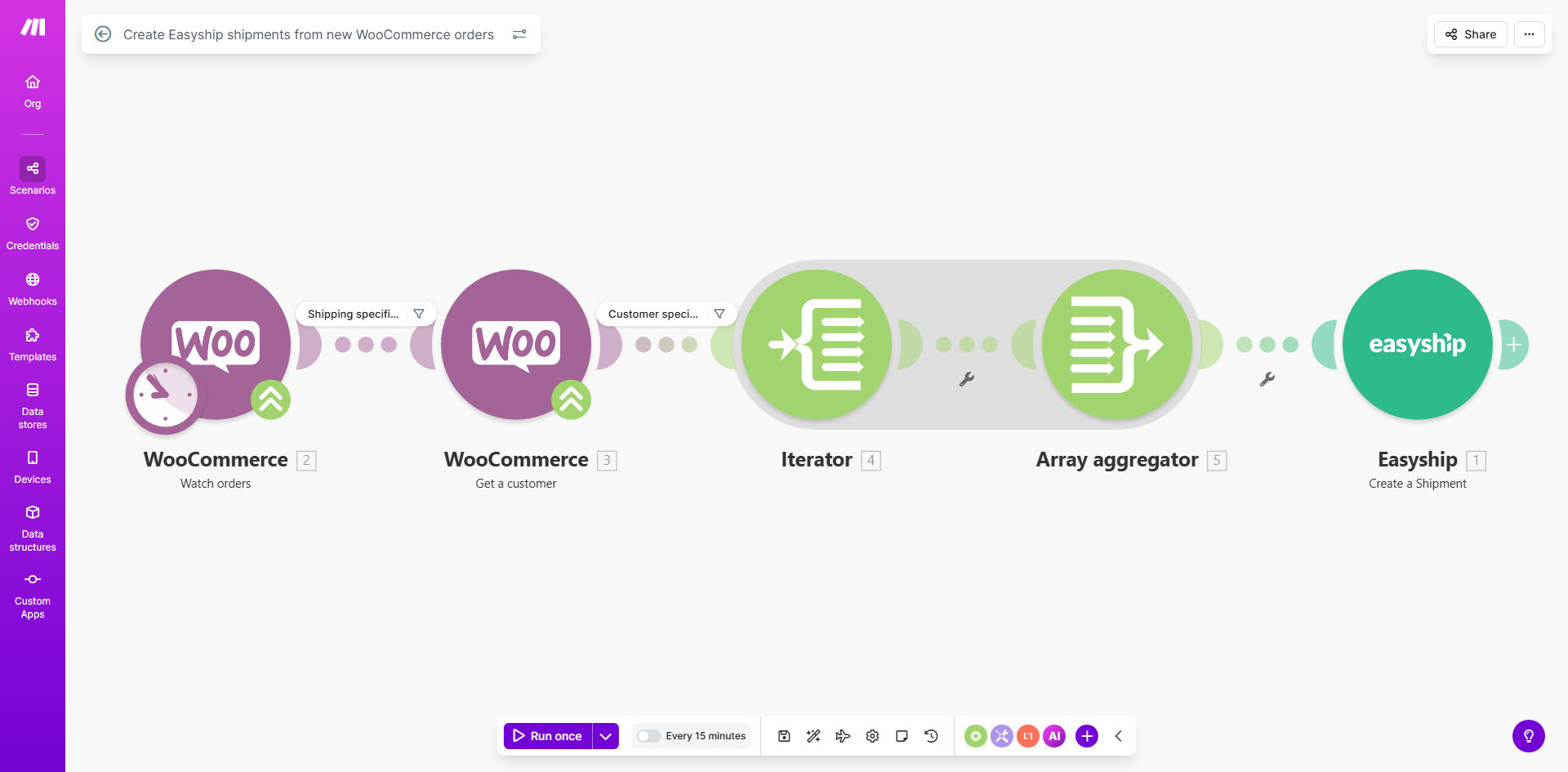
What This Workflow Does
For any e-commerce business using WooCommerce, the process between receiving an order and getting it out the door is critical. Manually copying customer addresses, product details, and shipping preferences into a carrier platform like Easyship is a time-consuming, error-prone task that slows down fulfillment and frustrates customers waiting for their tracking numbers.
This automation solves that by creating a seamless bridge between your store and your shipping operations. The moment a customer completes a purchase, this Make.com workflow is triggered. It captures the entire order details—including the shipping address, items purchased, and any special instructions—and uses that data to automatically generate a corresponding shipment within Easyship. The label is created, rates are compared, and the shipment is ready for your team to pack and ship, often within minutes of the order being placed.
The business value is clear: you reclaim hours of administrative work each week, virtually eliminate shipping address errors, and accelerate your order-to-ship time. This leads to faster deliveries, improved customer satisfaction, and allows your staff to focus on higher-value activities like customer service or inventory management.
How It Works
The workflow operates on a simple, reliable trigger-action model. Here’s the step-by-step process:
Step 1: Monitor for New WooCommerce Orders
The workflow starts with a Make.com module that polls your WooCommerce store at regular intervals (e.g., every 15 minutes). It checks for any new orders with a status like "Processing" or "Completed". This is the trigger that kicks off the entire automation sequence.
Step 2: Extract and Format Order Data
Once a new order is detected, the workflow retrieves all necessary information. This includes the customer's full shipping address, the list of purchased items (which helps determine package weight and dimensions), the selected shipping method, and the order total. The data is cleaned and structured into the format required by the Easyship API.
Step 3: Create the Shipment in Easyship
The formatted data is sent to Easyship via its API. Easyship uses this information to create a new shipment in your dashboard. It calculates the best available rates across its network of carriers, applies any rules you have set up (like preferred carriers or insurance auto-add), and generates a shipping label with a unique tracking number.
Step 4: Update and Notify (Optional)
After successful creation, the workflow can be extended to perform follow-up actions. For example, it can update the WooCommerce order notes with the Easyship tracking number, or even trigger an email to the customer with their tracking information—closing the loop automatically and keeping the customer informed.
Pro tip: Set your WooCommerce order status flow so that orders only move to "Ready for Shipment" after payment is confirmed. Use that status as the trigger for this automation to avoid creating labels for unpaid or fraudulent orders.
Who This Is For
This automation is ideal for any business that sells physical products through a WooCommerce store and uses Easyship for shipping logistics. It's particularly valuable for:
- Small to Medium E-commerce Teams: Where one or two people handle everything from customer service to packing. Automating shipping saves them 1-2 hours per day.
- Stores with High Order Volume: Manually processing 20, 50, or 100+ orders a day is unsustainable. This workflow scales effortlessly with your sales.
- Businesses Shipping Internationally: Easyship excels at global logistics. Automating this ensures complex international address details and customs forms are handled correctly every time.
- Brands Focused on Customer Experience: Faster label creation means faster shipping and quicker tracking updates, which customers love.
What You'll Need
To implement this template, ensure you have the following set up and ready:
- An active WooCommerce store with orders flowing in.
- A paid Easyship account with API access enabled.
- Your Easyship API Key, which you can generate from your Easyship account settings.
- A Make.com account (free tier works for lower volumes).
- Basic product data in WooCommerce, ideally with weight and dimensions entered for accurate shipping calculations.
Quick Setup Guide
Getting this automation live takes about 15-20 minutes. Follow these steps:
- Clone the Template: Click "Get This Workflow" above to open the template in your Make.com account. Press the "Copy" button to create your own version.
- Connect WooCommerce: In the first module, click to add your WooCommerce connection. You'll need your store URL and WooCommerce API keys (found in WooCommerce > Settings > Advanced > REST API).
- Connect Easyship: In the Easyship module, click to add a new connection and paste your Easyship API Key when prompted.
- Configure the Trigger: Set the WooCommerce module to watch for "Order created" or "Order updated" events. You can filter by order status (e.g., "processing") to control which orders trigger the shipment.
- Map the Data: Review the data mapping between WooCommerce and Easyship. Ensure fields like 'address', 'city', and 'postcode' are correctly linked. The template provides a standard mapping you can adjust.
- Test with a Live Order: Turn the scenario ON and place a test order in your store. Watch the scenario run in Make.com's history to confirm a shipment appears in your Easyship dashboard.
- Go Live: Once testing is successful, the automation is active. New orders will now flow automatically to Easyship.
Key Benefits
Save 5-10 Hours Per Week on Manual Data Entry. Eliminate the tedious copy-paste process for every order. Your team can redirect that time towards growth-focused tasks like marketing, product sourcing, or customer engagement.
Reduce Shipping Errors by Over system90%. Manual entry leads to typos in addresses, wrong postal codes, or missed apartment numbers. Automated data transfer is precise, ensuring packages go to the right place the first time, saving you from costly redelivery fees and customer complaints.
Cut Order-to-Ship Time from Hours to Minutes. Speed is a competitive advantage in e-commerce. Automating this step means labels are generated almost instantly after purchase, allowing for same-day or next-day shipping promises you can reliably keep.
Gain Real-Time Visibility and Consistency. Every shipment is created the same way, following your predefined Easyship rules. This creates a consistent, professional process and gives you a single dashboard (Easyship) to manage all outgoing logistics.
Scale Effortlessly with Sales Growth. Whether you process 10 orders a day or 500, the automation handles the volume without needing additional staff. Your shipping process becomes a strength, not a bottleneck, as your business grows.