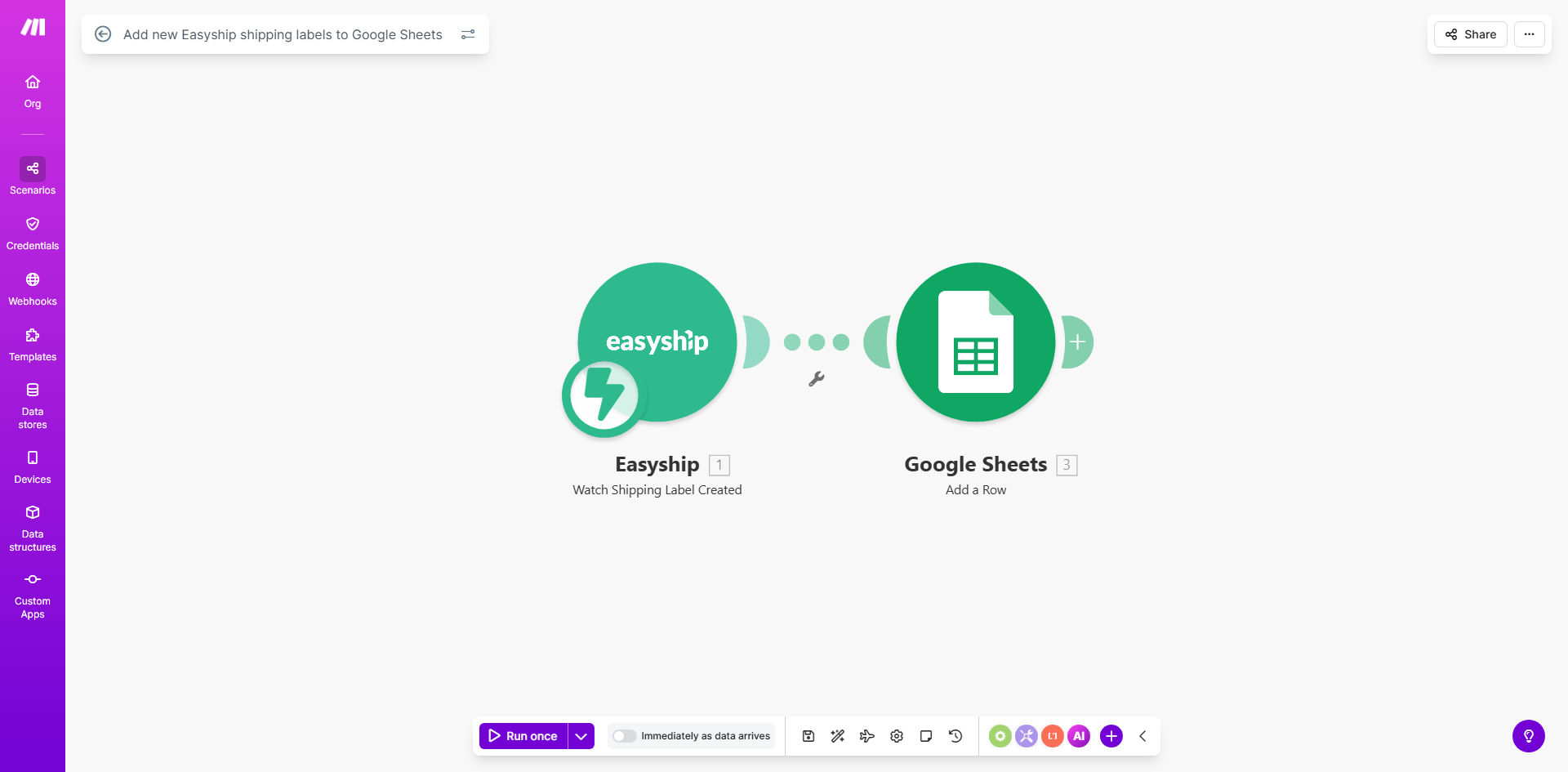
What This Workflow Does
For e-commerce businesses, managing shipping data is a constant manual chore. Every time a label is created in Easyship, someone must copy details—tracking numbers, costs, addresses—into a spreadsheet for record-keeping, accounting, or customer service. This process is tedious, prone to errors, and delays access to critical information.
This Make.com automation solves that by creating a seamless bridge between Easyship and Google Sheets. The moment a new shipping label is generated, the workflow triggers automatically. It extracts the key details and appends them as a new row in your designated Google Sheet. Your shipping log becomes real-time, accurate, and hands-free.
The result is a centralized, searchable database of all shipments that your entire team can access. No more digging through Easyship to find an old label. No more spreadsheets that are days out of date. This automation turns shipping from an operational task into a reliable data stream.
How It Works
The workflow operates on a simple "watch-and-record" principle, ensuring no shipment slips through the cracks.
Step 1: Monitor Easyship for New Labels
The scenario starts with an Easyship module set to "Watch Labels." It continuously checks your Easyship account for newly created shipping labels. This is an instant trigger—no polling delays.
Step 2: Extract Key Shipping Data
Once a new label is detected, Make.com captures the relevant data: tracking number, carrier service, shipment cost, destination, order reference, and the label creation timestamp.
Pro tip: You can filter labels at this stage. Only log labels for specific carriers, above a certain cost, or for international destinations to keep your sheet organized.
Step 3: Format and Prepare Data for Sheets
The raw data is processed. Dates are formatted, costs are converted to your preferred currency, and addresses can be parsed into separate columns (Street, City, ZIP). This ensures clean, consistent data entry.
Step 4: Add a Row to Google Sheets
The final module takes the prepared data and adds it as a new row at the bottom of your specified Google Sheet. It maps each data point to the correct column, maintaining your spreadsheet's structure automatically.
Who This Is For
This automation is a game-changer for any business that ships physical products and uses Easyship for label generation.
- E-commerce Store Owners: Keep perfect records for customer inquiries, returns, and delivery disputes.
- Small Business Logistics Managers: Eliminate the daily copy-paste task and free up time for strategic work.
- Accountants & Bookkeepers: Get a clean, timestamped log of all shipping expenses for accurate cost tracking and reconciliation.
- Dropshipping Operations: Maintain visibility into supplier shipments without manual follow-up.
- Multi-channel Sellers: Centralize shipping data from all your sales platforms into one master sheet.
What You'll Need
- A Make.com account (free tier is sufficient to run this template).
- An active Easyship account with shipping labels being generated.
- A Google Sheets spreadsheet set up with column headers for the data you want to capture (e.g., Date, Order ID, Tracking #, Cost, Carrier).
- API connection access to both services (authenticated via OAuth in Make.com).
Quick Setup Guide
- Get the Template: Click "Get This Workflow" to copy the scenario into your Make.com workspace.
- Connect Easyship: In the first module, click the Easyship icon and authenticate your account. Make.com will request the necessary permissions.
- Connect Google Sheets: Authenticate your Google account and select the specific spreadsheet and worksheet where labels should be logged.
- Map Your Data: Review the data mapping between Easyship and your Sheet's columns. Adjust if your column names differ from the template.
- Test & Activate: Create a test label in Easyship. Turn on the scenario and verify a new row appears in your Sheet. Once confirmed, the automation will run continuously.
Key Benefits
Eliminate Manual Data Entry & Save 5+ Hours per Month. This workflow removes a repetitive, low-value task from your or your team's plate. The time saved can be redirected to growth-focused activities like customer acquisition or product development.
Achieve 100% Accuracy in Your Shipping Log. Manual entry leads to typos in tracking numbers, misplaced decimals in costs, and forgotten shipments. Automation guarantees every label is recorded exactly as generated, creating a trustworthy audit trail.
Enable Real-Time Visibility for Your Entire Team. Your customer support, warehouse, and finance teams can access the live Google Sheet for instant answers. This slashes internal query time and improves cross-departmental coordination.
Simplify Accounting and Cost Analysis. With all shipping costs automatically logged in one sheet, monthly reconciliation becomes effortless. You can easily calculate total shipping spend, average cost per order, and identify cost-saving opportunities by carrier.
Build a Foundation for Advanced Automation. This centralized shipping data can now trigger other workflows—like automatic delivery notifications to customers, inventory stock updates, or alerts for delayed shipments—creating a powerful, automated fulfillment ecosystem.