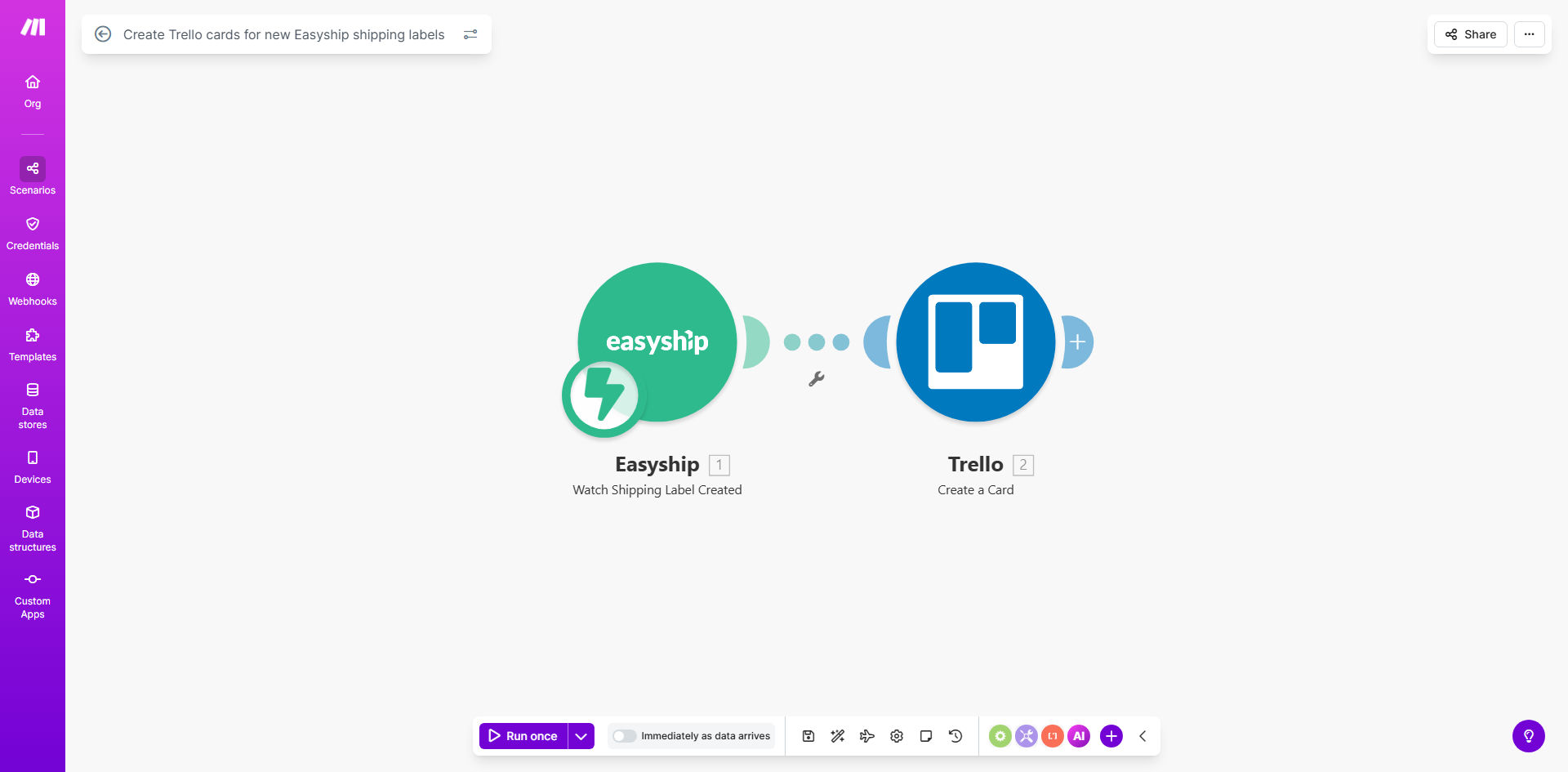
What This Workflow Does
For e-commerce businesses, the gap between printing a shipping label and getting the order out the door is where delays and errors happen. Manually transferring order details from your shipping platform like Easyship to a project management tool like Trello is a repetitive, time-consuming task that steals focus from value-added work like customer service and growth.
This automated workflow solves that problem instantly. It acts as a digital bridge between Easyship and Trello. Every time a new shipping label is generated in Easyship, this system automatically captures the key details—tracking number, destination, service type—and creates a corresponding, fully-formed card on your designated Trello board. This card can be assigned to team members, moved through custom lists like "To Pack," "Shipped," and "Delivered," and used as a central hub for fulfillment communication.
The business value is clear: elimination of manual data entry, a single source of truth for order status, and a dramatic reduction in the time between label creation and warehouse action. This leads to faster shipping times, fewer missed orders, and a more coordinated, efficient team.
How It Works
The automation is built on Make.com (formerly Integromat), a visual workflow platform that connects apps without coding. Here’s the step-by-step process:
Step 1: Trigger on New Label
The workflow is initiated by the Easyship module, which watches for the event "New Shipping Label Created." This is a real-time trigger, meaning the moment a label is generated in your Easyship account, the automation starts.
Step 2: Extract Label Data
Make.com receives a package of data from Easyship. This includes crucial information such as the tracking number, recipient name and address, parcel dimensions, shipping service selected, and the label's creation timestamp.
Step 3: Format Data for Trello
Before sending data to Trello, the workflow can transform it. It can combine fields (e.g., "Customer: [Name] - [City]"), format dates, or apply logic—like adding a "RUSH" label if the service is express. This step ensures the Trello card is informative and actionable.
Step 4: Create the Trello Card
The formatted data is sent to Trello's "Create a Card" module. You specify the target Board and List (e.g., "Fulfillment Board" > "New Orders"). The card is created with a title (often the tracking # or order ID), a description containing full details, and can include attachments like the label PDF URL, members assigned, due dates, and custom labels.
Pro tip: Use Trello's custom fields to add structured data like "Estimated Delivery Date" or "Package Weight." This makes filtering and reporting on your board much more powerful.
Who This Is For
This automation is ideal for any business that uses Easyship for shipping and needs better internal coordination.
- E-commerce Store Owners: Dropshippers, Shopify, WooCommerce, or Etsy sellers who manage fulfillment in-house and need to track dozens of orders daily.
- Small Warehouse & Fulfillment Teams: Teams of 2-10 people where clear task assignment and status visibility are critical to avoid mistakes and delays.
- Brands Using Trello for Operations: Companies that already use Trello for project management and want to integrate shipping logistics directly into their existing workflow boards.
- Businesss Scaling Their Shipping Volume: As order volume increases, manual processes break down. This automation provides a scalable, error-proof system that grows with you.
What You'll Need
To implement this template, you will need the following accounts and permissions:
- A Make.com account (free tier available).
- An active Easyship account with API access enabled (typically available in all paid plans).
- A Trello account with a board created for order fulfillment. You will need the Board ID and List ID where cards should be created.
- (Recommended) A basic understanding of how to navigate Make.com's scenario editor to paste your API keys and select the correct boards/lists.
Quick Setup Guide
You can have this workflow running in under 15 minutes.
- Clone the Template: Click "Get This Workflow" above to open the template on Make.com and create a copy in your own workspace.
- Connect Easyship: In the Make.com scenario, click on the Easyship module. Authenticate by entering your Easyship API key (found in your Easyship account settings under "API & Integrations").
- Connect Trello: Click on the Trello module. Authenticate with your Trello account. You will be asked to allow Make.com to access your boards.
- Configure the Trello Card: Select the specific Board and List where you want new shipping label cards to appear. Map the data from Easyship (like tracking number, address) to the Trello card's title and description fields.
- Test & Activate: Run a single test execution by creating a dummy shipping label in Easyship. Verify that a card appears correctly in your Trello board. Once confirmed, turn on the scenario scheduler to run automatically.
Key Benefits
Save 5-10 hours per week on manual order logging. Eliminate the need for a staff member to constantly switch between Easyship and Trello, copying and pasting information. This time can be redirected to customer support, quality control, or business development.
Achieve 100% accuracy in order tracking. Manual entry is prone to typos and missed orders. Automation guarantees every single shipping label is captured and logged with perfect data fidelity, ensuring no order falls through the cracks.
Improve team transparency and accountability. With every order as a visible Trello card, everyone knows what needs to be packed, who is responsible, and what the status is. This reduces internal queries and finger-pointing, creating a smoother operational flow.
Scale your fulfillment process without adding overhead. Whether you process 10 or 100 orders a day, the system works identically. This allows your business to grow without needing to proportionally increase administrative headcount.
Gain a searchable, auditable log of all shipments. Every Trello card serves as a permanent record. You can easily search by tracking number, customer name, or date to resolve customer inquiries or analyze shipping performance over time.