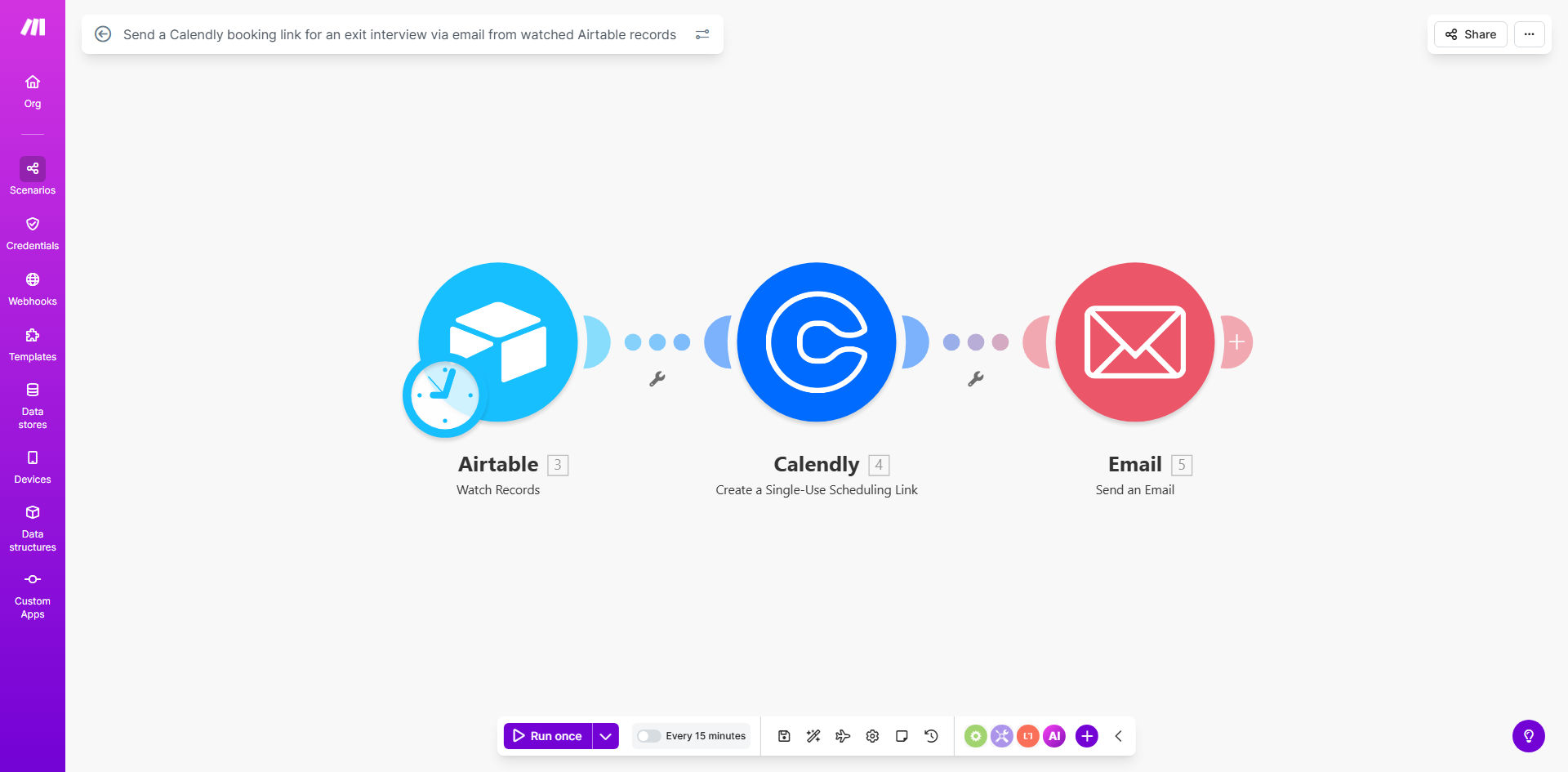
What This Workflow Does
Employee departures are a critical moment for any organization. Exit interviews provide invaluable insights into workplace culture, management effectiveness, and competitive pressures. However, manually tracking resignations and scheduling these interviews is a time-consuming, often inconsistent process for HR teams. This leads to missed opportunities for feedback and can leave departing employees feeling undervalued.
This automation solves that problem by creating a seamless, trigger-based workflow. When an employee's resignation is logged in your Airtable base—your central HR database—the system instantly reacts. It composes a personalized email to that employee, containing a direct link to schedule their exit interview via Calendly. The entire process happens automatically, within minutes of the record being created or updated, ensuring prompt, professional follow-up every single time.
The business value is clear: HR saves administrative hours per week, guarantees 100% follow-up rate, and collects more consistent, timely feedback. It transforms a reactive, manual task into a proactive, standardized system that enhances your offboarding experience and protects your organizational learning.
How It Works
The workflow connects three key tools: Airtable as the data source, Make.com as the automation engine, and Calendly & Email as the action outputs. It follows a logical, event-driven sequence.
Step 1: Monitor Airtable for New Resignations
The automation begins by watching a specific table in your Airtable base. It's configured to trigger whenever a new record is added or when a specific field (like "Status" changing to "Resigned") is updated. This ensures the workflow starts at the exact moment the offboarding process should begin.
Step 2: Retrieve Employee Details
Once triggered, the workflow pulls all relevant data from the Airtable record: the employee's full name, email address, department, resignation date, and any other notes. This data is used to personalize the subsequent communication, making the invitation feel tailored and respectful.
Step 3: Generate a Calendly Booking Link
Using the Calendly module in Make.com, the workflow creates a unique scheduling link for the exit interview. This link can point to a dedicated Calendly event type configured for exit interviews, with the appropriate duration, host (e.g., HR manager), and available time slots.
Step 4: Send the Personalized Invitation Email
The final step crafts and sends an email directly to the employee's address. The email is populated with the employee's name, includes the generated Calendly link, and can contain standard messaging about the purpose of the interview, confidentiality, and appreciation for their contributions. It's sent via your preferred email service (like Gmail or Outlook) connected through Make.com.
Pro tip: You can add a step to update the Airtable record after the email is sent, marking the interview as "Invited," or even later when Calendly confirms a booking, marking it as "Scheduled." This creates a full-circle automated tracking system.
Who This Is For
This template is ideal for any business with an HR function that conducts exit interviews. It's particularly valuable for:
- Small & Medium Businesses: Where HR personnel are stretched thin and manual follow-up is unreliable.
- Fast-Growing Companies: With higher turnover rates, needing to systematize offboarding to maintain culture insight.
- Remote or Distributed Teams: Where scheduling across time zones and locations adds complexity.
- Companies Using Airtable for HR Data: That want to leverage their existing database to automate processes.
- Organizations Focused on Data-Driven Improvement: That need consistent exit feedback to analyze trends and reduce attrition.
What You'll Need
To implement this workflow, you'll need access to the following tools and data:
- A Make.com account (free tier sufficient for this workflow).
- An Airtable base with a table tracking employee data, including a field that indicates resignation status.
- A Calendly account with an "Event Type" created for exit interviews (e.g., 30-minute one-on-one).
- An Email service (like Gmail, Outlook, or SMTP) connected to Make.com to send the invitations.
- The employee data in Airtable must include at least: Full Name and Email Address.
Quick Setup Guide
Getting this automation running in your environment involves a few straightforward configuration steps:
- Clone the Template: Use the "Get This Workflow" button to copy the template into your own Make.com account.
- Connect Your Apps: In the Make.com scenario, establish connections to your specific Airtable base, Calendly account, and email service.
- Configure the Airtable Trigger: Set the module to watch the correct table and specify the trigger condition (e.g., new record, or a field update).
- Map the Data Fields: Ensure the employee's name and email from Airtable are correctly mapped to the subsequent email and Calendly modules.
- Customize the Email Template: Edit the email content in the Make.com module to match your company's tone and include any necessary legal or policy links.
- Test the Flow: Run a test by creating a dummy resignation record in Airtable to verify the email is sent correctly with a working Calendly link.
- Activate: Turn on the scenario. It will now monitor your Airtable base and run automatically.
Key Benefits
Saves 2–5 HR Admin Hours Per Week: Eliminates the manual process of checking spreadsheets, drafting emails, and sending individual scheduling links for each departing employee. This time can be reinvested into strategic HR initiatives.
Ensures 100% Follow-Up Rate: Manual processes have drop-offs. Automation guarantees every resignation logged in your system receives an immediate, consistent invitation, maximizing your feedback capture rate.
Improves Offboarding Experience & Employer Brand: A prompt, professional automated invitation shows the company values the employee's input, leaving a positive final impression that can benefit future referrals or even re-hiring.
Creates Standardized, Analyzable Data: By automating the invitation, you ensure every exit interview follows the same process. This consistency makes the collected feedback more reliable and easier to aggregate for trend analysis over time.
Reduces Scheduling Friction & Increases Participation: Providing a convenient Calendly link directly in the email removes barriers. Employees are more likely to book a slot, leading to more conversations and richer insights.