What This Workflow Does
Managing translation projects across multiple platforms is a notorious time-sink. Project managers, localization teams, and global content creators constantly switch between their project board (like Monday.com) and their translation management platform (like RWS Language Cloud) to check statuses, download finished files, and manually upload them to the corresponding task. This fragmented process leads to delays, errors, and frustrated teams.
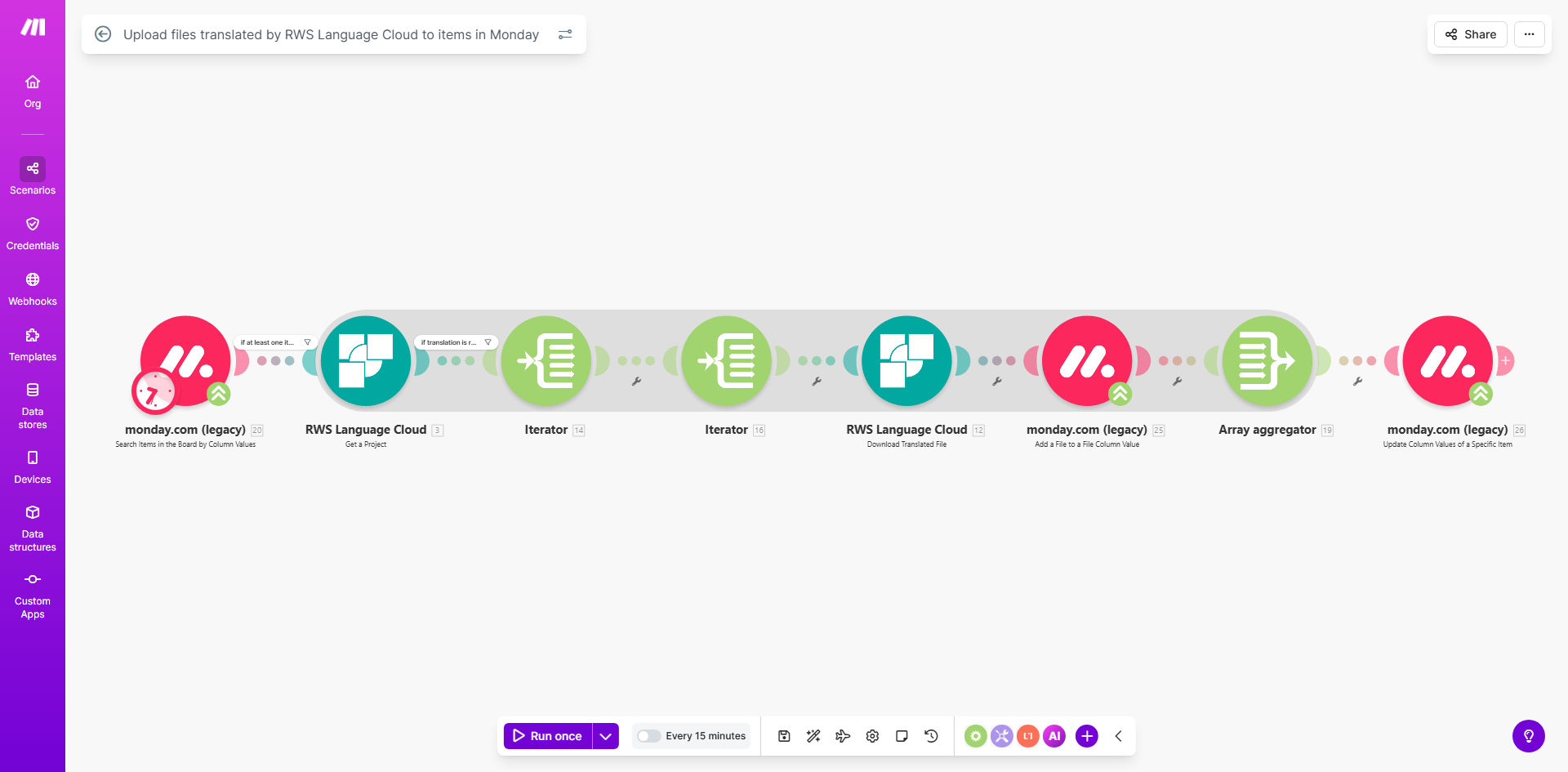
This automation solves that by creating a seamless bridge between Monday.com and RWS Language Cloud. It acts as your dedicated digital assistant, periodically checking for Monday.com items marked "Working on it," verifying their translation status in RWS, and—the moment files are ready—automatically retrieving and attaching them to the correct item before updating its status to "Done." This end-to-end automation turns a multi-step, manual chore into a silent, reliable background process.
The business value is profound: it accelerates project delivery cycles, eliminates human error in file handling, and frees up your team to focus on higher-value work like client communication and quality assurance. For agencies and businesses handling frequent translations, this workflow can reclaim dozens of hours per month.
How It Works
The workflow operates on a scheduled, "check-and-act" basis, ensuring your Monday.com board always reflects the latest state of your translation projects.
Step 1: Monitor Monday.com for Active Translation Items
The automation starts by querying your specified Monday.com board. It filters for all items with a status column set to "Working on it," identifying tasks that are awaiting translated deliverables. For each item found, it extracts crucial data: the RWS project ID and the target language(s).
Step 2: Check Translation Status in RWS Language Cloud
Using the RWS project ID from Monday.com, the workflow then calls the RWS Language Cloud API. It checks the current status of that specific translation project. The automation is designed to proceed only if the status indicates the files are completed and ready for download, ensuring it doesn't interrupt ongoing work.
Step 3: Retrieve and Upload Translated Files
Once the translation is confirmed as ready, the automation retrieves the translated file(s) from RWS Language Cloud. It then uploads these files directly into the "Translated Files" file column of the original Monday.com item. This action happens automatically, with no manual intervention required.
Step 4: Update Item Status and Close the Loop
Finally, to signal completion and notify the team, the workflow updates the status of the Monday.com item from "Working on it" to "Done." This status change can trigger Monday.com notifications, keeping project managers, clients, or the next person in the workflow instantly informed that the translated assets are ready for use.
Pro tip: You can easily adjust the schedule from the default 15 minutes to match your project's urgency—set it to run every 5 minutes for rush jobs or hourly for less time-sensitive projects.
Who This Is For
This automation is a game-changer for any business or team that manages translation and localization projects. It's ideal for:
- Translation & Localization Agencies: Handle multiple client projects simultaneously without the risk of missing a delivered file or forgetting to update a project tracker.
- Global Marketing Teams: Ensure translated campaign assets (website copy, ad creatives, brochures) are automatically filed and ready for the regional teams the moment they're done.
- Software & Product Companies: Streamline the process of getting UI strings, help documentation, and release notes translated and linked to their corresponding development tickets.
- Project Managers & Operations Leads: Who are tired of manually chasing translation statuses and want to provide real-time visibility to stakeholders.
What You'll Need
To implement this automation successfully, ensure you have the following set up beforehand:
- A Make.com Account: A free or paid plan to host and run the automation scenario.
- Monday.com Account & Board: A Monday.com board set up for managing translation projects.
- RWS Language Cloud Account: An active RWS Language Cloud account with API access enabled.
- Specific Monday.com Board Columns: Your board must include four custom columns besides the default ones:
- RWS project id (Text column)
- Languages (Dropdown column)
- Source Files (File column)
- Translated Files (File column)
- API Credentials: Your API keys/tokens for both Monday.com and RWS Language Cloud, ready to be securely connected in Make.com.
Quick Setup Guide
Follow these steps to get your automated translation workflow up and running in under 15 minutes.
- Clone the Template: Click "Get This Workflow" to open the template on Make.com. Press the "Copy" button to create your own private version.
- Connect Your Apps: In your new scenario, click the Monday.com and RWS Language Cloud modules. Authenticate each by logging into your accounts and granting Make.com the necessary permissions.
- Configure the Monday.com Trigger: Point the first module to your specific Monday.com board and ensure it's filtering for the status value "Working on it." Map the RWS project ID and language columns correctly.
- Map the RWS Language Cloud Check: In the RWS module, ensure the "Project ID" field is correctly mapped from the Monday.com item data. The workflow will use this ID to find the right translation job.
- Set the Schedule: The template defaults to running every 15 minutes. Adjust the schedule module to a frequency that suits your operational tempo.
- Test with a Live Item: Create a test item in your Monday.com board with a known-completed RWS project ID. Run the scenario once to see the file upload and status change happen automatically.
- Activate and Monitor: Turn the scenario on. It will now run automatically on its schedule, keeping your translation pipeline flowing smoothly.
Key Benefits
Eliminate Manual Grunt Work: Save an estimated 15-30 minutes per translation project by removing the need to manually download, rename, and upload files between systems. For teams handling 20 projects a week, that's 5-10 hours saved.
Accelerate Project Delivery: Translated files are attached to tasks the moment they are ready, shaving hours or even days off delivery times. This speed enhances client satisfaction and allows you to take on more work.
Ensure Accuracy and Reduce Errors: Automated systems don't make human mistakes like uploading a file to the wrong task or forgetting to update a status. This guarantees data integrity and project clarity.
Improve Team Focus & Morale: Free your project managers and coordinators from tedious administrative tasks. They can redirect their energy towards client service, quality control, and strategic planning.
Gain Real-Time Project Visibility: With statuses updating automatically, your Monday.com board becomes a single, reliable source of truth for the entire team and stakeholders, improving communication and reducing status update meetings.